
odkdlljoangmamjilkamahebpkgpeacp
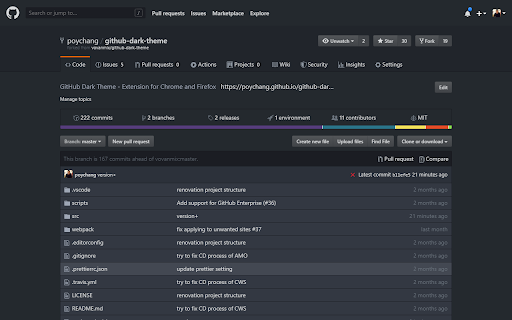

A Dark theme for all of GitHub based on Atom One Dark. # About this extension. This package will alternate appearance of all GitHub pages to dark theme with original GitHub themes. GitHub Dark Theme extension doesn't collect/share/care about your data at all. Notice: dark theme applying for GitHub pages. GitHub Dark Theme had never collected and will never collect any personal data, browsing history etc. In future GitHub Dark Theme may collect browser version, platform name, display settings and user's filter settings (except website list or any other data which can help identify user). This information is needed for decision on implementing new features, removing unused features or suggesting default settings for new users. It will happen only with your permission.

Midnight Dark mode - Dark theme Chrome
Turn on dark mode across all websites. Customize dark theme and brightness. Dark reader - dark skin for Chrome. Dark Mode - Midnight Chrome: A Night-Time Companion for Your Browsing Experience Transform your browsing experience with Dark Mode - Midnight Chrome, the ultimate Chrome extension designed for comfortable and eye-friendly internet usage at any hour.* Key Features and Benefits: 1. Universal Dark Mode: Instantly apply a sleek, dark theme across all your favorite platforms, including YouTube, Facebook, and more, ensuring a consistent and strain-free viewing experience. 2. Reading Night Shift Mode: Automatically adjusts your screen to warmer tones during night-time, reducing blue light exposure and aiding in better sleep quality. 3. Collaborative Browsing Support: Enhance group work or shared screen experiences with an interface that's easy on everyone's eyes, ideal for late-night study sessions or team projects. 4. Customizable Viewing: Tailor your browsing experience with adjustable brightness, contrast, grayscale, and color temperature settings, providing personalized comfort and accessibility. 5. Enhanced Contrast for Accessibility: Specialized contrast settings to aid users with visual impairments, ensuring the web is accessible and enjoyable for everyone. 6. Free to Use: Enjoy all these premium features at no cost, making it an ideal choice for students, professionals, and casual users alike. 7. Multi-Language Support: Catering to a global audience, ensuring a user-friendly experience for diverse users. 1. Install with a Click: Simply add the "Dark Mode - Midnight Chrome" extension to your Chrome browser from the Chrome Web Store. 2. One-Touch Activation: Enable dark mode across all sites with just one click. 3. Customize Your Experience: Access the extension's menu to adjust brightness, contrast, and more to fit your viewing preferences. 4. Enjoy Collaborative and Individual Browsing: Whether it's for personal use or while collaborating, the extension adapts to your needs. - Eye Comfort: Reduces eye strain, particularly during night-time browsing. - Enhanced Readability: Improves text clarity and reduces glare. - Energy Efficient: Can lead to reduced screen power consumption. - User-Friendly: Intuitive design for ease of use and customization. With "Dark Mode - Midnight Chrome," night-time browsing is no longer a strain on your eyes. Whether you're a night owl, a professional working late, or someone who enjoys a customizable browsing experience, this extension is your go-to solution for a more comfortable and personalized internet experience.

Google Dark Theme
A dark theme for google searches

Octotree - GitHub code tree
Browser extension that enhances GitHub code review and exploration. Features * Fast IDE-like code tree * Quick search in tree format * Bookmark repos, issues, PRs, files * Support GitHub themes * Support private repositories * High performance, working with repositories of any size NO BS POLICY: Octotree doesn't track you or share/care about your data at all. GitHub tokens are only needed when you want to access private repositories or exceed GitHub API rate limit. Octotree stores tokens in your browser storage and only uses them to authenticate with GitHub.

Atom Material Icons
Atom Material Icons for Web (GitHub, BitBucket, Gitee, Azure and GitLab) This extension replaces file icons in sites such as GitHub, GitLab or BitBucket according to their extensions or associated frameworks/libraries. This is a porting of the famous extension Atom Material Icons for JetBrains (https://github.com/mallowigi/a-file-icon-idea), now in your web browser! Works on: - GitHub (Repositories, Search and Pull Requests) - GitLab - Gitee - BitBucket - Azure 13.0.0 - Fix Styling in the GitHub Search - Improve performance on repositories with thousands of files, preventing freeze - Upgrade latest dependencies and icons 12.0.0 - Fix GitHub Code View not replacing icons on the tree - Fix Folder Icons in GitHub Pull Requests - Prevent wrong icon replacement in Azure - Import latest Atom Material Icons - Fix Icons losing their viewBox, reducing their size - Setting to hide the Floating Action Button - Fix display:flex in Github CSS - Support for Azure - Fix icon alignment issues 9.0.0 - Settings popup: - Monochrome mode - Custom Icon Size - Floating Button in the bottom right of the page to quickly toggle features!
