
oclmkehbddfdamoibcalfcaghghablic

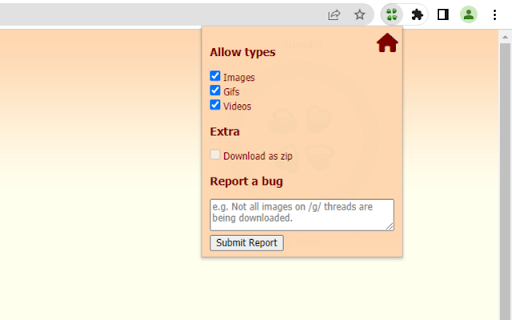
Download all images, gifs, and videos within a 4chan thread. A lightweight extension that allows you to download all images, gifs, and videos within a 4chan thread at the click of a button. You can configure what extensions to download in the settings panel.

Video Downloader for reddit - Redditsave
A powerful reddit video downloader with sound powered by rapidsave.com RapidSave (formerly Redditsave) extension allows you to download reddit videos with audio. With this extension, you can download reddit videos and gifs embedded from v.redd.it, imgur, gfycat, streamable, giphy etc for free. These are the steps to download videos from reddit using this extension: Step 1: Open reddit and locate the post which contains the video or gif you want to download. Step 2: Click on the RapidSave (formerly Redditsave) extension's icon on the top right bar of your browser (red download icon). The download page will be opened in a new tab. Step 3: Click the "Download HD Video" button to download and save the video to your local device storage. ===================================================== There is also a right-click option. Just right-click on the post title/url, then select redditsave on the right-click menu. This will take you to the download page quickly.

4chan Archive Image Viewer
Quickly show images from page, they're overlayed on current page and eliminate the need to open 8 million images in a new tab. An in page overlay used for viewing a thread images easily, and without tab hassle. Uses the default archive site for 4chan at the moment, https://archived.moe, which is utilized by 4chanX. Speaking of 4chanX, this app is essentially a lower-level version of that for the archive site. Note : Due to cloudfront policy, not able to use traditional /b/ archive. Will reroute any expired 4chan thread from the default archive site : archive.moe to thebarchive.com since it allows for grabbing images from the source and displaying in page.

4chan image features
Your extension description **AFTER DOWNLOADING MAKE SURE YOU HAVE THE IMAGE EXPANSION AND IMAGE HOVER FROM 4CHANS SETTINGS MENU DISABLED EVERYTHING ELSE IS FINE, THE MENU IS LOCATED IN THE TOP RIGHT OF THE SCREEN** This extension is a script that adds various features to the image board 4chan and 4channel these features include: -Image hover preview: Hover your mouse over an image to get a preview of the higher quality version theres 2 versions no1. dynamic positioning you can move the preview left and right by moving your cursor left and right. no2. the default hover behaviour non moving placed on the right of the screen. -Image grid: Creates a grid of all images within the thread if you click on an image it can take you to a fullscreen version of the image or to the post in the thread depending on what you choose in the settings menu. -Load images as you scroll the thread option: This utilizes an infinite scroll tactic to lazy load images in as you will need them this is recommended for bigger threads with a lot of images to save your bandwith. -Mass downloading images in thread with original file names: Added the option to mass download images with their original file names make sure you have the option "Ask where to save each file before downloading" which is located via settings -> downloads if this is left on when mass downloading you will be prompted to save every file you have selected to download. -Full screen image viewing: You can click on an image in the image grid to go fullscreen on the image -Slideshow functionality: This allows you to view all images in the thread via a fullscreen slideshow with personalizable slide interval length. -Expand all images This will go through and expand all images and videos in the thread -Customizable keybinds I have provided many keybinds in the settings menu that you can customize to your liking these include: Keybind to instantly go to image grid, Keybind to expand all images, Keybind to go fullscreen, Keybind to go to the top of the thread and Keybind to go to the bottom of the thread.

Bulk Media Downloader
Grab and download media (image and video) sources by monitoring network (like FlashGot) The "Bulk Media Downloader" extension is a downloader that collects all sorts of media file resources (images, audio, and video) and allows you to batch download them with the default download manager of your browser or a custom download manager. With this extension, you can bulk download media files. Just open the grabber window by pressing the toolbar button. Now allow the extension to fetch media resources. If a media file is in a tab that has already been loaded, you need to refresh the tab for the media link to appear in the grabber window. After the desired media link is detected, press the pause button to ask the extension to stop monitoring your network In oppose to the other similar extensions, this extension has zero impact on your browser performance when the grabber window is closed. Monitoring the network resources only occurs when the grabber window is open and there is an "R" badge notification in the toolbar area. ---- Please note that Bulk Media Downloader is not responsible for media content that you download. We suggest checking the media copyright before downloading them. Change Log: version 0.1.6: 1. BMD now resolves filename and filesize from the request itself 2. Filenaming is improved 3. BMD now scrolls to the last fetched resource when the window is open version 0.1.8: 1. It is now possible to download all the already loaded images on web pages using the grabber tool added to the right-click context menu over the toolbar button. version 0.2.0 1. 16.png and 32.png is updated to have better visibility in dark themes (like incognito mode) 2. "Download all Images" extension is updated to the latest version (downloads all images in a ZIP archive) version 0.2.1 1. It is now possible to send downloading jobs to an external download manager 2. A new selector to select resources from the current tab is added.
