
hhienkkjhkcdeaolmcniloflgpjhdefi
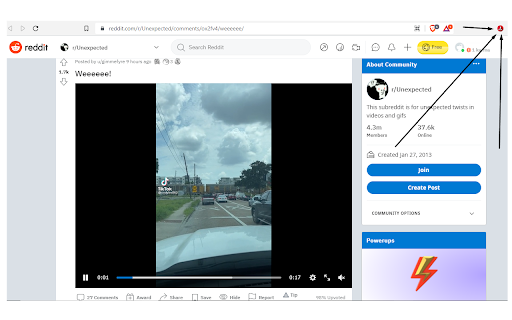
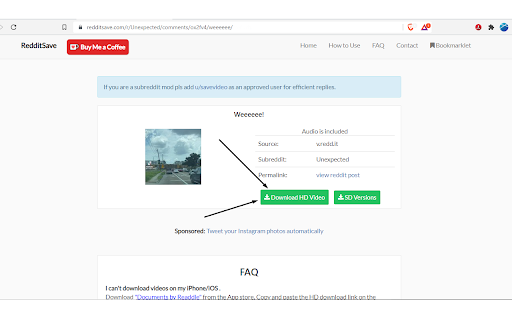


A powerful reddit video downloader with sound powered by rapidsave.com RapidSave (formerly Redditsave) extension allows you to download reddit videos with audio. With this extension, you can download reddit videos and gifs embedded from v.redd.it, imgur, gfycat, streamable, giphy etc for free. These are the steps to download videos from reddit using this extension: Step 1: Open reddit and locate the post which contains the video or gif you want to download. Step 2: Click on the RapidSave (formerly Redditsave) extension's icon on the top right bar of your browser (red download icon). The download page will be opened in a new tab. Step 3: Click the "Download HD Video" button to download and save the video to your local device storage. ===================================================== There is also a right-click option. Just right-click on the post title/url, then select redditsave on the right-click menu. This will take you to the download page quickly.

Reddit Video Downloader - Download from Posts, Profiles & Subreddits
Save Reddit Videos - Bulk download videos from Reddit posts, user profiles, and entire subreddits. 🚀 The All-in-One Reddit Video Saver for Creators, Researchers, and Content Collectors Tired of saving Reddit videos one by one? Reddit Video Downloader is your powerful Chrome extension that lets you download Reddit videos in bulk — effortlessly and instantly from posts, user profiles, and entire subreddits. Perfect for: • 🎬 Content creators • 📱 Social media managers • 📂 Digital archivists • 📊 Researchers & journalists Whether you’re collecting memes, archiving important clips, or curating research material — this tool has you covered. ⚙️ Key Features You’ll Absolutely Love 2️⃣ Handles Reddit’s Infinite Scroll ⚡ Works seamlessly with Reddit’s endless feed, dynamic loading, and gallery posts. Downloads even when other tools fail. 3️⃣ Fast, Lightweight, and Ad-Free ⚡ Minimal design, smooth performance, and zero ads. Works without slowing your browsing. If Reddit is part of your daily content discovery or workflow, this extension is for you: • 🎬 Video curators collecting clips for projects • 📰 Journalists & researchers archiving source material • 📱 Social media managers sourcing content for posts • 😂 Meme collectors keeping a personal stash • 📂 Archivists preserving niche subreddit content Reddit Video Downloader helps you save time, stay organized, and never lose content you love. 🔒 Your privacy is our top priority: • Everything runs locally in your browser • No data ever leaves your device • No login required • No tracking or hidden scripts Your downloads stay private and secure — always. ⚠️ Legal Disclaimer This tool is an independent extension and not affiliated with Reddit, Inc. Use responsibly and in accordance with Reddit’s terms of service. ✅ Start Downloading Smarter — Today! ✨ Stop wasting time with manual saving ✨ Keep your Reddit finds organized and accessible ✨ Download anything you love — instantly and effortlessly ➡️ Add Reddit Video Downloader to Chrome now and take control of your content!

Turbo Downloader for Instagram
Download photos, videos and Reels from Instagram. Turbo Downloader for Instagram adds a button to every Instagram post, Reel, and Story so you can quickly and easily download anything while browsing Instagram. The “Download All” button added to Instagram accounts lets you bulk download all their posts in one click. NOTE: Please reload your Instagram tabs after installing or updating to load the extension. While browsing Instagram, just hover over a post preview and click the download button to save it. If there are multiple images/videos in the post, they’ll all be saved. If you’re looking at a post or Reel, check next to the bookmark and share icons for the download button, or try the hotkey Ctrl + Shift + D or Cmd + Shift + D. A story can be saved with the download button in the top right corner. When downloading an entire Instagram account, you’ll be prompted to choose a folder. A new folder will be created inside that folder with the name of the account being downloaded. Images and videos will appear in that folder as soon as they get downloaded. For future account downloads, files with the same name in that folder will be skipped. As of February 21, 2026, version 4.12.16 of Turbo Downloader is up and running. Feel free to reach out to igdownload2023@gmail.com if you have questions. Version 4.12.16 changes: -Fixed download icon not appearing on posts with multiple images/videos. Version 4.12.15 changes: -Fixed download icon not appearing on stories from the home page Version 4.12.14 changes: -Added a download all button for stories and highlights -Fixed "Could not find post" for stories and highlights -Fixed "Download all" button not appearing on profiles Version 4.12.11 changes: -Fixed "Could not find post" in some cases -Fixed download icon not appearing beside the bookmark icon on some posts -Fixed download icon not appearing in some places when not signed in -Fixed some images being cropped or downloaded in a lower resolution than available Version 4.12.9 changes: -Fixed download icon not appearing while hovering Instagram posts in a grid -Added a tip for Brave users who are unable to select an accounts download folder Version 4.12.5 changes: -Account download folder is now saved. -Added option to change your account download folder -Fixed "Could not find post" for some users. Version 4.12.4 changes: -Added options page. -Posts with multiple images/videos now show a download icon by default. Please use the options page if you would like to change this behavior. -Fixed download icon sometimes appearing in places it shouldn't. -Fixed "Could not find post" for some users. Version 4.12.1 changes: -Fixed download icon over carousel media for some users -Fixed “Could not find post” for most users Version 4.11.2 changes: -Download icon on posts with multiple images/videos now downloads everything -Added a download icon when hovering the image/video of a carousel for only that item -Fixed “Could not find account” for some users Version 4.11.1 changes: -Fixed download icon for some users with dark mode off -Fixed “Could not find post” for some users Version 4.11.0 changes: -New bulk account download now saves files as they're downloaded instead of all at the end -Fixes bulk account downloads sometimes failing to start -Fixes bulk account downloads sometimes failing to complete Version 4.10.5 changes: -Fixes Reels downloads sometimes downloading a profile picture -Fixes for smaller screen sizes Version 4.10.4 changes: -Fixes "Cannot find post" for some users -Fixes for some Stories Version 4.10.0 changes: -Adds hover downloader -Fixes for feed downloads Version 4.9.0 changes: -Migrated to MV3 -Fixed Feed post downloads -Updated progress bar for bulk downloads -Added progress bar for reel/video post downloads

TTNote: Video Downloader and Saver
Download videos without watermark from TT. Save and manage videos in a single home. TTNote - Download and Save your videos without watermarks. 🚀 Feature: ● Download videos without watermarks; ● Batch download videos wich one click; ● Share videos with anyone; ● View video datas and experience tagging and comment function; ● Store, organize and manage in your single home; ● Easy to use; 🚀 How to Use? ● Quick access to www.tiktok.com/@yourname. ● Choose the video you want to download and click the "Save" button. They will be saved. ● Click the TTNote button on the side of the page to open the expanded action panel. You can see your saved videos and batch download of them without watermarks. ● Go to your personal home to categorize and manage your saved videos. Share video links with your peers. 🚀 Important: This extension does not collect browsing history. The tabs permission is required for the video downloader to send information from the background script to the content_scripts, which triggers the warning for browsing history. 🚀 Is TTNote Legal? Yes, as long as you download videos for personal offline use, you are unlikely to engage in any illegal activities. However, if you intend to share them within the community or for commercial purposes, you will need the author's consent. 📢 Notice: We hereby declare that TTNote is an independent mobile application (APP) and has no direct or indirect affiliation or collaboration with TK and its product series. TTNote is developed and operated independently by our team, aiming to provide users with a completely new and unique mobile experience.

UI Changer for Reddit
Enforce your preferred user interface. Changes various parts of Reddit's user interface. Note: The notice you see about having access to your data on all Reddit sites is automatically generated because the extension runs on every Reddit tab. It does NOT require your personal information to work properly.
