
ockmipfaiiahknplinepcaogdillgoko
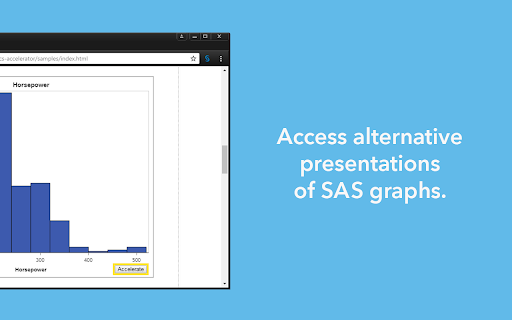
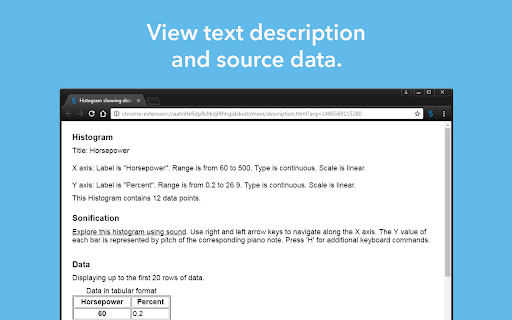
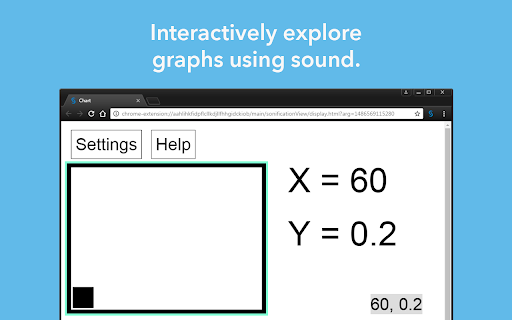
Enables users with visual impairments or blindness to create, explore, and share data visualizations. SAS Graphics Accelerator enables users with visual impairments or blindness to create, explore, and share data visualizations. It supports alternative presentations of data visualizations that include enhanced visual rendering, text descriptions, tabular data, and interactive sonification. Sonification uses non-speech audio to convey important information about the graph. See the SAS Graphics Accelerator product page at http://support.sas.com/software/products/graphics-accelerator/ for sample graphs, documentation, and more. Feedback Your feedback will help shape the next release of SAS Graphics Accelerator. Please send questions or comments to accessibility@sas.com. Permissions SAS Graphics Accelerator requires the following browser permissions: * The "Read your browsing history" permission is required for users to access accessible alternative presentations of graphs and tables within inline frames, also known as "iframes", within web pages and web apps. * The "Manage your downloads" permission is required for users to quickly access accessible graphs and other files that are saved to the Downloads folder. License Agreement Your use of this product indicates your acceptance of the terms of the SAS Institute Inc. License Agreement for SAS Graphics Accelerator, available here: http://support.sas.com/legaldocs/Graphics_Accelerator_Chrome.pdf. If you do not agree with these terms, you are not authorized to use the product.

TooSlow? - Load Websites Faster
Browse websites faster and smoother with advance caching, pre-loading and no-refresh mechanism. Transform your web browsing into a lightning-fast experience. TooSlow is an ultimate tool for impatient surfers. This extension deploys advanced techniques to accelerate your favorite websites, dramatically reduces the amount to load. 🚀 No-Refresh: Accelerates pages/links without the annoying full page reloads. It converts any site into a smooth single-page application for seamless navigation. 🚀 Instant Loading/Caching: Don't waste time fetching the same content repeatedly. It intelligently caches requests, ensuring instant access to previously visited pages. 🚀 Pre-Load Requests: Load content before you even click, ensuring lightning-quick browsing. It only preloads when there’s a good chance that you will visit them. By default this extension is enabled for all website with all the features. You can enable or disable features on a per-website basis. While it works on most of the websites, it may affect some complex JavaScript-dependent ones. Easily disable the extension or specific features for these websites. Say goodbye to slow-loading websites and significantly improve your browsing speed with TooSlow, the ultimate web accelerator chrome extension. No more frustrations with pages loading at a snail's pace. TooSlow is your go-to solution for turning "Too Slow" into "Too Fast" when browsing the web. This chrome web speed optimizer guarantees lightning-fast web page loading and enhanced internet speed, making slow old web pages a thing of the past. With TooSlow's webpage load accelerator and website speed booster, you'll experience immediate page access, fast loading, and reduced page load times. We understand that slow websites can be frustrating, which is why we've designed this chrome extension to eliminate those annoying delays. Don't let your browsing experience be "Two Slow" when you can supercharge it with TooSlow. Our chrome site speed booster intelligently caches requests, ensuring instant access to previously visited pages. It eliminates the need to repeatedly fetch the same content, saving you valuable time and providing a more responsive web experience. Whether you're looking for a chrome speed utility, a website performance enhancer, or a tool to accelerate web navigation and fix slow websites, TooSlow has you covered. Say hello to faster internet surfing and bid farewell to the days of "Too Slow" web browsing. Experience the power of TooSlow and transform your online experience today. Download our chrome extension now and enjoy the benefits of instant page access, fast loading, reduced load times, and enhanced website speed. Say goodbye to "Too Slow" and embrace the lightning-fast web with TooSlow!

Video Filter
Enhance your video color everywhere you watch! Just drag and drop any available filters, connect and tweak to make a magical result. Video Filter works everywhere: YouTube, Vimeo, Facebook, Netflix, HTML5 video and so on. Available filters: * brightness * contrast * gamma * saturate * grayscale * sepia * hue-rotate * flood (SVG display on) * image * blur * opacity * blend * composite * merge * morphology * SVG-code

Image Describer
Image Describer uses AI to describe content and images on the web for people who are blind or have low-vision. To describe content, use the context menu on a specific image, or the Extension keyboard shortcut Alt+Shift+I to describe the full tab contents. The description can be copied to your clipboard through an menu item in the context menu, or through the extension popup or Chrome side panel drawer. You can also change the voice or toggle muting using the Extension Options page at chrome-extension://ogoddjgogmlndofcpkljmmdobjpfdolf/options.html To access the side panel without the mouse, on Mac press Command + Option + Down arrow. On Windows, press F6.

Accessibility Insights for Web
Accessibility Insights for Web helps developers quickly find and fix accessibility issues. The default keyboard shortcut to launch Accessibility Insights for Web is [Ctrl+Shift+K]. If that doesn't work, follow these instructions: 1. Select Shift+Alt+T to move focus to the Chrome address bar 2. Select the Left arrow key to move focus to the Accessibility Insights for Web extension. 3. Select the Space key to open the extension.
