
ogoddjgogmlndofcpkljmmdobjpfdolf
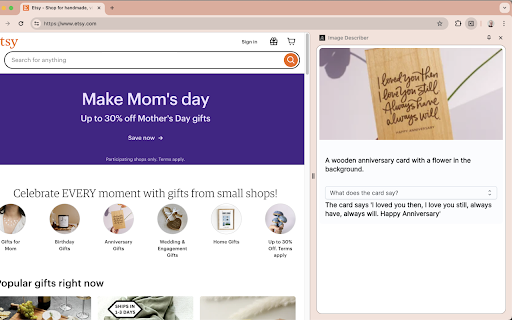
Image Describer uses AI to describe content and images on the web for people who are blind or have low-vision. To describe content, use the context menu on a specific image, or the Extension keyboard shortcut Alt+Shift+I to describe the full tab contents. The description can be copied to your clipboard through an menu item in the context menu, or through the extension popup or Chrome side panel drawer. You can also change the voice or toggle muting using the Extension Options page at chrome-extension://ogoddjgogmlndofcpkljmmdobjpfdolf/options.html To access the side panel without the mouse, on Mac press Command + Option + Down arrow. On Windows, press F6.

ImageDescriber
This plugin uses OpenAI's Vision API to create descriptive text for any image. To use it, focus on an image with your screen reader and press Alt+I.

SEO Alt Text Generator
Generate context-aware, SEO-safe alt text locally with on-device AI. Bulk Alt Text Generator helps you create high-quality, context-aware image alt text for any webpage in seconds. Built for SEO teams, accessibility specialists, content editors, eCommerce stores, agencies, and site owners who need fast, consistent alt text generation at scale. Instead of generic captions, this extension analyzes the full page context — including headings, schema, nearby text, and page topic — to produce cleaner, more relevant alt text suggestions you can review, edit, and apply in bulk. It works directly inside Chrome and fits real publishing workflows. • 🧠 Local AI processing – no paid API required • 💾 One-time model download (~75MB), then cached • 🌐 Works offline after download • 🔐 No API key, no credits, no per-image fees • 🛡️ Privacy-first architecture (processing stays in your browser) 1️⃣ Scan Page The extension collects image metadata and analyzes on-page context such as title, headings, nearby text, and schema signals. 2️⃣ Generate Alt Text Each image is processed using local visual captioning combined with page context signals to produce accurate, SEO-safe alt text. 3️⃣ Review & Edit Edit suggestions inline, check character length, regenerate selected images, and decide which alts to keep or replace. 4️⃣ Apply & Export Apply alt text directly to page elements or export results as CSV or JSON for CMS import, team review, or QA workflows. 🎯 Built for SEO & Accessibility • ❌ Avoids boilerplate phrases like “image of” • ✍️ Keeps output concise and readable • 🎨 Handles decorative images correctly with empty alt attributes • 🔘 Detects functional images and suggests action-based alt text • 🚫 Prevents keyword stuffing and repetition • 📊 Supports bulk workflows for large pages 🧩 Smart Controls in the UI • 🔎 Filters: All, Missing Alt, Low Confidence, Decorative, Functional, Content • 🔄 Regenerate selected rows for alternate wording • 🔁 Optional: Replace GOOD existing alt text • 🗂️ Optional: Include decorative images in export • 📍 Optional: Add location when contextually relevant • Existing alt text • Generated suggestion • Final edited alt • Decision/action type (keep, replace, decorative) • Confidence score and notes • Image source and selector metadata • 📈 SEO managers optimizing image search visibility • ♿ Accessibility teams improving screen reader experience • 📰 Web publishers updating legacy content faster • 🛍️ eCommerce teams managing large product catalogs • 🏢 Agencies auditing and improving client websites • Find missing or weak alt text on landing pages • Standardize alt quality across blog posts • Improve product image metadata before launch • Run content QA before publishing • Audit client sites for accessibility improvements All processing happens locally in your browser. No external paid AI endpoints are required. Session-based caching improves speed while minimizing unnecessary data storage. • First run requires model download; progress is shown inside the extension. • Some cross-origin image sources may limit direct pixel access. In those cases, context-based generation is used instead of visual captioning.

Shramko Video Describer
Analyzes video content and generates descriptions, titles, and keywords using advanced machine learning algorithms. Сpecifically designed to enhance the workflow of content creators who use https://microstock.plus for video management. It leverages state-of-the-art machine learning algorithms to analyze video content and automatically generate concise titles, informative descriptions, and targeted keywords. Tailored for bloggers, marketers, and digital creators, this tool streamlines the SEO optimization process, saving valuable time in metadata creation and significantly improving video visibility across search platforms.

Easy Keywords for AdobeStock
Easy get keywords(powered by AI) and adding keywords to AdobeStock Easy Keyword for Adobe Stock is an extension specifically designed for image contributors on stock.adobe.com. It allows seamless navigation to find keywords automatically within seconds. Here are its key features: + New Introducing the new ‘AI+ High Accuracy Features’. + Automated Keyword Search: Easily search for keywords with the click of a button. + Copy and Paste Keywords: Quickly copy and paste keywords. + Automatic 49-Keyword Search: Retrieve up to 49 keywords automatically in 2-5 seconds. +Time-Saving Image Data Entry: Streamline the process of entering image data. +Highly Effective: References keywords from top-selling images. **Some features (AI Auto Mode) require users to log in. This feature will upload your image thumbnails (size
