
occbjkhimchkolibngmcefpjlbknggfh

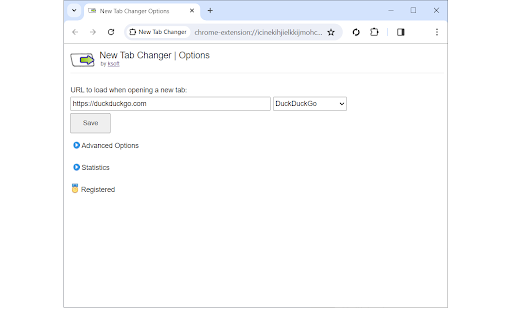

Load a custom web page or url in a new tab. Fast, light, and easy to use. * Load a custom web page or url in a new tab. * Make new tabs automatically load Gmail, Bing, or any web site. * Easily setup a new tab redirect to a local file url. * Automatically sets focus to url bar. * Supports Incognito mode. * Fast, light, and easy to use. * Clear cache when loading new tabs. * Redirect to last visited url. * Advanced statistics to display a history of max and total tabs open per day. Automatically set a custom url to load in new tabs. Setup a new tab redirect to Gmail, Yahoo, Bing, or any web page you desire! Simply enter the desired web site url and click Save. Any time a new tab is opened, the web site you selected will automatically display. New Tab Changer supports web site urls and local file urls. New Tab Changer lets you automatically setup a new tab redirect to a custom url.

New Tab Redirect
Allows a user to provide the URL of the page that loads in a new tab. Allows you to change the new tab page to the New Tab Redirect app page, or a custom URL of your choice! Choose from chrome's about pages, *NewTab, Extensions, Downloads, History*, a few popular URLs, or provide your own. Your custom tab can also be a local file, allowing you to create your own new tab page. Saving blank text will cause your new tab to be about:blank. Files can begin with: file:\\, file://, and file:/// Important: This is not meant to replace your homepage, only new tabs. If your browser is set to load the New Tab page as your homepage, there may be odd consequences. Note: Because this extension perform a "redirect", I have no control over address bar highlighting or focus. I am not affiliated with Google or Google Chrome. Google Chrome is a registered trademark of Google, Inc. The 'Popular Pages' are taken from www.alexa.com/topsites. I am in no way affiliated with Google, Facebook, Twitter, Yahoo, Wikipedia, Digg, Slashdot or any other page listed here. These are provided as a convenience to the user of this extension. By using those pages or any others as a replacement for your new tab, you are still bound by any agreement between you and that site or service.

Custom New Tab
Customize the New Tab URL. Change New Tab to point to any URL or local file you want. Chrome does not let you customize the new tab page. The new tab page always opens a custom Google Search page, and Chrome extensions do not work on this page. This extension lets you point the new tab page to a URL of your choice. It can be Google.com, your company's homepage, or a blank page. It is lightweight on your browser (

Speed Dial 2 New tab
Speed Dial 2 is an easy-to-use extension that lets you save and organize your most visited websites and customize your new tab page. Radically better new tab page! Level up your workspace with our unique tools designed to make you more productive. Transform and customize your new tab experience to your liking. 🏆 Acclaimed & featured as one of the "Best New Tab" extensions on multiple tech blogs! 📌 More than 10 years in the Chrome Web Store 👏 More than 2 million downloads, trusted by happy users around the world 💼 Used by professionals from leading tech companies 🥷🏼. Private and secure ✦✦ Key Features ✦✦ • Save unlimited number of your favorite websites and organize them into groups • Easy access to bookmarks and recently closed tabs • Beautiful themes and powerful customization • Dark and light theme support • Collaborate and share a group of bookmarks with your friends • Synchronization with other computers and mobile devices • Private and secure — we don’t share or sell your data • Clean and intuitive design • Available in 9 languages • Beautiful custom new tab page • Bookmark organization Note: For the best experience, after installing Speed Dial 2, click the ‘Keep it’ button on the ‘Change back to Google’ notification. This will show Speed Dial 2 every time your open a new tab. ✦✦ Privacy & Security ✦✦ The information we gather or process is used solely for the core functionality of Speed Dial 2 and to improve the quality of our service. We do not sell your information to any third parties. Speed Dial 2 is designed to be a secure and private place for your bookmarks. We have been in the Chrome Web Store since 2011 and earned the trust of more than 1 million users. We are GDPR compliant and CCPA ready. For more information on privacy and the security of your data visit https://www.speeddial2.com/privacy-policy * Keep your new tab page it organized * Save your most visited websites for convenient access, organize them into groups, and customize them to suit your needs. * Find anything, instantly * Quickly find anything you need, including your browser bookmarks and recently closed tabs. * Make it yours! * Choose from a variety of themes and customize the look and feel of your new tab page with custom backgrounds and more. Version 3.8.0 - Improved Bookmarks Sidebar panel - Allow file:// URLs for custom icons Version 3.7.4 - Improved search functionality - Improved synchronization - Fix for alphabetical sorting Version 3.5.8 - 3.5.9 Improvements to sync, hotfix for account access Version 3.5.6 Add an option to customize the keyboard shortcut Version 3.5.2 Added a keyboard shortcut Ctrl (⌘) + U to open Speed Dial 2 action menu from any page Version 3.5.0 Upgraded extension to Manifest V3 Version 3.3.8 We made it easier to use Speed Dial 2 with your keyboard. Press the "Tab" key to focus on bookmarks, and use arrow keys to navigate through your new tab page. Open the selected bookmark by hitting Enter or open it in a new tab with Ctrl/⌘ + Enter Access the search by pressing the forward-slash "/" and start typing. The search will show you the bookmark results as you type and offer to switch to a different group in the dropdown menu. Version 3.3.6 Fixed the issue preventing bookmarks from opening in the new tab Version 3.3.5 Added an option to display number of visits for each bookmark Version 3.3.3 Show time created and Group name in bookmark search results Version 3.3.2 Improved dialog for adding new bookmarks Version 3.3.1 Bugfix for bookmark ordering after the synchronization Version 3.2.9 Improvements to the backup and synchronization Version 3.2.6 - Allow to rename the Home group - Updated logos of most popular websites Version 3.2.5 Improved loading speed of bookmark thumbnails and minor bug fixes Version 3.2.4 Customize your new tab page with carefully selected fonts that look great in your browser! Version 3.2.3 Added the changelog with the latest features Version 3.2.2 Allow to set the opacity of a background image Version 3.2.0 Add Alphabetical order for bookmarks and groups

Simple New Tab URL
Simply set the URL you want new tabs to load and it'll load it. No fluff. Very similar to other "New Tab URL" redirect extensions but this one is stripped down to the bare essentials. There are 4 options available: - URL you want the new tab URL to be - whether you want the URL to be auto-highlighted/selected on new tab page load (or if you want the focus on new tab load to be on your page) - whether you wish to enable a light mode theme (it currently defaults to a dark theme) - whether chrome should sync this setting Note: If your new tab url is a local file (i.e. it starts with "file://" rather than "http://") then you will have to enable the "Allow access to file URLs" permission for this extension on the Manage Extensions page. See source code here: https://github.com/zach-adams/simple-new-tab-url Icon is "redo" by Mohamed Riyaz Ali from the Noun Project https://thenounproject.com/term/redo/1175677/
