
jpfpebmajhhopeonhlcgidhclcccjcik

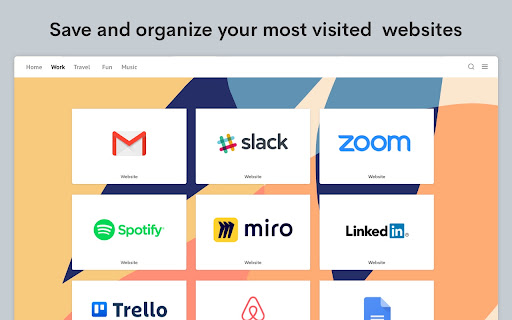
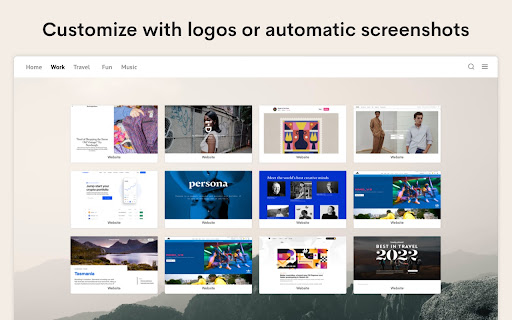


Speed Dial 2 is an easy-to-use extension that lets you save and organize your most visited websites and customize your new tab page. Radically better new tab page! Level up your workspace with our unique tools designed to make you more productive. Transform and customize your new tab experience to your liking. 🏆 Acclaimed & featured as one of the "Best New Tab" extensions on multiple tech blogs! 📌 More than 10 years in the Chrome Web Store 👏 More than 2 million downloads, trusted by happy users around the world 💼 Used by professionals from leading tech companies 🥷🏼. Private and secure ✦✦ Key Features ✦✦ • Save unlimited number of your favorite websites and organize them into groups • Easy access to bookmarks and recently closed tabs • Beautiful themes and powerful customization • Dark and light theme support • Collaborate and share a group of bookmarks with your friends • Synchronization with other computers and mobile devices • Private and secure — we don’t share or sell your data • Clean and intuitive design • Available in 9 languages • Beautiful custom new tab page • Bookmark organization Note: For the best experience, after installing Speed Dial 2, click the ‘Keep it’ button on the ‘Change back to Google’ notification. This will show Speed Dial 2 every time your open a new tab. ✦✦ Privacy & Security ✦✦ The information we gather or process is used solely for the core functionality of Speed Dial 2 and to improve the quality of our service. We do not sell your information to any third parties. Speed Dial 2 is designed to be a secure and private place for your bookmarks. We have been in the Chrome Web Store since 2011 and earned the trust of more than 1 million users. We are GDPR compliant and CCPA ready. For more information on privacy and the security of your data visit https://www.speeddial2.com/privacy-policy * Keep your new tab page it organized * Save your most visited websites for convenient access, organize them into groups, and customize them to suit your needs. * Find anything, instantly * Quickly find anything you need, including your browser bookmarks and recently closed tabs. * Make it yours! * Choose from a variety of themes and customize the look and feel of your new tab page with custom backgrounds and more. Version 3.8.0 - Improved Bookmarks Sidebar panel - Allow file:// URLs for custom icons Version 3.7.4 - Improved search functionality - Improved synchronization - Fix for alphabetical sorting Version 3.5.8 - 3.5.9 Improvements to sync, hotfix for account access Version 3.5.6 Add an option to customize the keyboard shortcut Version 3.5.2 Added a keyboard shortcut Ctrl (⌘) + U to open Speed Dial 2 action menu from any page Version 3.5.0 Upgraded extension to Manifest V3 Version 3.3.8 We made it easier to use Speed Dial 2 with your keyboard. Press the "Tab" key to focus on bookmarks, and use arrow keys to navigate through your new tab page. Open the selected bookmark by hitting Enter or open it in a new tab with Ctrl/⌘ + Enter Access the search by pressing the forward-slash "/" and start typing. The search will show you the bookmark results as you type and offer to switch to a different group in the dropdown menu. Version 3.3.6 Fixed the issue preventing bookmarks from opening in the new tab Version 3.3.5 Added an option to display number of visits for each bookmark Version 3.3.3 Show time created and Group name in bookmark search results Version 3.3.2 Improved dialog for adding new bookmarks Version 3.3.1 Bugfix for bookmark ordering after the synchronization Version 3.2.9 Improvements to the backup and synchronization Version 3.2.6 - Allow to rename the Home group - Updated logos of most popular websites Version 3.2.5 Improved loading speed of bookmark thumbnails and minor bug fixes Version 3.2.4 Customize your new tab page with carefully selected fonts that look great in your browser! Version 3.2.3 Added the changelog with the latest features Version 3.2.2 Allow to set the opacity of a background image Version 3.2.0 Add Alphabetical order for bookmarks and groups

Group Speed Dial
Speed Dial [Group Speed Dial] is the most advanced start page! It's like a visual bookmarks, plus many more tools for professionals! Speed dial ⏹️ will upgrade your "New Tab" page with quick access to your favorite pages organized into groups / folders. 🔒 Privacy-friendly - no ads, no tracking, instead you get E2E encryption! (E2EE) 🚧 Actively developed since 2016 by me - Juraj Mäsiar: https://www.linkedin.com/in/juraj-masiar/ ⭐ TOP FEATURES: 🔸 Cloud synchronization - synchronize your data between devices and browsers - for free and with E2EE (End-to-End encryption) 🔸 Cloud speed dials - access your links in any browser, even in your phone! 🔸 Search engines - easy access to your favorite search providers! 🔸 Timer - stopwatch / countdown / alarm 🔸 Top-sites - fast access to your most visited pages 🔸 Recently closed tabs list 🔸 Text notes - for your todo list 🔸 Import from other popular extensions (FVD and other speed dials and bookmark managers) 🔸 Share your speed dials groups with your friends (supports E2E encryption) 🔥 Need more features? Upgrade to PRO to get: 🔸 Live dials - a full live interact-able pages 🔸 Folders - organize your groups into folders 🔸 Grid layout - resize each dial individually 🔸 Multi-page dials - multiple links in a list 🔸 Weather forecast - for any location for 5 days 🔸 Automatic Productivity mode 🔸 and many more: https://github.com/fastaddons/GroupSpeedDial/wiki/PRO-version-features

EverSync - Sync bookmarks, backup favorites
Synchronize your bookmarks, FVD Speed Dials. Secure online access. Backup, restore your bookmarks. Sync favorites between computers EverHelper.pro is a powerful bookmark sync and Speed Dial synchronization extension that keeps your bookmarks (favorites), Speed Dials, and groups safely synced across browsers and devices. If you are looking for a reliable Xmarks replacement, EverHelper provides secure cloud sync, online backup, and full restore protection. Sync bookmarks (favorites) across Chrome, Firefox, Edge, and Opera Sync FVD Speed Dial, groups, and layouts between devices Automatic sync between computers (Windows, macOS, ChromeOS) Secure HTTPS cloud storage for bookmarks and Speed Dials Access your bookmarks online from any computer — even without installing the extension All data is protected using HTTPS secure access Private bookmarks and Speed Dials are password-protected Your data is never shared or exposed to third parties Only browser bookmark data is accessed — no personal files EverHelper is built for users who value privacy, safety, and transparency. 🗄 Backup, Restore & Archive (Never Lose Bookmarks) Automatic online backup of bookmarks and Speed Dials Trash & restore feature to recover deleted items Archive bookmarks you don’t need but want to keep Restore previous bookmark states safely without accidental overwrites Perfect for users with large bookmark collections. Find and remove duplicate bookmarks and folders Organize bookmarks efficiently Import bookmarks into FVD Speed Dial in just 3 clicks Full Speed Dial and group synchronization between devices Works with Chrome, Firefox, Edge, and Opera Sync across multiple computers and browsers On macOS, bookmark file sync is limited due to browser restrictions Speed Dial sync and online backup still work Bookmarks remain accessible via the web interface We clearly indicate supported features based on your browser and operating system. EverHelper integrates seamlessly with FVD Speed Dial: This permission is required by Chrome to allow bookmark synchronization. ❌ We do NOT access your files, photos, or documents ✅ We ONLY access browser bookmark storage Chrome labels overwrite permission as “full access” All such extensions are manually reviewed by the Chrome Web Store team Your trust matters to us. 🔁 Xmarks Replacement EverHelper is a modern and reliable Xmarks / X-marks replacement, designed for today’s browsers and large bookmark libraries. 🐞 Bugs, Feedback & Support We actively maintain and improve EverHelper. 👉 http://fvdmedia.userecho.com/list/21212-everhelper/?category=4907 If something doesn’t work as expected, please contact us — we focus on fixing issues and protecting your data.

Awesome New Tab Page
Enhance your New Tab Page with ultimate customizability and power. Awesome, like you. [ANTP] Awesome New Tab Page transforms your Chrome new tab into a personalized dashboard with apps, shortcuts, and widgets you'll actually use. Features: - Interactive widgets that display real-time information - Fully customizable layout - add, remove, and resize tiles - Create personalized shortcuts to your favorite sites - Direct search from shortcuts - Flexible resizing for apps and widgets Awesome New Tab Page is a privacy-oriented extension. It does not track your browsing activity or sell it or in any way share it with third parties. Awesome New Tab Page is 100% ad free and completely customizable. Current Widgets: - Weather - xkcd Comic - Cryptocurrency Price Trackers (BTC, XRP, ETH) - More crypto widgets coming soon with enhanced features! Have suggestions? Contact us at hi@antp.co How to Use: 1. Unlock the grid with the padlock icon 2. Open the widgets drawer and drag a widget out onto the grid 3. Customize to your heart's content 4. Lock the grid when finished FAQ Q: How can I add my own links and images? A: Unlock the grid, then click on an empty tile. This will create a custom shortcut and open the tile editor, allowing you to start customizing. Q: Can I remove tiles from my dashboard? A: Yes! Unlock the grid, click the "X" on any tile, then lock again to use your dashboard. Q: Can I change the background image or color? A: Yes! Click the settings icon and use the color picker to select any background color. Q: How do I go back to the default Chrome new tab page? A: Uninstall the extension through Chrome's extension management. Thanks for trying it, and please share any feedback you have! It would mean a lot if you would like and share on Bluesky: https://bsky.app/profile/antp.co Use License: Permission granted for personal, non-commercial use only. This license prohibits: - Modifying or copying materials - Commercial use or public display - Reverse engineering - Removing copyright notices - Redistributing materials Disclaimer: Awesome New Tab Page is provided "as is." Awesome HQ, LLC makes no warranties regarding merchantability, fitness for purpose, or non-infringement of rights. We do not guarantee accuracy, results, or reliability of materials within Awesome New Tab Page. Widgets may display content from third-party sources including weather services, cryptocurrency data providers, and other external sources. Awesome HQ, LLC is not responsible for the accuracy, content, or availability of these third-party services. User-created shortcuts, bookmarks, and custom content are the sole responsibility of the user who created them.

Minimal Bookmarks Tree
Display a tree of bookmarks under a toolbar button, and search your bookmarks in the omnibox using the keyword 'bm'. This extension adds a button to Chrome in the top right corner (next to the "three-dot" settings button). When you click the button you get a tree of your bookmarks with folders that you can open and close by clicking them. A simple -non obtrusive- sliding animation is applied to the opening and closing of folders. You can open bookmarks in the following ways: - click: open in current tab - middle-click (scrollwheel): open in new tab and close minimal bookmarks tree - ctrl+click: open in new tab and keep minimal bookmarks tree open You can also right click a folder and click "Open all" to open all bookmarks in that folder in tabs. Right click also let's you edit/delete bookmarks and folders. The tree uses simple folder icons that show their state (open/close) and also shows the favicons for the websites you've bookmarked. The extension remembers which folders were open, so you can leave your favorite folders open at all times. Additionally the extension enables you to search through your bookmarks and bookmark folders easily by entering 'bm' into the URL bar (or "omnibox" as chrome calls it) and then type your search terms. It is not and will not be possible to search in the popup window itself because this wouldn't add anything to the extension; it would just duplicate behaviour. The extension needs permission to view and edit your bookmarks, but will only ever edit bookmarks if you instruct it to, it will never change bookmarks on its own. Minimal bookmarks tree is completely open source and available on github: https://github.com/rpkamp/chrome-minimal-bookmarks-tree Any and all suggestions are welcome!
