
imfeikbeimbfpmgfkkmjekabdehiiajc
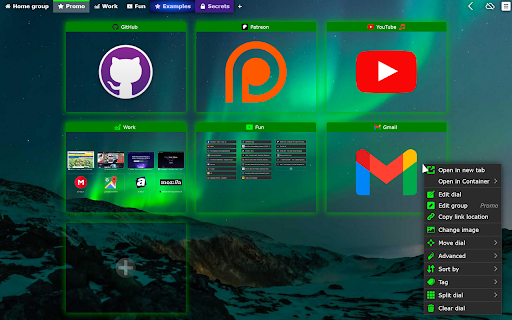


Speed Dial [Group Speed Dial] is the most advanced start page! It's like a visual bookmarks, plus many more tools for professionals! Speed dial ⏹️ will upgrade your "New Tab" page with quick access to your favorite pages organized into groups / folders. 🔒 Privacy-friendly - no ads, no tracking, instead you get E2E encryption! (E2EE) 🚧 Actively developed since 2016 by me - Juraj Mäsiar: https://www.linkedin.com/in/juraj-masiar/ ⭐ TOP FEATURES: 🔸 Cloud synchronization - synchronize your data between devices and browsers - for free and with E2EE (End-to-End encryption) 🔸 Cloud speed dials - access your links in any browser, even in your phone! 🔸 Search engines - easy access to your favorite search providers! 🔸 Timer - stopwatch / countdown / alarm 🔸 Top-sites - fast access to your most visited pages 🔸 Recently closed tabs list 🔸 Text notes - for your todo list 🔸 Import from other popular extensions (FVD and other speed dials and bookmark managers) 🔸 Share your speed dials groups with your friends (supports E2E encryption) 🔥 Need more features? Upgrade to PRO to get: 🔸 Live dials - a full live interact-able pages 🔸 Folders - organize your groups into folders 🔸 Grid layout - resize each dial individually 🔸 Multi-page dials - multiple links in a list 🔸 Weather forecast - for any location for 5 days 🔸 Automatic Productivity mode 🔸 and many more: https://github.com/fastaddons/GroupSpeedDial/wiki/PRO-version-features

Speed dial 2.0 - New Tab, Bookmarks, History
Customizable dashboard every time you click a new tab that will help you organize your favorite sites, bookmarks, history, etc.! 1. Install and add the extension to Chrome. 2. This extension takes over your new tab and lets you add shortcuts (speed-dials) in a fun way. 3. Add a speed dial and assign it an icon. 4. Arrange your speed dials in standard/fancy/list views. 1. Drag and drop your speed dials. 2. Edit the number of columns, size of the speed dials and customizable transparency. 3. The new tab will have your speed dials, recently visited and closed pages, and visual bookmarks 🔖to make it easy for you to go and forth between them. 4. Sync your dials between different browsers. This extension is a New Tab replacement with syncable 3D Speed Dials, with which you can organize your bookmarks🔖, groups, and most visited pages.

Nice Speed Dials
Nice and Simple Speed dials Extension for Chrome Nice Speed Dials is a Chrome extension With a sleek and intuitive interface that allows you to organize your browser's new tab page with your favourite websites and links. With just a few clicks, you can create and organize a collection of speed dials that can be accessed from any new tab you open. Unlike other speed dial extensions or the default new tab page, Nice Speed Dials stores your speed dials as bookmarks in your Chrome account. This means that even if you change devices or uninstall the extension, your speed dials will remain safe and accessible. Simply log in to your Chrome account on any device, and your speed dials will be there waiting for you. Features: - Sleek and intuitive interface - Create and organize speed dials - Access speed dials from any new tab - Speed dials are stored in your Chrome account - Sync speed dials across multiple devices (if your chrome sync is on) - Reorder speed dials via drag and drop - Keyboard accessibility - Options for customization - Nice animation on any actions Future Plan: - Import and export speed dials - Support for folders - Better Keyboard accessibility - More features to come! IMPORTANT: Please remember that your speed dials are not stored on our server, but in your own Chrome account's bookmarks. So please do not delete the bookmark folder "NICE_SPEED_DIALS_BOOKMARKS\_[DO_NOT_DELETE]", as this is where your speed dials are stored. If you delete this folder, you will lose your speed dials. or any update in that folder will be reflected in your new tab speed dials. However, you can use this to your advantage by saving any bookmark to this folder, and it will appear on your new tab speed dials! Try Nice Speed Dials today and streamline your browsing experience!

Yay! Another Speed dial!
A cool and highly customizable Speed Dial focused on style and simplicity. Your new tab, your way — Yay! Another Speed Dial! gives you a beautiful, lightning-fast start page you'll actually love opening. Organize bookmarks into tabs, customize every pixel with a powerful theme editor, and browse stunning backgrounds from Pexels — all while keeping your data 100% local and private. No account needed, no data collection, ever. Why users love it: • Theme Gallery & Editor: Pick from ready-made themes or build your own — adjust colors, transparency, blur, and background images. • Tab Organization: Group your favorite sites into tabs for clutter-free browsing. • Drag & Drop: Rearrange dials and tabs effortlessly. • Built-in Web Search: Search the web directly from your new tab. • Quick Add: Right-click any page to save it as a dial instantly. • Pexels Integration: Millions of free HD photos at your fingertips for backgrounds. • Auto Thumbnails: Crisp previews generated automatically for every bookmark. • Import & Export: Back up your setup and restore it anytime. • Multi-Language: Available in English, French, German, Spanish, Italian, Polish, Portuguese (BR), Japanese, Russian, Ukrainian, Chinese, and Hungarian. Privacy first: All your data stays on your device. No tracking, no accounts, no servers. Fast & lightweight: Built with performance in mind — your new tab loads instantly.

yet another speed dial
a modern speed dial for chrome, edge, and firefox YASD replaces your new tab page with customizable thumbnails of your favorite sites. This extension makes it easier to access and organize all of your bookmarks. - Free and open source - Automatically generates high quality site thumbnails - Speed dials are based on bookmarks for easy backup and sync, even to other extensions - Supports folders, sorting, searching, and drag and drop - It's fast and minimalist Available for brave, chrome, firefox, and edge - Read and modify bookmarks: Speed dials are saved as bookmarks in your browser. This makes it easy to add new dials (just save a bookmark to your speed dial folder), export them (you aren't locked into this extension), and sync them between devices. - Access browser tabs and access data for all websites: When you add a new speed dial, an icon and thumbnail is captured from the site. YASD has a very clear privacy policy: no user information is collected or stored for any reason whatsoever.
