
icpgjfneehieebagbmdbhnlpiopdcmna
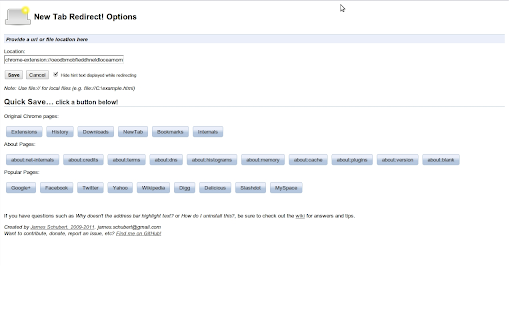
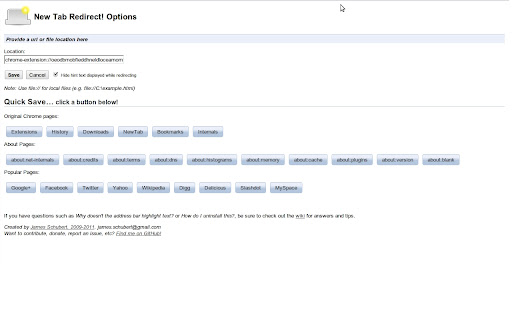
Allows a user to provide the URL of the page that loads in a new tab. Allows you to change the new tab page to the New Tab Redirect app page, or a custom URL of your choice! Choose from chrome's about pages, *NewTab, Extensions, Downloads, History*, a few popular URLs, or provide your own. Your custom tab can also be a local file, allowing you to create your own new tab page. Saving blank text will cause your new tab to be about:blank. Files can begin with: file:\\, file://, and file:/// Important: This is not meant to replace your homepage, only new tabs. If your browser is set to load the New Tab page as your homepage, there may be odd consequences. Note: Because this extension perform a "redirect", I have no control over address bar highlighting or focus. I am not affiliated with Google or Google Chrome. Google Chrome is a registered trademark of Google, Inc. The 'Popular Pages' are taken from www.alexa.com/topsites. I am in no way affiliated with Google, Facebook, Twitter, Yahoo, Wikipedia, Digg, Slashdot or any other page listed here. These are provided as a convenience to the user of this extension. By using those pages or any others as a replacement for your new tab, you are still bound by any agreement between you and that site or service.

Humble New Tab Page
Redesigned new tab page featuring your bookmarks, apps, most visited, and recently closed in a custom layout. Features: • Simple, clean design • Highly customizable • Fast loading and lightweight This extension replaces the default new tab page. Drag and drop folders to create new columns or reorder them. The font, colors, spacing, and more can be customized from the options menu. The source code is available under the MIT license github.com/ibillingsley/HumbleNewTabPage Version 1.26 - July 2, 2023 • Added font-weight option • Replaced Apps folder with a link to chrome://apps Version 1.23 - December 2, 2018 • Added tooltips for truncated text • Added option to remember open folders Version 1.14 - May 11, 2014 • Reduced memory usage • Added option to set number of items for recently closed, recent bookmarks, and most visited • Added option for background image size • Added link to bookmark manager in folder context menu Version 1.12 - August 18, 2013 • Reorder apps via drag and drop Version 1.11 - August 3, 2013 • Fixed launching packaged apps (Google Keep) • Fixed launching file:/// and chrome:// URLs • Fixed Mobile Bookmarks folder not being removable • Disable weather if geolocation is denied • Default layout changed to 2 columns • Uninstall apps from the context menu • Hide Google Wallet Service from apps Version 1.9 - December 30, 2012 • Uses geolocation for weather by default • Fixed bug with drag and drop • Added Chrome Web Store to apps Version 1.8 - November 9, 2012 • Redesigned options panel • Added several new settings • Performance tweaks • Source code released under the MIT license Version 1.7 - September 8, 2012 • Added custom CSS field for advanced users • Added option to hide Bookmarks bar and Other bookmarks • Added option to open links in new tabs • Support local file for background image • Weather errors fixed Version 1.4 - August 10, 2012 • Added option to disable the weather and other special folders • Minor bug fixes Version 1.2 - August 8, 2012 • Added apps, most visited, recently closed, and weather • More flexible layout with unlimited columns • Open all links in folder from context menu • Color themes and new default style • Added smooth animation and highlight shadow • Drag and drop to reorder folders and columns • Background image support • Bug fixes • New name (formerly New Tab + Bookmark Tree)

Blank New Tab Page
Override the default new tab page with blank page. This extension prevents "Google search" page from showing up when you open a new tab. You can also disable the "Sign in to Chrome" page that is shown when you open a new Chrome window, just go to "chrome://settings" page, choose "Open a specific page or set of pages" and enter "chrome://newtab".

Link Blanker
When you click a link to open in a new tab. Anyway open in a new tab. (You can also open in the background. ) And you can close tabs cluttered together. The browser 'back' how to hate, why strangers.

Show Apps in new tab
This extension shows the apps overview when opening a new tab in Chrome. Make sure to use Chrome version 84+ with this extension, otherwise the automatic selection of the locationbar text doesn't work. Since Google updated Chrome to version 29, the App overview is no longer shown, when opening a new tab. This extension restores that behaviour to the way it was. Tip: the keyboard shortcut CTRL+L (Windows/Linux) or CMD+L (macOS) highlights the URL. v.3.0.0 * Upgraded to manifest V3. The rest of the extension code is exactly the same as version 2.1.0. Please bear in mind that the display of the apps is handled by internal Chrome code. This means that this extension has no influence over how that looks. * Fixed a bug so that the address bar is highlighted again v.2.1.0 This is the same as v.1.1.0, back by popular demand v.2.0.0 Removed for now v.1.1.0 Now automagically selects the URL, as many of you have requested.
