
ocabfdicbcamoonfhalkdojedklfcjmf
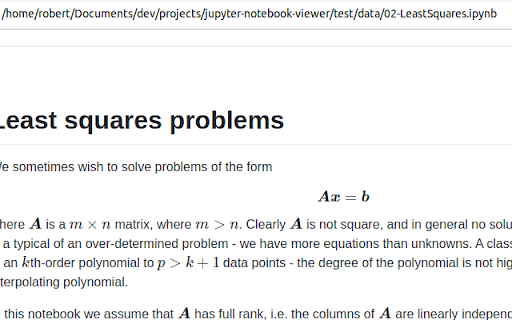
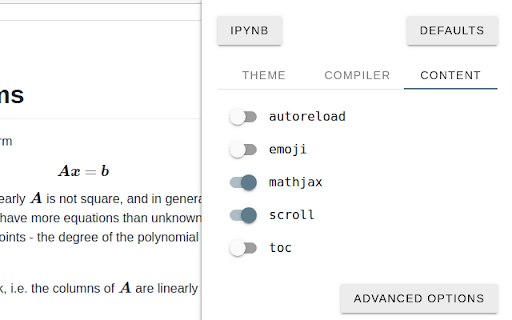
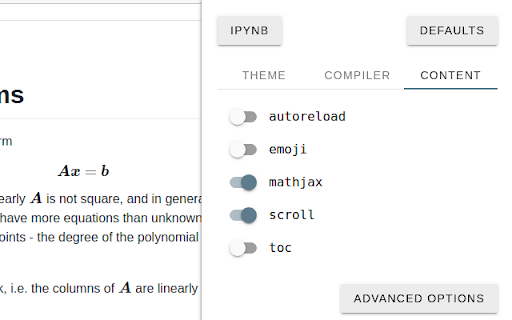

📘 Jupyter Notebook Viewer Extension This Chrome extension lets you render local and remote Jupyter Notebook files (*.ipynb) directly in your browser. ━━━━━━━━━━━━━━━━━━━━ 📥 Installation ━━━━━━━━━━━━━━━━━━━━ ⚠ IMPORTANT: After installation, go to: Chrome → Extensions → Jupyter Notebook Viewer → Details and enable the setting: "Allow access to file URLs" ▶ Watch the tutorial how to do it: 🔗 https://www.youtube.com/watch?v=izGeP2wyOIk ━━━━━━━━━━━━━━━━━━━━ ✅ Features ━━━━━━━━━━━━━━━━━━━━ ✔ Renders local and remote Jupyter notebooks ✔ Granular access to specific remote origins ✔ Full control over compiler options ✔ Multiple themes for better readability ✔ Auto reload on file change ✔ Syntax-highlighted code blocks ✔ Built-in Table of Contents (TOC) ✔ KaTeX / MathJax support for LaTeX equations

PyConsole: Python shell uncomplicated
An intuitive python shell in the browser PyConsole is an extension which you can use to directly run python programs in the browser; It mimics the behavior of a normal REPL that you can launch in a terminal but aims to achieve more with the power of the browser environment. You can import popular data analysis libraries such numpy and pandas for data wrangling or just write normal python snippet for day to day tasks. You can even create beautiful visualizations directly in the console using various visualization libraries such as altair, plotly, matplotlib, bokeh etc. Pro tips: 1. Delete commands you don't like any more by clicking the trash icon to keep the session clean.

Colab Themes
Changes the appearance of Google Colab! This extension will enhance your data science experience by allowing you to change the style of Google Colab much more than a simple dark mode or light mode! By importing your own themes from VS Code, or using any of the 56 provided themes, your Google Colab experience will be transformed by your favorite theme changing the way you see your code and data.

arxiv-utils
Easy access on ArXiv! Auto-rename tabs to paper title, Quick navigation via button/hotkey, Save PDFs by paper title, and more. For ArXiv PDF / abstract tabs: - Renames the title to paper's title automatically in the background. (Originally is meaningless paper id, or start with paper id) - Add an action button to open its corresponding abstract / PDF page. (Originally is hard to get back to abstract page from PDF page) - Add a direct download link on abstract page, click it to download the PDF with the title as filename. (Originally is paper id as filename) - Open the paper in extra services such as ar5iv and arXiv Vanity. - Better title even for bookmarks! - Firefox has strict restrictions on PDF.js. So it doesn't work well with OneTab, the PDF renaming is achieved by intercepting requests and show the PDF in a container. The bookmark works well though. - Works well with native tab search - `tabs`: On extension button click, open a new tab and move it to the right of the old active tab. - `activeTab`: Read active tab's title and modify it using the tab's url. - `storage`: Save extension configurations. - `contextMenus`: When right-click the extension button, show a help menu item. - `scripting`: Inject content scripts to existing tabs. - `*://arxiv.org/*`: Inject content scripts to existing tabs. - `*://export.arxiv.org/*`: Inject content scripts to existing tabs. - `*://browse.arxiv.org/*`: Inject content scripts to existing tabs. - `*://ar5iv.labs.arxiv.org/*`: Inject content scripts to existing tabs.

Markdown Preview Plus
Converts and previews markdown files (.md, .markdown) to HTML(include TOC) right inside Chrome and support live reload Automatically parses markdown files (.md) into HTML with live reload 1. Install extension from webstore (creates no new UI) 2. Check "Allow access to file URLs" in chrome://extensions listing: 3. Open local or remote .md file in Chrome. 4. See nicely formatted HTML! Note: The auto reload feature is disabled default. * Support auto reload. * Support external css file. * Customize theme for every md file. * Support github flavored markdown. * Export nicely formatted HTML. * Support render Katex, Mermaid. The extension is open source. https://github.com/volca/markdown-preview Fix a bug for the tag style * Fix a bug for load fonts of Katex * Fix a bug for "table of contents"
