
oagcgmfbkpelgahbgilehnmjajpgdflg


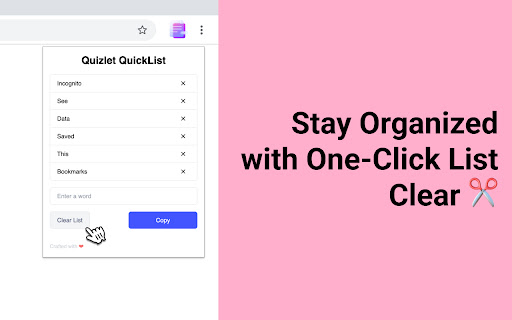
🔹 Right-click any word on a webpage → instantly add it to your list 🔹 Manage your vocabulary directly from the popup 🔹 Copy your entire word list to clipboard in one click — ready to paste into Quizlet or any flashcard app 🔹 Works on any website — articles, blogs, news, research papers Whether you're a student, a language enthusiast, or just browsing the web in a foreign language — this extension is your shortcut to faster, smarter learning. What's New in v2.0: - TSV and CSV export — download files for Anki, Google Sheets, or Excel - Live badge counter — word count shown on the extension icon - Smart input — auto-capitalization and duplicate prevention Simple. Fast. Distraction-free. Just the words that matter. Everything is stored locally on your device. No account. No server. No tracking.

Anki Highlight Helper
Easily create Anki cards from highlighted text in your browser. Elevate Your Learning with Anki Highlight Helper! (Setup instructions below) Anki Highlight Helper is designed for students, educators, and lifelong learners who want to maximize their study efficiency. This intuitive Chrome extension integrates smoothly with Anki, enabling you to generate flashcards quickly and easily from any webpage. With Anki Highlight Helper, your study sessions become more productive, allowing you to capture key information in just a few clicks. Whether you're browsing articles, research papers, or online textbooks, this tool ensures that you never miss an important detail. ----------Features---------- ✅ One-Click Card Creation – Select text, right-click, and choose “Make Anki Card” to instantly add flashcards. ✅ Deck & Note Type Selection – Choose from your existing Anki decks and note types. ✅ Persistent Preferences – Your last-used deck and note type are saved for a seamless experience. ✅ Cloze Deletion Support – Easily generate Cloze cards without manual formatting. ✅ Dynamic Fields – Automatically adapts to different note types, ensuring a flexible workflow. ----------Setup---------- ⚠️NECESSARY STEPS⚠️ 1) Open the Anki desktop application. 2) Navigate to Tools > Add-ons > Get Add-ons. 3) Enter the code 2055492159 to download and install the AnkiConnect add-on. 4) Go to Tools > Add-ons and find AnkiConnect in the list. 5) Select AnkiConnect and click Config. 6) Update the address field from "http://localhost" to "*". 7) Save your changes and restart Anki to apply the configuration. Privacy: We respect your privacy. No personal data is collected. Support Us: Your participation helps support the development and maintenance of this free extension. Version History: v1.1: Improved setup instructions and error handling. v1.2: Enhanced security and optimized extension permissions. v1.3: General optimizations and minor bug fixes. v1.4: Major UI update – improved design, persistent deck/note type selection, added Cloze card support, and dynamic field loading to accommodate different note types.

Anki Vocabulary
Easily save words and get instant translations. Review, export for Anki, and accelerate language learning. Save to Anki - Chrome Vocabulary Assistant Enhance your language learning experience with the "Save to Anki" Chrome Extension, the ultimate tool for building your Anki deck on the go. Effortless Word Collection: Simply right-click on any word you encounter while browsing, select "Save to Anki," and the word is instantly saved with an automatic translation. Personalized Language Targeting: Choose your preferred target language directly from the popup window, ensuring the translations align with your language learning goals. Convenient Word Management: Access all your saved words through the extension's popup window. The intuitive interface allows you to view, search, and edit your vocabulary list with ease. Seamless Anki Integration: Ready to review? Export your vocabulary list as a CSV file with a single click, making it incredibly simple to import into Anki and start studying. Streamlined Learning Journey: Designed for language enthusiasts, "Save to Anki" simplifies vocabulary acquisition, management, and revision, propelling your language skills forward. This extension is inspired by Ibrahem Magdy's "Save words" extension, with enhanced features to support language learners in building their Anki decks efficiently.

Knowt: Quizlet Import, AI Notes & Flashcards
Automatically import flashcards and notes from any video, PDF, article, or flashcard site. Knowt is the fastest way to study. The only AI-powered chrome extension students need - make flashcards & summarized notes from anything on the internet & seamlessly moves your Quizlets to Knowt. Discover a new way of learning with Knowt, the all-in-one study app trusted by 2 million+ students. On top of our Free Learn Mode, Knowt also has unique AI features designed to save you time when studying. What can you do with the Knowt extension? 🧠 Move your Quizlets to Knowt faster Import your Quizlet sets into Knowt with a single click & study them with free learn mode (or one of our other study modes) 🚀 Cut through your teacher’s BS with Video Summaries Import lecture videos into Knowt & we will make summarized notes and flashcards on the most important stuff your teacher covered. 📚 Make Practice Problems from Anything Get ready for your test by testing yourself with practice questions that directly test you your notes, pdfs, videos and more 📌 Instant Flashcards made from your Notes & Videos Interactive flashcards made from your notes and lecture videos, that you cna then study with our free study modes (Learn Mode, Practice Test, Spaced Repetition, Flashcards) Once you import your notes, videos, pdfs, articles or flashcards to Knowt, it’s our job to make sure you understand the material and ace your exams! Download the new Knowt Chrome Extension today & unleash the power of AI to learn better & improve your grades. Join the Knowt Community! 👉 We are committed to protecting your personal information and your right to privacy. If you have any questions or concerns about our practices with regard to your personal information, please contact us at contact@knowt.com.

NoteGPT: AI Flashcard for Quizlet and Cram
🚀Features: Study smarter with NoteGPT. Create personalized flashcards powered by AI, designed to enhance your memorization process through active recall and spaced repetition. With seamless Quizlet integration, you can import your flashcards with ease and study efficiently. Key features include: ● One-click import: Easily import Quizlet flashcard decks with just one click. ● Knowledge integration: Automatically identify key points, important facts, and concepts from your materials. ● Convenient studying: Start reviewing your flashcards anytime, anywhere with minimal distractions. 🚀How to Use : ● Install the extension. ● Pin the extension and click on the logo. ● Navigate to the flashcard details page on Quizlet (must enter the flashcard page, unable to import card decks from Quizlet homepage). ● After successful import, visit the NoteGPT website to review your flashcards anytime, anywhere. 💡 Q&A Q1: What is Flashcards? A1: Flashcards are a tool for active recall, used to help with memorization and review. Each card typically has a question on one side and an answer on the other, helping to reinforce memory retention through repetition. Q2: What is an Article summary? A2: With NoteGPT, you can generate flashcards from articles, videos, PDFs, and more, saving time and improving study efficiency. NoteGPT:The intelligent learning tool that helps you study smarter. We're continuously expanding our integrations with other flashcard platforms to bring you even more ways to enhance your learning experience!
