
kllcgbpnofmhokdemkejfnfnmidmnhfd
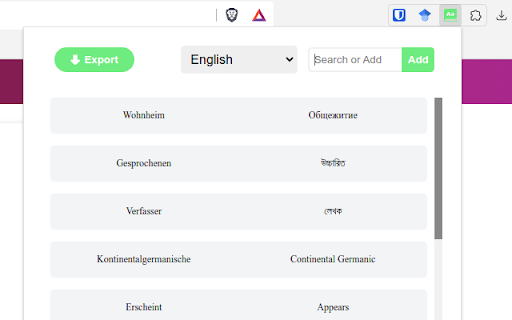

Easily save words and get instant translations. Review, export for Anki, and accelerate language learning. Save to Anki - Chrome Vocabulary Assistant Enhance your language learning experience with the "Save to Anki" Chrome Extension, the ultimate tool for building your Anki deck on the go. Effortless Word Collection: Simply right-click on any word you encounter while browsing, select "Save to Anki," and the word is instantly saved with an automatic translation. Personalized Language Targeting: Choose your preferred target language directly from the popup window, ensuring the translations align with your language learning goals. Convenient Word Management: Access all your saved words through the extension's popup window. The intuitive interface allows you to view, search, and edit your vocabulary list with ease. Seamless Anki Integration: Ready to review? Export your vocabulary list as a CSV file with a single click, making it incredibly simple to import into Anki and start studying. Streamlined Learning Journey: Designed for language enthusiasts, "Save to Anki" simplifies vocabulary acquisition, management, and revision, propelling your language skills forward. This extension is inspired by Ibrahem Magdy's "Save words" extension, with enhanced features to support language learners in building their Anki decks efficiently.

Anki Flashcard Sender
Select your text and send to Anki.

Anki generator, powered by open ai GPT
Maximize your study effectiveness and learning retention with the AI Flashcard Creator Extension! Harnessing the power of advanced Artificial Intelligence, this extension takes your learning experience to the next level, enabling seamless creation of insightful flashcards from your study materials. With our AI Flashcard Creator, you can simply select the text you want to learn, and the AI will instantly generate a set of comprehensive flashcards. The AI identifies key points, important facts, figures, and concepts, turning them into an interactive learning tool that's perfect for memory retention and periodic review. Don't just study, study smart. Let our AI Flashcard Creator Extension supercharge your learning experience! Try it today and experience the future of learning. You will need to install the anki add-on ankiconnect, the instruction are on the settings page. Features: - Highlight text and create flash cards related, you can modify the prompts - Drag images directly - Open the card in anki editor - Easily search images related to the content of the flash card on different engine - Works on pdf with chrome by using the sidepanel options and right-click menu

Quick Anki Adder
Quick Anki card adder with translate, animated picture (.gif), and text-to-speech (TTS ) resources. A quick Anki card adder with translate, animated picture (.gif), and text-to-speech (TTS ) resources. How to Use: https://www.linkedin.com/pulse/quick-anki-adder-chrome-extension-fran%C3%A7ois-souza/ - - - - - Setup - - - - - In order to use this app, you need to have the AnkiConnect (2055492159) add-on and do a little configuration described as follows: “Now, click on the AnkiConnect add-on and then on the Config button. In the windows that show up, there is the field "http://localhost". You need to change this to "*". This is a crucial step to do to make possible the communication between Anki and any website, otherwise, the connection will fail. You can read more about this with the CORS docs provided by the Mozilla 💻.” - - - - - Features - - - - - Instantly translate from selected word/sentence in any website: If you select a text on website a little popup will appers below your selection with the original sentence (that you can highlight any word by click on them) and the automatic translation 🔠; Instantly add a card to Anki: After setting up the target Anki language and deck by clicking the Quick Anki Adder icon, simply select the phrase on the website and click the Add to Anki 🃏 button. That's it! your card was created in a few seconds 🗃️; If you study on a smartphone or in books and collect phrases from there, just add all phrases in one batch option by clicking the 📃 Add multiple phrases button in the popup. It will open a new page where you can paste your sentence on the left side and on the right side the formed sentences will appear that you can highlight. It's an efficient way to add multiple sentences in just a few seconds 📑; You can improve your cards with the amazing free Text-To-Speech (TTS) feature provided by the VoiceRSS API. Just visit the Voice RSS website to request your key and place it in the Quick Anki Adder popup 🗣; You can enhance your cards with funny GIFs provided by GIPHY. Again, to use it, you just need to order a free key from the GIPHY website and place it in the Quick Anki Adder popup 🖼️;

Quick Anki
Add new notes to your Anki decks with a click of a button Add new notes to your Anki decks with a click of a button! At the moment these sites are supported: More sites can be easily added. Say which ones you want :) The project is open-source and any help is welcome! How to use 1. Run Anki Desktop on your computer - https://apps.ankiweb.net/ 2. Make sure AnkiConnect add-on is installed - https://ankiweb.net/shared/info/2055492159. 3. Open one of the supported websites. 4. Find the Anki Deck dropdown and choose the desired deck. 5. Click on the Anki button to add a new note with the front and the back already filled :)
