
imnbdkfiifnoefjkcjlbhbhdimmldblp
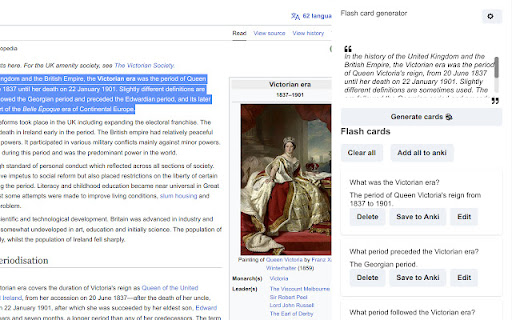
Maximize your study effectiveness and learning retention with the AI Flashcard Creator Extension! Harnessing the power of advanced Artificial Intelligence, this extension takes your learning experience to the next level, enabling seamless creation of insightful flashcards from your study materials. With our AI Flashcard Creator, you can simply select the text you want to learn, and the AI will instantly generate a set of comprehensive flashcards. The AI identifies key points, important facts, figures, and concepts, turning them into an interactive learning tool that's perfect for memory retention and periodic review. Don't just study, study smart. Let our AI Flashcard Creator Extension supercharge your learning experience! Try it today and experience the future of learning. You will need to install the anki add-on ankiconnect, the instruction are on the settings page. Features: - Highlight text and create flash cards related, you can modify the prompts - Drag images directly - Open the card in anki editor - Easily search images related to the content of the flash card on different engine - Works on pdf with chrome by using the sidepanel options and right-click menu

Anki Tool
Effortlessly convert any web content into Anki flashcards for smarter, faster learning. 📚 Easily create and manage your Anki flashcards directly from your browser! Anki Tool is the perfect solution for students, teachers, and lifelong learners looking to enhance their study efficiency. This powerful Chrome extension integrates seamlessly with your Anki profile, allowing you to create flashcards with ease and speed, directly from any webpage. 🚀 Setup Instructions (IMPORTANT) 🛠 AnkiConnect Setup: 1️⃣ Install AnkiConnect: 2️⃣ In the Anki desktop app, go to Tools > Add-ons > Get Add-ons. 3️⃣ Enter the code 2055492159 to install AnkiConnect. 4️⃣ Save changes and restart Anki. ⚙️ Anki Tool Setup: 1️⃣ Install Anki Tool from the Chrome Web Store. 2️⃣ Click the Anki Tool icon in your toolbar. 3️⃣ Enter flashcard details, select your deck and card type. 4️⃣ Click "Add Card" to sync with your Anki profile. 🌟 Key Features: ⚡ Quick Card Creation: Instantly generate new flashcards from web content, enhancing your study efficiency and knowledge retention. 👁️ Card Preview: Preview your cards before creating them with front/back views and your selected note type's styling for formatting verification. 📂 Deck & Model Selection: Easily choose from your existing Anki decks and card types for personalized learning. ✨ AI Auto-fill: Save time by automatically filling empty card fields. Simply fill one field and let the AI generate context-aware content for the others! 🔤 Cloze Deletion Toolbar: Create cloze cards using C1, C2, C3, and C+ buttons to test your knowledge. 🖼️ Image & Audio Uploads: Boost retention by adding images or audio recordings directly to your flashcards with simple copy-paste or file upload. 📝 Text Formatting: Use the formatting toolbar to bold, italicize, and style your flashcards for better clarity and structure. 🖱️ Highlight & Send: Select text on any webpage to instantly send it to your Anki Tool fields. 🌙 Light and Dark Themes: Customize your experience with light and dark themes to reduce eye strain and improve visual comfort. 🌐 Multi-Language Support: Use Anki Tool in your preferred language for a smoother experience. 💡 Why Anki Tool? Whether you're preparing for exams, mastering a new language, or organizing study materials, Anki Tool is your go-to extension for efficient and effective flashcard creation. Simplify your study process and maximize your learning outcomes with this essential educational tool. 🔒 Privacy: We respect your privacy. No personal data is collected. 🎉 Get Started: Install Anki Tool today and revolutionize your study sessions. Enhance your learning with the power of seamless Anki integration! 📝 Version History: 🤖 v1.10: Introduced AI Auto-fill to automatically generate card content and added a Highlight Popup to instantly send selected text to specific fields. 🎯 v1.9: Added card preview, advanced cloze deletion toolbar, and added a shortcut to close the side panel. 🧩 v1.8: Added tags support, a formatting toolbar, highlight-to-send feature, and revamped the settings page with new toggles. 📌 v1.7: Introduced a side panel for a more convenient and persistent Anki card creation experience, allowing users to manage flashcards without interrupting their workflow. 🌟 v1.6: Added keyboard shortcuts for faster access, a settings page for customization, and support for multiple languages. 🌗 v1.5: Added light and dark themes for better user customization. ✨ v1.4: Added the ability to upload and attach audio recording files directly to text fields within your flashcards. Improved overall stability when syncing with Anki profiles. 🐛 v1.3: Fixed note type errors that previously displayed "empty notes." Cards can now be created with all note types. 🎨 v1.2: Updated the UI to match design rebranding, added image uploading features, and optimized text boxes. 🛠️ v1.1: Fixed UI elements and ensured text saves to local storage on extension close.

AnkiLingoFlash
Automatically generate Anki flashcards with pronunciation guide and mnemonic for language learning. 📚 Anki uses spaced repetition to enhance learning, but creating a quality deck of flashcards can be time-consuming. Fortunately, AnkiLingoFlash is here to simplify the process! Once installed, AnkiLingoFlash allows you to generate flashcards from any word or phrase you select on a webpage. The front of the flashcard features a definition and direct translation, while the back includes the selected term (with an audio pronunciation guide), three example sentences, and a mnemonic — all AI-generated. ✨ How It Works: 1. Select text and right-click: Highlight a word or phrase, right-click, and choose the option to generate a flashcard. 2. Review the flashcard: Check the definition, direct translation, example sentences, and mnemonic. You can regenerate any part of the flashcard or edit it manually if needed. 3. Choose the deck: Select the Anki deck to add your new flashcard to, and you're done! 🧩 Key Features: - No ads - enjoy a clean, distraction-free experience - Free trial mode uses gpt-4o model from OpenAI - Option to use your own OpenAI API key for access to other models - Create flashcards in multiple languages (see below) 🌍 Flashcard Content Languages: While the extension interface is currently available only in English, you can create flashcards in the following languages: - Arabic (Standard, Egyptian) - Cantonese - Dutch (Netherlands, Belgium) - English (US, UK, Australia, Canada) - French (France, Canada) - German (Germany, Switzerland) - Hindi - Italian (Italy, Switzerland) - Japanese - Korean - Mandarin Chinese (Simplified, Traditional) - Persian (Farsi) - Portuguese (Portugal, Brazil) - Russian - Spanish (Spain, Latin America) 🧠 Whether you’re an elementary student, a university scholar, or simply someone looking to accelerate your language learning journey, AnkiLingoFlash is your perfect companion. It offers a limited number of free flashcards, and after that, you can continue at a very low cost by using your own OpenAI or Google Gemini API key — a single dollar can generate thousands of flashcards. Your API key is encrypted before being stored locally, ensuring your data remains secure. ⚠️ PLEASE NOTE: - Initial setup takes less than 5 minutes, a step-by-step tutorial is available at https://ankilingoflash.com/quick-tutorial.html, and a Google account is required for free trial mode - This is a beta version - your patience and feedback are appreciated as I work to improve the extension - The quality of flashcards may vary significantly between languages depending on the performance of the AI model used. - If you encounter any issues during setup, please contact support@ankilingoflash.com (response within 48 hours)

Anki Dictionary
Look up words instantly and save them as Anki flashcards, 100x faster than manual entry. Any language, auto-detected. Anki Dictionary is the fastest way to capture, learn, and remember vocabulary in any language while browsing the web. Look up words in seconds, get context-aware definitions, and export beautiful flashcards to Anki for long-term retention. 🔥 Now with Multi-Language Support powered by Wordwise! Learn Spanish, German, French, Italian, Russian, Hungarian, and more - all with the same seamless experience you love. ⚡ Instant Lookup: Double-click any word for instant definitions. 🌍 Multi-Language: Auto detects language from context, get clear, structured definitions in your target language. 📥 One-Click Anki Export: Generate beautifully designed flashcards optimized for Anki. No manual formatting needed. Context sentence auto-captured. 📖 Context-Aware: Definitions adapt to the sentence context, so you learn the right meaning. Double-click any word to see definitions instantly (additional trigger key can be configured in settings) Export to Anki with one click That's it! Enjoy your learning in Anki. No account required for English lookups; Multi-language support available with Wordwise (7-day free trial included) ✅ Install now and start learning without breaking your reading flow. 🛠️ Setup: Connect to Anki (Required for Export) To export flashcards directly to Anki, you need the AnkiConnect plugin: Step 1: Open Anki on your computer Step 2: Go to Tools → Add-ons → Get Add-ons Step 3: Enter this code: 2055492159 Step 4: Click OK and restart Anki Step 5: ⚠️ Important: Refresh any open browser tabs after installing AnkiConnect That's it! Your flashcards will now sync directly to Anki. --------------------------------------------------- Change log v2.1.18 Smart head word v2.1.16 Bug fix v2.1.15 Since last export in lookup history page. Option to trigger auto-sync to AnkiWeb after export. Bug fix. v2.1.13 bug fix v2.1.12 Dark / auto mode; improved onboarding; bug fix v2.1.8 Show word on top of context (optional but default) v2.1.7 Bulk export via txt v2.1.6 Bug fix v2.1.5 Local look-up history management and batch export is now available! v2.1.2 Improved performance v2.1.1 Fix audio on AnkiDroid and card size on AnkiMobile v2.0.10 & v2.0.11 Improved export hints & banner v2.0.9 Allow showing pronunciation on card front v2.0.8 Getting started & clarify free usage v2.0.5 Improved sign up display v2.0.4 Minor bug fixes v2.0.1 Brand new design with multi-language support by Wordwise v1.0.18 Add a feedback form v1.0.17 Fix audio play button style on certain pages. v1.0.16 Better scrollbar for pop up window. v1.0.15 Do not redirect to onboarding page from manage page. Fix onboarding description for Mac. v1.0.14 Fix the bug that selected words count is not updated in the manage page. v1.0.13 Add an onboarding page to guide new users, and a congratulations page after looking up 50 words. v1.0.12 Add row to sort by words or added time. v1.0.11 Add a clear all saved words button in options page. v1.0.10 Add a search box to filter all words in manage page. v1.0.9 Support Option or ⌥ key for Mac v1.0.8 Optimize export file v1.0.7 Update AnkiDict template url v1.0.6 Add a warning line when not using AnkiDict template v1.0.5 Minor fix to always show export hint v1.0.4 Use AnkiDict card template for a better card appearance. v1.0.3 Make clear when no definition is found v1.0.2 Fix bug of looking up from right click menu v1.0.1 Change from double click to Ctrl + double click to avoid conflicts with select and copy etc.

Anki Vocabulary
Easily save words and get instant translations. Review, export for Anki, and accelerate language learning. Save to Anki - Chrome Vocabulary Assistant Enhance your language learning experience with the "Save to Anki" Chrome Extension, the ultimate tool for building your Anki deck on the go. Effortless Word Collection: Simply right-click on any word you encounter while browsing, select "Save to Anki," and the word is instantly saved with an automatic translation. Personalized Language Targeting: Choose your preferred target language directly from the popup window, ensuring the translations align with your language learning goals. Convenient Word Management: Access all your saved words through the extension's popup window. The intuitive interface allows you to view, search, and edit your vocabulary list with ease. Seamless Anki Integration: Ready to review? Export your vocabulary list as a CSV file with a single click, making it incredibly simple to import into Anki and start studying. Streamlined Learning Journey: Designed for language enthusiasts, "Save to Anki" simplifies vocabulary acquisition, management, and revision, propelling your language skills forward. This extension is inspired by Ibrahem Magdy's "Save words" extension, with enhanced features to support language learners in building their Anki decks efficiently.
