
lpfpajiaohmafbnaidbfiolibpnclhei

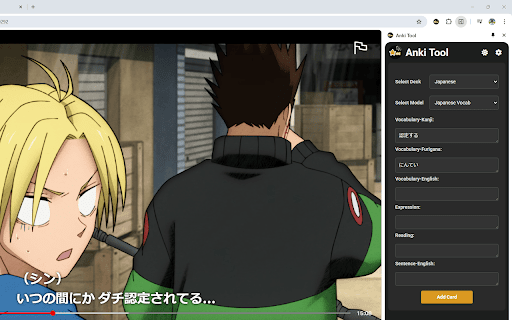


Effortlessly convert any web content into Anki flashcards for smarter, faster learning. 📚 Easily create and manage your Anki flashcards directly from your browser! Anki Tool is the perfect solution for students, teachers, and lifelong learners looking to enhance their study efficiency. This powerful Chrome extension integrates seamlessly with your Anki profile, allowing you to create flashcards with ease and speed, directly from any webpage. 🚀 Setup Instructions (IMPORTANT) 🛠 AnkiConnect Setup: 1️⃣ Install AnkiConnect: 2️⃣ In the Anki desktop app, go to Tools > Add-ons > Get Add-ons. 3️⃣ Enter the code 2055492159 to install AnkiConnect. 4️⃣ Save changes and restart Anki. ⚙️ Anki Tool Setup: 1️⃣ Install Anki Tool from the Chrome Web Store. 2️⃣ Click the Anki Tool icon in your toolbar. 3️⃣ Enter flashcard details, select your deck and card type. 4️⃣ Click "Add Card" to sync with your Anki profile. 🌟 Key Features: ⚡ Quick Card Creation: Instantly generate new flashcards from web content, enhancing your study efficiency and knowledge retention. 👁️ Card Preview: Preview your cards before creating them with front/back views and your selected note type's styling for formatting verification. 📂 Deck & Model Selection: Easily choose from your existing Anki decks and card types for personalized learning. ✨ AI Auto-fill: Save time by automatically filling empty card fields. Simply fill one field and let the AI generate context-aware content for the others! 🔤 Cloze Deletion Toolbar: Create cloze cards using C1, C2, C3, and C+ buttons to test your knowledge. 🖼️ Image & Audio Uploads: Boost retention by adding images or audio recordings directly to your flashcards with simple copy-paste or file upload. 📝 Text Formatting: Use the formatting toolbar to bold, italicize, and style your flashcards for better clarity and structure. 🖱️ Highlight & Send: Select text on any webpage to instantly send it to your Anki Tool fields. 🌙 Light and Dark Themes: Customize your experience with light and dark themes to reduce eye strain and improve visual comfort. 🌐 Multi-Language Support: Use Anki Tool in your preferred language for a smoother experience. 💡 Why Anki Tool? Whether you're preparing for exams, mastering a new language, or organizing study materials, Anki Tool is your go-to extension for efficient and effective flashcard creation. Simplify your study process and maximize your learning outcomes with this essential educational tool. 🔒 Privacy: We respect your privacy. No personal data is collected. 🎉 Get Started: Install Anki Tool today and revolutionize your study sessions. Enhance your learning with the power of seamless Anki integration! 📝 Version History: 🤖 v1.10: Introduced AI Auto-fill to automatically generate card content and added a Highlight Popup to instantly send selected text to specific fields. 🎯 v1.9: Added card preview, advanced cloze deletion toolbar, and added a shortcut to close the side panel. 🧩 v1.8: Added tags support, a formatting toolbar, highlight-to-send feature, and revamped the settings page with new toggles. 📌 v1.7: Introduced a side panel for a more convenient and persistent Anki card creation experience, allowing users to manage flashcards without interrupting their workflow. 🌟 v1.6: Added keyboard shortcuts for faster access, a settings page for customization, and support for multiple languages. 🌗 v1.5: Added light and dark themes for better user customization. ✨ v1.4: Added the ability to upload and attach audio recording files directly to text fields within your flashcards. Improved overall stability when syncing with Anki profiles. 🐛 v1.3: Fixed note type errors that previously displayed "empty notes." Cards can now be created with all note types. 🎨 v1.2: Updated the UI to match design rebranding, added image uploading features, and optimized text boxes. 🛠️ v1.1: Fixed UI elements and ensured text saves to local storage on extension close.

Anki Highlight Helper
Easily create Anki cards from highlighted text in your browser. Elevate Your Learning with Anki Highlight Helper! (Setup instructions below) Anki Highlight Helper is designed for students, educators, and lifelong learners who want to maximize their study efficiency. This intuitive Chrome extension integrates smoothly with Anki, enabling you to generate flashcards quickly and easily from any webpage. With Anki Highlight Helper, your study sessions become more productive, allowing you to capture key information in just a few clicks. Whether you're browsing articles, research papers, or online textbooks, this tool ensures that you never miss an important detail. ----------Features---------- ✅ One-Click Card Creation – Select text, right-click, and choose “Make Anki Card” to instantly add flashcards. ✅ Deck & Note Type Selection – Choose from your existing Anki decks and note types. ✅ Persistent Preferences – Your last-used deck and note type are saved for a seamless experience. ✅ Cloze Deletion Support – Easily generate Cloze cards without manual formatting. ✅ Dynamic Fields – Automatically adapts to different note types, ensuring a flexible workflow. ----------Setup---------- ⚠️NECESSARY STEPS⚠️ 1) Open the Anki desktop application. 2) Navigate to Tools > Add-ons > Get Add-ons. 3) Enter the code 2055492159 to download and install the AnkiConnect add-on. 4) Go to Tools > Add-ons and find AnkiConnect in the list. 5) Select AnkiConnect and click Config. 6) Update the address field from "http://localhost" to "*". 7) Save your changes and restart Anki to apply the configuration. Privacy: We respect your privacy. No personal data is collected. Support Us: Your participation helps support the development and maintenance of this free extension. Version History: v1.1: Improved setup instructions and error handling. v1.2: Enhanced security and optimized extension permissions. v1.3: General optimizations and minor bug fixes. v1.4: Major UI update – improved design, persistent deck/note type selection, added Cloze card support, and dynamic field loading to accommodate different note types.

Anki Dictionary
Look up words instantly and save them as Anki flashcards, 100x faster than manual entry. Any language, auto-detected. Anki Dictionary is the fastest way to capture, learn, and remember vocabulary in any language while browsing the web. Look up words in seconds, get context-aware definitions, and export beautiful flashcards to Anki for long-term retention. 🔥 Now with Multi-Language Support powered by Wordwise! Learn Spanish, German, French, Italian, Russian, Hungarian, and more - all with the same seamless experience you love. ⚡ Instant Lookup: Double-click any word for instant definitions. 🌍 Multi-Language: Auto detects language from context, get clear, structured definitions in your target language. 📥 One-Click Anki Export: Generate beautifully designed flashcards optimized for Anki. No manual formatting needed. Context sentence auto-captured. 📖 Context-Aware: Definitions adapt to the sentence context, so you learn the right meaning. Double-click any word to see definitions instantly (additional trigger key can be configured in settings) Export to Anki with one click That's it! Enjoy your learning in Anki. No account required for English lookups; Multi-language support available with Wordwise (7-day free trial included) ✅ Install now and start learning without breaking your reading flow. 🛠️ Setup: Connect to Anki (Required for Export) To export flashcards directly to Anki, you need the AnkiConnect plugin: Step 1: Open Anki on your computer Step 2: Go to Tools → Add-ons → Get Add-ons Step 3: Enter this code: 2055492159 Step 4: Click OK and restart Anki Step 5: ⚠️ Important: Refresh any open browser tabs after installing AnkiConnect That's it! Your flashcards will now sync directly to Anki. --------------------------------------------------- Change log v2.1.18 Smart head word v2.1.16 Bug fix v2.1.15 Since last export in lookup history page. Option to trigger auto-sync to AnkiWeb after export. Bug fix. v2.1.13 bug fix v2.1.12 Dark / auto mode; improved onboarding; bug fix v2.1.8 Show word on top of context (optional but default) v2.1.7 Bulk export via txt v2.1.6 Bug fix v2.1.5 Local look-up history management and batch export is now available! v2.1.2 Improved performance v2.1.1 Fix audio on AnkiDroid and card size on AnkiMobile v2.0.10 & v2.0.11 Improved export hints & banner v2.0.9 Allow showing pronunciation on card front v2.0.8 Getting started & clarify free usage v2.0.5 Improved sign up display v2.0.4 Minor bug fixes v2.0.1 Brand new design with multi-language support by Wordwise v1.0.18 Add a feedback form v1.0.17 Fix audio play button style on certain pages. v1.0.16 Better scrollbar for pop up window. v1.0.15 Do not redirect to onboarding page from manage page. Fix onboarding description for Mac. v1.0.14 Fix the bug that selected words count is not updated in the manage page. v1.0.13 Add an onboarding page to guide new users, and a congratulations page after looking up 50 words. v1.0.12 Add row to sort by words or added time. v1.0.11 Add a clear all saved words button in options page. v1.0.10 Add a search box to filter all words in manage page. v1.0.9 Support Option or ⌥ key for Mac v1.0.8 Optimize export file v1.0.7 Update AnkiDict template url v1.0.6 Add a warning line when not using AnkiDict template v1.0.5 Minor fix to always show export hint v1.0.4 Use AnkiDict card template for a better card appearance. v1.0.3 Make clear when no definition is found v1.0.2 Fix bug of looking up from right click menu v1.0.1 Change from double click to Ctrl + double click to avoid conflicts with select and copy etc.

AI Art Prompt Lucky Dice
Easily helps convert text to image by creating detailed prompts, fast and effective! AI Art Prompt Lucky Dice -- Best Extension for AI Art Generator AI Art Prompt Lucky Dice is a web tool that helps you create accurate and detailed prompts for AI art generator from text. Just click the lucky dice, it will generate texts within seconds. Click on the lucky dice until you are satisfied with the generated ones, with no limits! AI art generator online credits are precious, to make most use of them, please don't hesitate to use this extension for text to image generators. Key Features: ✓ Accurate And Detailed Prompts Copy the AI-generated texts, accurate and detailed, and paste to the best AI art generator to make the best AI art work. ✓ AI Text To Image As a must-have tool for AI text to image generator, our chrome extension, powered by AI, can automatically generate comprehensive texts as you like. Of cause, you can also manually enter words to create the artwork you exactly want. ✓ Save Online AI Art Generator Creadits We will show you texts or modifiers randomly. Once you get your ideal ones, it offers an access to AI art generator online directly, such as 4AiPaw, Wombo AI art generator, Nightcafe, Hotpot and Photoroom. ✓ No Limits No purchase required and no times limits in this Lucky Dice service! So keep clicking the lucky dice to get your ideal texts. With it, there is no need to worry about being uninspired when using AI art generator APPs. ✓ 100% Safe Our extension do not collect any user information, so there are no privacy issues involved and you can use it with no worries. All done on your browser, no need to download anything. ✓ Professional Support If you have any questions or inquires, please don't hesitate to contact support@hitpaw.com, our support team will give you professional help as soon as possible.

FlashSpanish - Spanish Translator
Learn Spanish vocabulary while reading online. Hover for instant translation and export to Anki for spaced repetition. Learn Spanish vocabulary while reading online. Hover over any Spanish word for instant translation and automatically save words to Anki for spaced repetition. FlashSpanish is the easiest way to improve Spanish reading comprehension without constantly switching tabs to Google Translate. ✨ HOW IT WORKS 1. Hover over any Spanish word while reading 2. See instant English translation in a popup 3. Click to save words to your personal dictionary 4. Export your vocabulary to Anki for spaced repetition practice 📚 PERFECT FOR - Spanish students (high school, college, self-taught) - Anyone reading Spanish news, articles, or social media - Language learners who want to stop tab-switching - Anki users looking for effortless vocabulary collection 🚀 KEY FEATURES - Instant hover translations - no interrupting your reading flow - Works on any website (news, Reddit, Twitter, articles) - 50,000+ word Spanish-English dictionary - Automatic conjugation and verb form handling - One-click Anki export (.txt tab-separated format) - Completely free, no ads, no account required 🔒 PRIVACY FIRST All data stored locally on your device. No tracking, no data collection, no account needed. Your vocabulary stays completely private. 💡 PRO TIPS - Try it on BBC Mundo, El País, or Spanish Reddit - Save words as you encounter them naturally - Export to Anki weekly for spaced repetition review - Perfect alongside Duolingo, Babbel, or immersion learning 🎓 WHY FLASHSPANISH? Traditional approach: Read Spanish → see unknown word → open Google Translate → type word → translate → close tab → forget what you translated → repeat 20+ times per article. FlashSpanish approach: Hover → instant translation → keep reading → remember the word. Built by a Spanish learner frustrated with tab-switching, for Spanish learners who want to actually enjoy reading in Spanish. Questions or feedback? We'd love to hear from you!
