
gadgjbkjjnchcfddakikflcnnlanjcfm

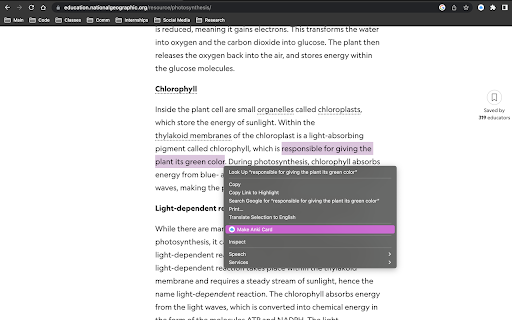
Easily create Anki cards from highlighted text in your browser. Elevate Your Learning with Anki Highlight Helper! (Setup instructions below) Anki Highlight Helper is designed for students, educators, and lifelong learners who want to maximize their study efficiency. This intuitive Chrome extension integrates smoothly with Anki, enabling you to generate flashcards quickly and easily from any webpage. With Anki Highlight Helper, your study sessions become more productive, allowing you to capture key information in just a few clicks. Whether you're browsing articles, research papers, or online textbooks, this tool ensures that you never miss an important detail. ----------Features---------- ✅ One-Click Card Creation – Select text, right-click, and choose “Make Anki Card” to instantly add flashcards. ✅ Deck & Note Type Selection – Choose from your existing Anki decks and note types. ✅ Persistent Preferences – Your last-used deck and note type are saved for a seamless experience. ✅ Cloze Deletion Support – Easily generate Cloze cards without manual formatting. ✅ Dynamic Fields – Automatically adapts to different note types, ensuring a flexible workflow. ----------Setup---------- ⚠️NECESSARY STEPS⚠️ 1) Open the Anki desktop application. 2) Navigate to Tools > Add-ons > Get Add-ons. 3) Enter the code 2055492159 to download and install the AnkiConnect add-on. 4) Go to Tools > Add-ons and find AnkiConnect in the list. 5) Select AnkiConnect and click Config. 6) Update the address field from "http://localhost" to "*". 7) Save your changes and restart Anki to apply the configuration. Privacy: We respect your privacy. No personal data is collected. Support Us: Your participation helps support the development and maintenance of this free extension. Version History: v1.1: Improved setup instructions and error handling. v1.2: Enhanced security and optimized extension permissions. v1.3: General optimizations and minor bug fixes. v1.4: Major UI update – improved design, persistent deck/note type selection, added Cloze card support, and dynamic field loading to accommodate different note types.

WebClipper for Anki - XXHK
Web Clipping + Spaced Repetition: Capture web content directly to Anki for spaced repetition. Simply select text or images on any webpage and send them to Anki - either as-is or with your sidenotes. You can make multiple selections before sending them together, and easily return to the original context from your Anki cards. This extension serves as a powerful alternative to tools like Readwise, RemNote, Notion, Evernote, Onenote and other web clippers. To get started, click the extension icon in the top-right corner after installation to view the setup guide and usage instructions. 网页:WebClipper for Anki - XXHK

copy-to-anki: Generate Anki Cards from your browser
Generate Anki cards from selected text on your browser. Save highlighted text from any webpage as an Anki flashcard — with optional ChatGPT-powered question generation. Turn highlights into Anki flashcards in seconds — without leaving the page. copy-to-anki lets you clip content from websites and save it directly into your Anki decks. Power users can optionally enable ChatGPT to auto-generate question prompts from the selected text. 🚀 Features ✏️ Highlight and Save – Right-click any selected text and save it to Anki instantly. 🔥 Auto-generate questions with ChatGPT – Let AI generate concise, smart prompts for your cards. 📚 Manual mode fallback – Customize your flashcards manually if needed. 🌐 Offline support – Cards are cached locally if Anki isn't running, and synced automatically when available. ⚙️ Customizable – Choose deck, note model, GPT model, and more from the options page. 📎 Source-aware – Each card includes a subtle reference to the original web page for context. 🧠 Perfect For Students & researchers, Language learners, Active recall & spaced repetition practitioners, Anyone who reads online and wants to remember more 🛠️ Requirements 1. Anki running locally 2. AnkiConnect add-on installed (Optional) OpenAI API key if you want GPT to generate prompts 🔐 Privacy Your data never leaves your machine. No tracking, no analytics. Only you control your flashcards.

Quick Anki Adder
Quick Anki card adder with translate, animated picture (.gif), and text-to-speech (TTS ) resources. A quick Anki card adder with translate, animated picture (.gif), and text-to-speech (TTS ) resources. How to Use: https://www.linkedin.com/pulse/quick-anki-adder-chrome-extension-fran%C3%A7ois-souza/ - - - - - Setup - - - - - In order to use this app, you need to have the AnkiConnect (2055492159) add-on and do a little configuration described as follows: “Now, click on the AnkiConnect add-on and then on the Config button. In the windows that show up, there is the field "http://localhost". You need to change this to "*". This is a crucial step to do to make possible the communication between Anki and any website, otherwise, the connection will fail. You can read more about this with the CORS docs provided by the Mozilla 💻.” - - - - - Features - - - - - Instantly translate from selected word/sentence in any website: If you select a text on website a little popup will appers below your selection with the original sentence (that you can highlight any word by click on them) and the automatic translation 🔠; Instantly add a card to Anki: After setting up the target Anki language and deck by clicking the Quick Anki Adder icon, simply select the phrase on the website and click the Add to Anki 🃏 button. That's it! your card was created in a few seconds 🗃️; If you study on a smartphone or in books and collect phrases from there, just add all phrases in one batch option by clicking the 📃 Add multiple phrases button in the popup. It will open a new page where you can paste your sentence on the left side and on the right side the formed sentences will appear that you can highlight. It's an efficient way to add multiple sentences in just a few seconds 📑; You can improve your cards with the amazing free Text-To-Speech (TTS) feature provided by the VoiceRSS API. Just visit the Voice RSS website to request your key and place it in the Quick Anki Adder popup 🗣; You can enhance your cards with funny GIFs provided by GIPHY. Again, to use it, you just need to order a free key from the GIPHY website and place it in the Quick Anki Adder popup 🖼️;

Web to Anki
A simple extension to create Anki cards from web content. A browser extension that helps learners make better flashcards, faster. You just highlight text, notes, code or math — and it turns into an Anki card. With formatting, LaTeX, and even relevant images if you want. This tool already saves me hours every week. If you're the kind of person who reads online notebooks, PDFs, academic blogs and actually wants to remember it, this might be your new favorite tool.
