
oacpegaegonlmnobkoeiiegdccgcmpnj
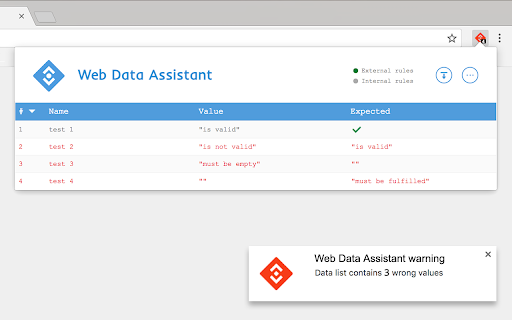
Web Data Assistant allows to control custom data from a Web page. Web Data Assistant helps to verify data implementations with automated check of a custom JavaScript dataset without diffusing information into everyone's browser console, and to share data valorization status with no effort to collaborators (developers, analytics teams, project managers, and any third party contributors). Create custom check rules to display data values and compare them with expected ones, you can also set them right from the extension to avoid deployment dependency. This helper works asynchronously and checks data list updates when data are added, modified or deleted. With some options, you can: • use different data set names, • create tag and datalayer check rules for particular domains, • insert custom code as inside a script tag, • export and import check rules, • activate wrong data values notification, • use icon as count checker for active rules, • or as counter of wrong data values, • watch data update in browser's console, • filter summary and console viewing of good and/or wrong data valorizations, • etc... All settings and rules are synced with your browser profile.

UET Tag Helper (by Microsoft Advertising)
This extension helps to identify issues in Microsoft Advertising UET tags • Navigate to any page of your website and the tag helper will tell you which UET tags are on the page and if they are working correctly. • Find out if your conversion goals or Dynamic Remarketing lists have been set up correctly on your website. • Learn about the issues that are encountered and how to fix them.

Simple Data Layer Viewer
The Simple Data Layer Viewer is a lightweight, no-nonsense extension for inspecting data layers on any website. 🔍 Features: > Instantly view detected data layers via a popup or a dedicated Developer Tools panel > Live updates: the DevTools panel refreshes automatically as the data layer changes > Data layer history: track how the data layer evolves across the full session > Console logging: stream data layer changes directly to the browser console > Supports common data layer formats out of the box (dataLayer, digitalData, utag.data, etc.) > Fully customizable: define your own data layer names, tweak appearance, and choose between light and dark mode > Inject code to activate debugging mode or initialize a custom data layer > Rewrite requests to load development environments or block domains for testing 🚫 No tracking. No data collection. No external communication. This extension is purely local and transparent—it simply displays data layers. Whether you're debugging, analyzing, or just exploring, this tool is designed to support your daily work—just like it does mine.

Google Analytics Debugger
Prints useful information to the JavaScript console by enabling the debug version of the Google Analytics Javascript. This extension loads the debug version of the Google Analytics Javascript for all sites you browse using Google Chrome. It prints useful information to the Javascript console. These messages include error messages and warnings which can tell you when your analytics tracking code is set up incorrectly. In addition, it provides a detailed breakdown of each tracking beacon sent to Google Analytics. To use this extension, You need to follow three steps: 1. Turn it on by clicking its icon to the right of the address bar. 2. Open the Chrome Javascript console to see the messages. On Windows and Linux, press Control-Shift-J. On Mac, press Command-Option-J. 3. Refresh the page you are on. By installing this extension, you agree to the Chrome Gallery Terms of Service at https://chrome.google.com/extensions/intl/en/gallery_tos.html You can ask questions about the plugin and report bugs at analytics-extensions@google.com

Elevar GTM Event Builder
Browser extension for Google Tag Manager The fastest and easiest way to add GA4 custom event tags via Google Tag Manager. With Elevar's GTM Event Builder you can point-and-click your way to creating new GA4 tags and triggers inside of Google Tag Manager! This extension allows you to create the following events for Google Analytics: - Form Submissions - Click events - Visibility events - Pageview events - Automatically select the DOM element required for custom click triggers - Google Analytics event tags with associated triggers automatically assigned Once done tagging your site you can import these events in 1-click to GTM.
