
jnkmfdileelhofjcijamephohjechhna
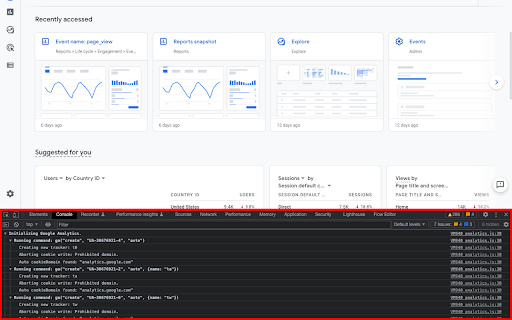

Prints useful information to the JavaScript console by enabling the debug version of the Google Analytics Javascript. This extension loads the debug version of the Google Analytics Javascript for all sites you browse using Google Chrome. It prints useful information to the Javascript console. These messages include error messages and warnings which can tell you when your analytics tracking code is set up incorrectly. In addition, it provides a detailed breakdown of each tracking beacon sent to Google Analytics. To use this extension, You need to follow three steps: 1. Turn it on by clicking its icon to the right of the address bar. 2. Open the Chrome Javascript console to see the messages. On Windows and Linux, press Control-Shift-J. On Mac, press Command-Option-J. 3. Refresh the page you are on. By installing this extension, you agree to the Chrome Gallery Terms of Service at https://chrome.google.com/extensions/intl/en/gallery_tos.html You can ask questions about the plugin and report bugs at analytics-extensions@google.com

UET Tag Helper (by Microsoft Advertising)
This extension helps to identify issues in Microsoft Advertising UET tags • Navigate to any page of your website and the tag helper will tell you which UET tags are on the page and if they are working correctly. • Find out if your conversion goals or Dynamic Remarketing lists have been set up correctly on your website. • Learn about the issues that are encountered and how to fix them.

GTM Variable Builder
🚀 Build Custom JS Variables with Ease! Highlight any text on a webpage, click the extension, and instantly generate the JavaScript needed to extract your highlighted content. Perfect for creating custom JavaScript variables in Google Tag Manager (GTM) or any other platform that requires variables from a page (e.g., ID, title, value, phone, email, etc.)!

GTM Copy Paste
Copy your Tags, Triggers and Variables and Paste them into any other account Easily Copy and Paste your Tags, Triggers, and Variables from one Google Tag Manager account to the next. Simply add them to the extension and then paste them into your intended account. Your items will be uploaded through the GTM API. You can put together your own menu of Tags, Triggers and Variables that you want to copy to another account. No more Container exports and reimports through the GTM Admin interface. Notes: - The relationship between Tags and Triggers will remain intact as long as they are part of the same "paste". - If an asset (Tag, Trigger or Variables) under the same name already exists, the extension will upload the asset with "(#)" attached to the end of the name. - Completely re-written the extension (March 2025): - newly improved "copy" experience - new UI for the clipboard - dependency check feature to add all dependancy to the clipboard - the oauth scope now ask for less permissions - now supports templates, tag sequencing, built-in variables and dependency rewrites Known issues: - If you edit an item right before you copy it to the clipboard, it might not have the changes in the paste. That’s because the extension is working with a cached version of the container. - If you copy a tag connected to a template, the upload might fail because it can’t find the reference - If you delete a dependant item from the clipboard, the upload might fail as it doesn’t have the right items to connect back while pasting

Consent Mode Inspector by InfoTrust
Check the status of Consent Mode, display gcs & gcd parameters, and view real time consent signals.🔐 Consent Mode Inspector is a lightweight Chrome Extension designed to monitor Google Consent Mode, providing real-time insights into gcs and gcd parameters sent with Google Tags, alongside current signal states found under google_tag_data.ics.entries. ● Real-Time GCS Code Display ↳Instantly view the latest GCS code being sent with a Google Tag. ● Detailed GCD Code Insights ↳Understand the latest GCD code with comprehensive explanations of each value. ● Dynamic Table View ↳Explore the google_tag_data.ics.entries object directly from the DOM for in- depth analysis. If ad_user_data or ad_personalization are granted or denied, then you have v2 setup. ● Consent History Tracking ↳Keep a history of tags fired, including GCS codes and their consent states at the point of firing. ● One-Click Screenshots ↳Easily screenshot the extension's display to share the current consent results with your team or for your records. ─────────── Update Notes ─────────── ● GCD parameter calculator ↳Edit the gcd parameter and view what different values may mean. Copy paste in a whole gcd parameter or update single characters to quickly view what it may mean. ● Bug Fixes ↳Fix various bugs and add improvements ─────────── Feedback and Support ─────────── Your input is invaluable to us! For questions, comments, concerns, feature requests, or bug reports, please feel free to reach out to ✉️ ryan.bulcher@infotrustllc.com. or visit 🔗 https://infotrust.com/google-consent-mode-inspector We're here to assist and look forward to enhancing your experience with Consent Mode Inspector. ⚠️ Please Note ⚠️ This extension serves as a tool for a Google product that is continuously evolving. As such, both Google's product and this extension are subject to changes. We advise not to rely solely on this extension for consent or compliance verification.
