
nojcialipgadjmbkgdhildheeahajphm
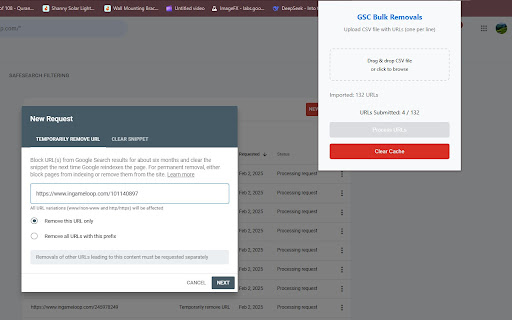
GSC Bulk URL Removals is a powerful Chrome extension designed to help webmasters and SEO professionals efficiently remove multiple… GSC Bulk URL Removals is a powerful Chrome extension designed to help webmasters and SEO professionals efficiently remove multiple URLs from Google Search Console’s Removals Tool in a single automated process. Instead of manually submitting each URL one by one, this extension streamlines the process, saving you valuable time and effort. 🔹 Key Features: ✅ Bulk URL Submission – Upload a CSV file and process multiple URLs effortlessly. ✅ Automatic Domain Validation – Ensures URLs match the correct Google Search Console property. ✅ One-Click Processing – Automates the submission of URLs, reducing manual effort. ✅ Clear Cache Option – Instantly stop the process and reset the URL queue if needed. ✅ Live Progress Tracking – Monitor the number of processed and pending URLs. 🛠 How to Use: Open Google Search Console and navigate to the Removals Tool. Click the extension icon and upload your CSV file containing the URLs. Click Process URLs to start automatic submissions. Optionally, click Clear Cache to stop and reset the process. 💡 Note: Ensure you are logged into the correct Google Search Console property before processing URLs.

Google Search Console - Bulk URL Removal 4.0
This extension allows you to remove multiple URLs from Google Search Console (formerly Webmaster Tools) in bulk. Instead of manually copying and pasting each URL, simply create a CSV file with the URLs you want to remove, upload it, and click remove. 🚀 NEW UPDATED VERSION - 2025 ⭐️ Turbo Mode. Submit one url for removal in 100 ms. You can submit 1000 urls for removal in about 10 minutes. 🚀 NEW UPDATED VERSION - 2024 ⭐️ Keep track of the progress of your bulk removal job ⭐️ Pause and restart the bulk removal process ⭐️ Display the number of removed urls, pending urls, and urls that error out. ⭐️ Ability to download a csv report of each url removal status. Google limits removals to 1000 URLs per 24 hours. If you need to remove more, divide them into batches of 1000 and submit each batch daily. For details on the CSV format, visit: https://github.com/noitcudni/google-search-console-bulk-url-removal/#csv-format. Upload your CSV file by clicking the green trash can icon to start the removal process. For support, file an issue on GitHub: https://github.com/noitcudni/google-webmaster-tools-bulk-url-removal/issues

Google Index Remover - Bulk & Fast
Bulk Remove Indexed URLs from Google — Instantly. This free Chrome extension helps you remove already indexed URLs from Google Search faster — using Google Search Console’s removal tool. ✅ Upload a CSV file (one URL per line) ✅ Choose removal type: • Temporarily remove URL (hide from Search for ~6 months) • Clear cached snippet (remove outdated content only) ✅ Works on Chrome and Microsoft Edge ✅ No login or API keys — just run it on the GSC Removals page ✅ 100% free, no tracking, no bloat 📌 Note: Google Search Console allows a maximum of 1000 removal requests every 24 hours. 👉 For large lists, split your CSV into chunks of 1000 and submit daily. Save hours. Clean up your indexed content fast.

Google Search Console & Bing Webmaster Tools
Enhance your website management experience with GSCTool.com - the ultimate solution for efficient Google Search Console and Bing Webmaster Tools management. This powerful tool offers a wide range of features to streamline your URL indexing, removal, and overall optimization process. ✅ Track your website's performance in Google Search Console easily with our new feature showing percentage changes for quick insights. ✅ View Google Search Console at Full Width: No more scrolling to the right to see the full width of the Google Search Console. ✅ Free XML Sitemap URL Extractor: Easily extract and download the URLs from your XML sitemap. This tool helps you to quickly extract all URLs listed in an XML sitemap even if it's split into multiple sitemaps. ✅ Support Managing Multiple Google Service Accounts: Seamlessly navigate and manage multiple Google service accounts for enhanced control over your website's performance. ✅ Bulk Indexing URLs to Google: Quickly index multiple URLs on Google for improved visibility and search engine ranking. ✅ Bulk URL Index to Bing, Yandex with IndexNow: Extend your reach by effortlessly indexing URLs on Bing, Yandex, and more using the innovative IndexNow feature. ✅ Bulk Inspection URLs Google Search Console: Conduct bulk inspections on URLs within Google Search Console to identify and resolve issues efficiently. ✅ Bulk URL Removal for Google Search Console: Easily remove multiple URLs from Google Search Console to maintain a clean and optimized website. ✅ Bulk URL Removal for Bing Webmaster Tool: Streamline the removal process by eliminating multiple URLs from Bing Webmaster Tool with just a few clicks. ✅ Import and Export CSV: Conveniently import and export CSV files to manage your URLs and data effectively. ✅ Manage your URLs: Take full control of your URLs by organizing, inspecting, and optimizing them within a centralized platform. ✅ Settings for Bulk URL Removal: Customize and adjust settings for bulk URL removal to suit your specific requirements and preferences. ✅ Save Main Menu State in Google Search Console: Save the state of the main menu in Google Search Console so that it doesn't open every time you refresh the page. 👉 Watch how to Export More Than 1,000 Rows from Google Search Console https://www.youtube.com/watch?v=hdLxi7J316M 👉 Learn how to Bulk Index URLs to Google https://www.youtube.com/watch?v=KJGTCh77lII 👉 Discover how to Bulk URL Index to Bing, Yandex with IndexNow https://www.youtube.com/watch?v=Y5A6icO_N9Y 👉 See how to Bulk Inspection URLs in Google Search Console https://www.youtube.com/watch?v=Lay-rhuvg3c 👉 Learn how to Bulk Remove URLs in Google Search Console https://www.youtube.com/watch?v=W7lWN7Xbmx0 👉 Find out how to Bulk Remove URLs in Bing Webmaster Tool https://www.youtube.com/watch?v=mNgZt9IYB9w 👉 Easier Percentage % Changes Visibility Google Search Console: https://www.youtube.com/watch?v=ZPzn_BkOKh4 Stay ahead of the competition and optimize your website efficiently with GSCTool.com. Elevate your website management experience today!

PlePer Local SEO Tools
Useful shortcuts and quick analyzes for Local SEO`s The extension offers collection of tools and shortcuts for Local SEO's. With this extension you get detailed information for every google my business listing in Maps, Local Finder, Knowledge panel and making four different analysis based on maps search results. Listing details returned by the extension: Name / Address / Phone / All Categories / Verification status / Attributes / Coordinates / All important Google ID’s (CID, Place ID, Knowledge Graph ID) / Export function / Pin function / Links to popular business directories, search engines, different website analysis tools (Speed Test / Mobile Friendly Test / Whois information / Domain backlink analysis etc ). For US listing direct link to corespondig Secretary of state business lookup website. Four different analyzes when searching in Maps: - Categories - top categories used, average categories per listing, max categories per listing; - Reviews - average rating and reviews, maximum/minimum rating and reviews, listings without reviews; - Attributes - all the attributes used; - Business Hours - when business are open and the average business hours; Pin function - the listing information on any website with keyboard combination (CTRL + ALT + E). Easiest way to compare / enter data anywhere. The chrome extension is plug and play - no settings or configuration needed! Instructions: 1. Install the extension 2. Open in new tab google maps 3. Make a search and you will see the analyses. 4. Select any listing from the results and you will see the details.
