
glncpmnpbdpbipdgdpadhlcankfngejl


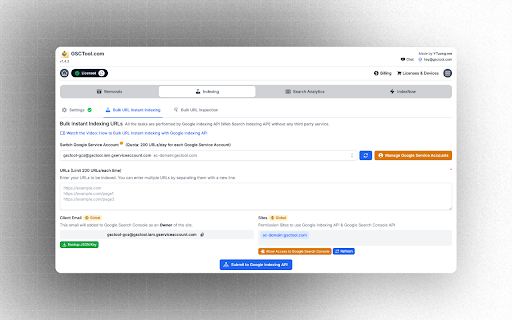
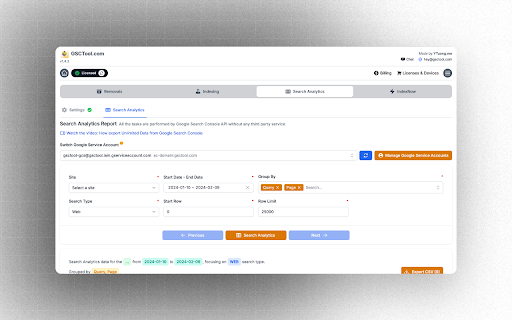
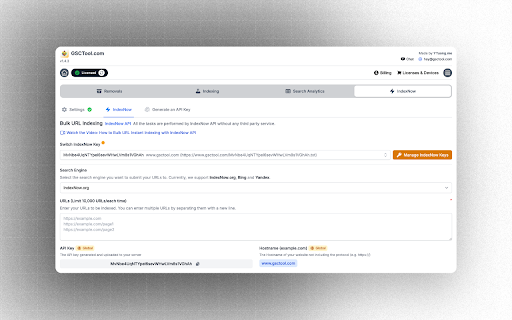
Enhance your website management experience with GSCTool.com - the ultimate solution for efficient Google Search Console and Bing Webmaster Tools management. This powerful tool offers a wide range of features to streamline your URL indexing, removal, and overall optimization process. ✅ Track your website's performance in Google Search Console easily with our new feature showing percentage changes for quick insights. ✅ View Google Search Console at Full Width: No more scrolling to the right to see the full width of the Google Search Console. ✅ Free XML Sitemap URL Extractor: Easily extract and download the URLs from your XML sitemap. This tool helps you to quickly extract all URLs listed in an XML sitemap even if it's split into multiple sitemaps. ✅ Support Managing Multiple Google Service Accounts: Seamlessly navigate and manage multiple Google service accounts for enhanced control over your website's performance. ✅ Bulk Indexing URLs to Google: Quickly index multiple URLs on Google for improved visibility and search engine ranking. ✅ Bulk URL Index to Bing, Yandex with IndexNow: Extend your reach by effortlessly indexing URLs on Bing, Yandex, and more using the innovative IndexNow feature. ✅ Bulk Inspection URLs Google Search Console: Conduct bulk inspections on URLs within Google Search Console to identify and resolve issues efficiently. ✅ Bulk URL Removal for Google Search Console: Easily remove multiple URLs from Google Search Console to maintain a clean and optimized website. ✅ Bulk URL Removal for Bing Webmaster Tool: Streamline the removal process by eliminating multiple URLs from Bing Webmaster Tool with just a few clicks. ✅ Import and Export CSV: Conveniently import and export CSV files to manage your URLs and data effectively. ✅ Manage your URLs: Take full control of your URLs by organizing, inspecting, and optimizing them within a centralized platform. ✅ Settings for Bulk URL Removal: Customize and adjust settings for bulk URL removal to suit your specific requirements and preferences. ✅ Save Main Menu State in Google Search Console: Save the state of the main menu in Google Search Console so that it doesn't open every time you refresh the page. 👉 Watch how to Export More Than 1,000 Rows from Google Search Console https://www.youtube.com/watch?v=hdLxi7J316M 👉 Learn how to Bulk Index URLs to Google https://www.youtube.com/watch?v=KJGTCh77lII 👉 Discover how to Bulk URL Index to Bing, Yandex with IndexNow https://www.youtube.com/watch?v=Y5A6icO_N9Y 👉 See how to Bulk Inspection URLs in Google Search Console https://www.youtube.com/watch?v=Lay-rhuvg3c 👉 Learn how to Bulk Remove URLs in Google Search Console https://www.youtube.com/watch?v=W7lWN7Xbmx0 👉 Find out how to Bulk Remove URLs in Bing Webmaster Tool https://www.youtube.com/watch?v=mNgZt9IYB9w 👉 Easier Percentage % Changes Visibility Google Search Console: https://www.youtube.com/watch?v=ZPzn_BkOKh4 Stay ahead of the competition and optimize your website efficiently with GSCTool.com. Elevate your website management experience today!

Google Console Bulk URL Remover
Dear Users, Our extension has faced an attack of negative reviews from our paid competitor. They come in batches of 3-4, not saying much about the problem, with a range of time of 1-3 weeks. Our extension will always be free, so you do not need to worry. If we helped you, please, leave a nice review! Introducing the Google Console Bulk URL Remover Extension, an efficient tool that makes managing your Google search results a breeze. This Chrome extension is carefully crafted for webmasters, SEO professionals and anyone seeking to maintain a organized presence. It simplifies the task of tidying up updating and streamlining your URLs in Google Search Console. FAQ (Please, read if you have a problem with the extensin): !!! Please, make sure to refresh the page before executing the extension !!! 1. Where should the extension be opened and run? - On the removals page of Google Search Console (https://search.google.com/search-console/removals); 2. How should I separate the links? - The links should be separated by a new line (Enter), in a new version we will introduce other types of separation; 3. What language my browser should be set to? - On the current version of the extension, your browser and the page are required to be set to "English" as the logic of the extension depends on it. 4. Why does Google show "Invalid sitemap address"? - The error usually pops up when you try to remove an URL from a website different from the one chosen in the top of the page (property). Version 1.86, Release log: - Added a caution about switching properties (Google Search Console bug), and the need for refreshing the page after for the script to work properly. Version 1.86, Release log: - A new feature of the Bulk Inspection and re-submitting for re-indexing if the URL is live. (Just press Start Inspection, or Start Removals for the old Removals). Version 1.8, Release log: - Added saving of links when closing the extension (if file uploaded/"Start" pressed). - Changing the Stylings. Version 1.7, Release log: - Increased performance. - Changed the Algorithm. - Decreased the size. - Added a How-To-Guide. Version 1.6, Release log: - Solved the bug when there are too many links to submit. - Solved the bug when the console is in the other versions of English (UK, Canada, India, etc). Version 1.5, Release log: - Added an alert every time a link is submitted/failed. - Added a prevention of running the script on a wrong page. - Added a prevention of running the script in a wrong language. - Added additional checks for the links format. We're continuously dedicated to enhancing our product. If you have any suggestions, ideas, or feedback on how we can make it even better, please don't hesitate to reach out to us. Your input is invaluable in helping us improve our offering and provide you with the best possible experience. Contact us anytime; we're here to listen and evolve with your needs.

Google Search Console Enhanced Analytics
Google Search Console Enhanced Analytics is a simple, time-saving extension that enhances your analysis. Google Search Console Enhanced Analytics let’s you easily select and compare dates, generate percentage changes or generate search volumes. It enhances your analysis! Features - Select a custom standard period (either in the UI or in the extension) - Do a quick comparison - Do a custom comparison - Generate percentage changes - Generate search volumes - See exact metrics above the chart - Export all generated data to Excel Privacy Your privacy is extremely important to me. This extension does not store any data. Does this extension need Google Search Console property access? No. The only thing this extension does to calculate data is use the info inside your browser. You do not need to give access to your Google Search Console property and I don’t store / send any data to a server. How do you save my DataForSEO credentials? To make sure you don’t need to login every time you open my extension, I give you an option to save your data. Save data, don’t remember me > Your credentials are saved in the session storage of your browser and are kept there during your browsers session. Save data, remember me > Your credentials are saved in the local storage of your browser and are kept there until you delete your data inside the extension or remove the extension.

Ahrefs SEO Toolbar
Save hours with a complete toolkit in one SEO extension. Insights for on-page, keyword research, and link analysis on any webpage. Ahrefs toolbar is free and gives you detailed SEO insights without leaving your browser. 🌍 Global SEO research (No VPN needed) Switch regions, Google domains, languages, and get new keyword ideas directly in search results. 📃 On-page SEO data in 1 click Check titles, meta descriptions, headers, and technical SEO factors like canonical tags and indexation directives in one click. 🔗 Link analysis made easy Highlight links on the page, trace redirects, filter outgoing links, spot broken links, and export all the data to CSV. 🛠 Detailed SEO research tools Save URLs from open tabs or a SERP, switch user agents to see pages like Googlebot, read HTTP headers, and get performance data for page speed insights. ✨ Paid Ahrefs users unlock Ahrefs metrics: See domain and page-level metrics like keyword counts, traffic estimates, referring domains, and more - directly on every site or result. 📌 Note: Ahrefs subscription is required for access to Ahrefs metrics. The core tools of this SEO extension remain completely free.

Advanced GSC Visualizer
Advanced charting with annotations & AI assistant for Google Search Console. One-click API access for data visualization. 𝐏𝐫𝐢𝐯𝐚𝐜𝐲 & 𝐭𝐞𝐫𝐦𝐬 (𝐀𝐩𝐫𝐢𝐥 𝟐𝟎𝟐𝟔) We refreshed our Privacy Policy and Terms of Service so they match how the product works today—especially optional AI: if you turn it on and add your key, relevant GSC-related content can be sent from your browser to the AI provider you choose, not through our servers for that flow. 𝐕𝐞𝐫𝐬𝐢𝐨𝐧 𝟑.𝟑.𝟔 𝐔𝐩𝐝𝐚𝐭𝐞𝐬: (𝐌𝐚𝐫𝐜𝐡 𝟐𝟎𝟐𝟔) 𝐌𝐮𝐥𝐭𝐢𝐥𝐚𝐧𝐠𝐮𝐚𝐠𝐞 𝐒𝐮𝐩𝐩𝐨𝐫𝐭: Language support added for Spanish (Español), French (Français), and Ukrainian (Українська) 𝐕𝐞𝐫𝐬𝐢𝐨𝐧 𝟑.𝟑 𝐔𝐩𝐝𝐚𝐭𝐞𝐬: (February 2026) AI Assistant (Beta): Chat with your GSC data using your OpenAI API key. Powered by GPT-4o mini, more models coming soon. Chart Improvements: Faster performance chart with custom metric colors and improved annotations. Visualizer Compare Mode: Overlay two filter sets on one chart in the API Visualizer, compare different pages, queries, or date ranges side by side. 𝐕𝐞𝐫𝐬𝐢𝐨𝐧 𝟑.𝟐 𝐔𝐩𝐝𝐚𝐭𝐞𝐬:(January 2026) URL Inspector Enhancement: View exactly what Google indexed and compare it side-by-side with your live page in real-time. Render Comparison Tool: Instantly spot differences between cached and live versions with synchronized scrolling and device switching (mobile/desktop). 𝐕𝐞𝐫𝐬𝐢𝐨𝐧 𝟑.𝟎 𝐔𝐩𝐝𝐚𝐭𝐞𝐬: (November 2025) One-Click API Access: Instantly connect to Google Search Console API to fetch massive datasets (up to 25k rows). Advanced Filtering: Dive deeper into your data with precise, custom API query filters. Enhanced Annotations: You can now store annotations for each property. 𝐕𝐞𝐫𝐬𝐢𝐨𝐧 𝟐.𝟓 𝐔𝐩𝐝𝐚𝐭𝐞𝐬: • In the "Top 10 Subfolders" section, you can now view level 2 folders for a more detailed insight. • Visualize your website structure with enhanced clarity and depth. 𝐕𝐞𝐫𝐬𝐢𝐨𝐧 𝟐.𝟒 𝐔𝐩𝐝𝐚𝐭𝐞𝐬: • Difference Chart View: In compare mode, you can now click on the chart to toggle a new difference view. 𝐕𝐞𝐫𝐬𝐢𝐨𝐧 𝟐.𝟑 𝐔𝐩𝐝𝐚𝐭𝐞𝐬: • Metric Summary Cards: Interactive dashboard cards displaying key performance metrics (clicks, impressions, CTR, position) with comparison mode support. 𝐕𝐞𝐫𝐬𝐢𝐨𝐧 𝟐.𝟎 𝐔𝐩𝐝𝐚𝐭𝐞𝐬: • Crawl Stats Visualization Dashboard: Transform raw crawl data into actionable insights with interactive charts and analytics • Multiple UI improvements and performance optimizations for a smoother experience 𝐕𝐞𝐫𝐬𝐢𝐨𝐧 𝟏.𝟕𝟎 𝐔𝐩𝐝𝐚𝐭𝐞𝐬: • Period Comparison Tool: Compare first and second half of selected date ranges with a single toggle. 𝐕𝐞𝐫𝐬𝐢𝐨𝐧 𝟏.𝟔𝟓 𝐔𝐩𝐝𝐚𝐭𝐞𝐬: • Force English Interface: Toggle English language mode for consistent data formatting and visualization across all regions. 𝐕𝐞𝐫𝐬𝐢𝐨𝐧 𝟏.𝟔𝟎 𝐔𝐩𝐝𝐚𝐭𝐞𝐬: • Top 10 Folders Analysis: Instantly see how your website sections perform with detailed performance data. 𝐕𝐞𝐫𝐬𝐢𝐨𝐧 𝟏.𝟓𝟎 𝐔𝐩𝐝𝐚𝐭𝐞𝐬: (New year update) • Charts now available in Discover and News modes, expanding beyond just search results • Latest algorithm updates of December 2024 now included • Export and import annotations: draw annotations, save them as JSON files, and reuse them later with import functionality • Enhanced annotation system: annotations are now responsive, tied to specific timeframes, and will snap to dates when drawn – ensuring accuracy and persistence when revisiting different timeframes 𝐕𝐞𝐫𝐬𝐢𝐨𝐧 𝟏.𝟒𝟐 𝐔𝐩𝐝𝐚𝐭𝐞𝐬: • Fixed the problem of loading the chart for users with multiple Google accounts. 𝐕𝐞𝐫𝐬𝐢𝐨𝐧 𝟏.𝟒𝟏 𝐔𝐩𝐝𝐚𝐭𝐞𝐬: • Fixed an issue where the extension stopped working after Google introduced the new 24-hour data feature in GSC. Thanks to your emails and feedback, we were able to resolve this sooner! 𝐕𝐞𝐫𝐬𝐢𝐨𝐧 𝟏.𝟒𝟎 𝐔𝐩𝐝𝐚𝐭𝐞𝐬: • Google algorithm updates with date ranges now visible on the chart with a click • New tool to draw arrows directly on the chart • Enhanced responsiveness for smaller screens 𝐕𝐞𝐫𝐬𝐢𝐨𝐧 𝟏.𝟑 𝐔𝐩𝐝𝐚𝐭𝐞𝐬: • Added CSV export functionality - download your chart data with one click • Introduced data labels for weekly and monthly views 𝐓𝐡𝐚𝐧𝐤 𝐲𝐨𝐮! We've reached 2,000+ users in just one week! 🎉 𝐕𝐞𝐫𝐬𝐢𝐨𝐧 𝟏.𝟐 𝐔𝐩𝐝𝐚𝐭𝐞𝐬: • Fixed average position display (now correctly shows position 1 as best) • Resolved button visibility issues when applying filters • Added automatic English interface switch for non-English users ▬ ▬ ▬ ▬ Advanced GSC Visualizer brings dynamic data visualization directly to your Google Search Console. With a single click, transform key metrics—such as clicks, impressions, CTR, and average position—into interactive, customizable charts. Choose from bar, line, or area chart types and view data daily, weekly, or monthly. Add trendlines and moving averages for deeper insights, and annotate charts by drawing vertical and horizontal lines, creating boxes, or adding text. All tools are integrated seamlessly, without storing or accessing any data outside of your Google Search Console environment. 𝐅𝐞𝐚𝐭𝐮𝐫𝐞𝐬 • Instantly add a chart button to Google Search Console • View metrics in daily, weekly, or monthly intervals • Select from bar, line, and area charts • Apply trendlines and moving averages • Annotate charts with lines, boxes, and text • No data storage or sharing beyond your Google Search Console view 𝐏𝐫𝐢𝐯𝐚𝐜𝐲: This extension only enhances your GSC experience—no data is stored, shared, or accessed outside of your account.
