
noggimpgfjnknjblddfibbdnocffdoii
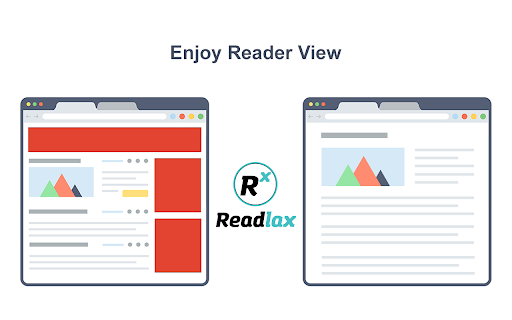
Clean websites from sidebars and ads, read with phrase highlighting. Phrase Highlighting for Speed Reading - Read Faster Immediately. The "Readlax Reader" removes ads and distractions, leaving only text and images for a clean reading view. How to use "Readlax Reader": - Install Readlax Chrome Extension. - Click "Reader View" on the popup.

Read fast - Speed Reading Extension
A beautiful speed reading extension Want to improve your reading speed? 1- Select some text on the webpage 2- Click on the "R" icon And here you go, ready to rock =) Version 0.9.4 - Added a new shortcut, Backspace, to go back to start. - Added some tips on the options page that may improve your reading experience. - Fixed an issue caused by the spacebar key. Version 0.9.3 - A link to the options page has been added - A loading animation has been added - Fixed a couple of bugs caused by the spacebar key Version 0.9.1 - Possibility to set the delay before the reading starts (on the options page) - Performance improvement

Reader Mode for Google Chrome™
Strips away clutter like buttons, background images, and changes the page's text size, contrast and layout for better readability Do you want to view a news article online without the advertisements etc all blocking the actual article? Simply install our software Reader Mode for Google Chrome™ and our software will help you remove all the clutter away from a webpage. This is a simple chrome reader mode software which allows you to focus on the text. Switch to reader view instantly once you install our software. To get started, here are the few simple steps to follow Install the software Reader Mode for Google Chrome™ Go to the website you want to use Reader Mode Click on our software icon/right click and choose "Reader Mode" Our software will automatically remove the advertisements, leaving behind only the article for you to focus on. Disclaimer: Please note this extension is NOT made by Google and is made by an independent development team. All copyrights belong to their respective owners. Google doesn’t endorse or sponsor this Chrome extension. Reader Mode for Google Chrome™ is not owned by, is not licensed by and is not a subsidiary of Google Inc.

Reader View
Removes clutter like buttons, backgrounds, adjusts text size, contrast, and layout for better readability Reader View extension brings Mozilla's open-source Readability implantation to Chromium. Using this extension you can strip clutters from webpages and read them on "Reader View" mode. The extension allows you to toggle between normal view and reader view by pressing the page-action button. Note that reader view mode works best for web pages that have a lot of content. There are some tools in the left side panel that can help you personalize your Reader View. You can change color, background-color, font-size, font-family and width of the reader view. Features: -> Remove distraction -> Read in fullscreen mode -> Remove advertisements -> Save in HTML format -> Print document -> Read content using a powerful Text to Speech (TTS) engine -> Edit HTML content (live editor) -> Email document (with title, body, and reference to the original document) -> Correctly display mathematical formulas (MathJax equations are Supported) -> Highlight selected text -> Move to the next and previous pages -> Keyboard shortcuts for almost all actions -> Resize images on the design-mode -> Display DOI (Digital Object Identifier) details -> Display publish date -> Add persistent sticky notes -> Bionic Reading -> Adjust number of columns *** 0.6.x releases *** The extension is now running on manifest v3! Make sure you have the latest version of your browser to use this extension (The minimum acceptable Chrome version is 104). There are a few changes to make it compatible, so please report bugs if you see broken features. For more info please visit: https://github.com/rNeomy/reader-view/ Change Log: 0.1.3: Calling a reader view by restoring it from history will trigger history.back 0.1.4: A more visible icon. Fixes a reader bug. 0.1.5: It is now possible to toggle the reader view using keyboard shortcut (define one from Chrome's settings page) 0.2.1: Document parsing is improved. Switched to the latest Readibility.js library. Ctrl + S now saves the document same as pressing the "Save" button. Reader View now supports both rtl and ltr languages 0.2.2: It is now possible to select some content and ask the reader view to convert only the selected part. This is useful if the automatic selection tool is not detecting the content correctly. 0.2.4: Speech engine is added. You can now ask the extension to read the article for you. Estimated reading time is displayed below the article title

Clearly Reader - Your AI Reading Assistant
A browser extension with reader mode for optimal experience. Features copy, translate, speech, and PDF and Markdown export. Clearly Reader - Redefine Your Web Reading Experience 【Key Features】 ✦ One-Click Reader Mode (Shortcut: Alt/Option + R) ✦ AI Article Assistant: Summarize/Translate/Chat With Article ✦ TTS: Read any article text to speech ✦ Cross-Device Sync & Cloud Storage ✦ Export Article to PDF, Word, and Markdown, etc. ✦ Add Article to: Pocket/Craft/Raindrop/Instapaper/Obsidian etc. 1️⃣ Ultimate Reading Experience • Remove ads, popups and distractions intelligently • Support dark mode & custom themes • Adjustable font, line height & page width • System fonts & custom CSS support • Unique book layout mode
