
nodkciekokflmbkobbjchpmajjklegfl
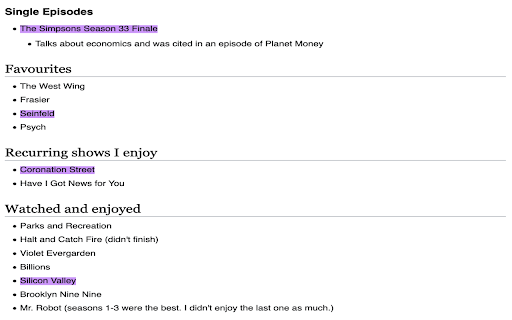
Highlight web pages with your own notes. annotate.js provides inline text annotation highlights for web pages. With annotate.js, you can interactively highlight text on a web page and get a shareable link with your saved highlights. To annotate, press Control + K at the same time. Then, highlight any text on the page that you want to appear in your shared link. You can do this by dragging your mouse over any text on the page. A box will appear in the top right corner that tracks how many highlights you have created in your session. When you are done, press Copy URL to copy the URL with your highlights to your clipboard. You can then paste this URL anywhere to share your highlights. Example of Highlights on a Web Page Open the following URL: - The Simpsons Season 33 Finale - Seinfeld - Coronation Street - Silicon Valley To install a custom version of highlight.js for your own website, check out the highlight.js source code. Adding a custom version of highlight.js to your site will let you share highlights on your website without people having to install this extension to see them. To highlight an entire paragraph on a page, check out fragmention.js The source code for this project, available on GitHub is released into the public domain.

Bookmark Manager
Bookmark sites, images, and videos to a gallery. Supports downloading videos from most sites. This extension allows you to bookmark your favorite sites, images, and videos. Instead of keeping a long list of unorganized bookmarks, you can add them to a visually appealing and navigable gallery. Simply open the context menu on a webpage, an image, or a video to bookmark it. Add tags to your bookmarks and quickly find them through a simple search interface. You can also download videos you bookmark. Most videos can be downloaded. Due to chrome store policy, youtube videos cannot be downloaded, although they can still be bookmarked.

Kifier
The missing tool to turn your Web 2.0 services into Wiki Kifier is a tool to copy viewing webpage into a hyperlink with title. Then you should paste it on Web 2.0 services like Google Drive , Evernote , Gmail etc. It helps you to link up different service easily. Moreover, Kifier may convert the link into another format for site like Google Spreadsheet , which do not support standard hyperlink. Google Doc/Drive , Evernote , and many other Web 2.0 services provides online document editing function. Contents can be linked across documents , sites by using hyperlink. They works similar as wiki but with more advanced features and for your personal / organization data only. However , making a referral of your current reading site in browser to those services is not straightforward. Because you can not copy site’s URL and title by a single click. With Kifier, you just have to press the Kifier button at the right of address bar. The URL with page's title will be copied to clipboard directly. Then you may paste to the target site easily. If you have dual monitor or installed the Dualless extension , you may have both of the reading and target site shown on screen at the same time. In such case, you may drag the link in popup dialog to target site. It will be much simpler. The software is released under open source license, GPL 2.0.

Hamsterbase Highlighter
Hamsterbase Highlighter is a versatile web highlighting software that allows users to easily highlight text on any webpage. It is perfect for anyone who needs to highlight and save important information from online articles, research papers, or any other web-based content. - Easy to use: simply select the text you wish to highlight and click - Save your highlights: easily save your highlights to notion, hamsterbase. We take your privacy very seriously. This privacy policy describes how our plugin collects and uses your personal information. Our plugin does not collect any personal information from you. We do not require you to provide any personal information in order to use our plugin. If you choose to bind our plugin with `Notion` and enable the auto on feature, we will send the current host information to Notion every time you visit a webpage. This is done to check if the current host has been saved before. We do not use this information for any other purpose. All content that resides under the "src/vscf" is copy from the [VS Code] project. The VS Code project is licensed under the [MIT License]. Hamsterbase Highlighter is licensed under the GNU AFFERO GENERAL PUBLIC LICENSE Version 3, 19 November 2007. See the [LICENSE] file for more details.

ChromeTabsPlus
Save and restore opened page tabs, grouped by window. *** If your window has too many tabs or data, it may not be able to save. There is a storage size limit for each window due to Chrome's Storage API. *** This extension uses Chrome's Storage API as its data storage backend. All data are saved within your Chrome's Google account and NOT on any third party service. Good for privacy but has a data size limit for each window.
