
inaddpoanfkkffpiklgdagboagdndahh
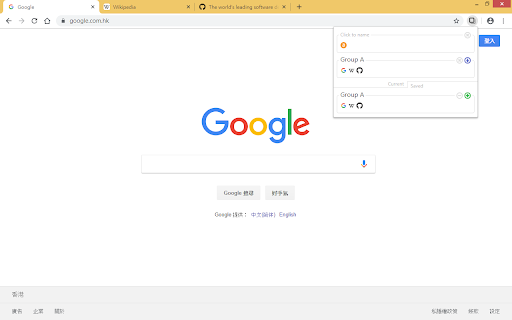
Save and restore opened page tabs, grouped by window. *** If your window has too many tabs or data, it may not be able to save. There is a storage size limit for each window due to Chrome's Storage API. *** This extension uses Chrome's Storage API as its data storage backend. All data are saved within your Chrome's Google account and NOT on any third party service. Good for privacy but has a data size limit for each window.

TabCloud
Save and restore window sessions over time and across multiple computers. Tab Cloud allows you to save any window session and restore it at a later date or on another computer. Effectively allowing you to sync open tabs between multiple computers. To use you simply click the TabCloud icon on the menu, you will then see your current open windows and previously saved windows, you can save open windows, or restore saved ones. You can also delete previously saved windows. Additional features: - Middle (or ctrl) clicking any tab icon opens just that tab. - Clicking on an open tab icon jumps to that tab in a browser. - Dragging a tab icon allows you to move tabs between windows, including to and from saved windows that are not currently open. - Secure login using your Google account, with the option to logout on the TabCloud menu. - Click on any windows name to rename at any time.

Smart Sessions - Tab Manager
Save & restore your browser sessions. Auto saving, multiple sessions and more. With this tab manager you can group your tabs into a session. Any changes are automatically saved. Close & restore when needed. - Online synchronization with your CHROME account - Multiple active sessions - Persistent size and position of session windows - Multiple windows in a session (you can drag a tab out from active session) - Auto saving - Tags - Tab groups - Incognito mode (should be explicitly allowed for extension) - Search - Export/Import (html document) - Tab navigation/closing To start, click "create" in the top bar, enter new session name and select few tabs. After creation, those tabs will be moved to a new window and all changes to its tab list will be recorded, window size and position too. You can also move any tab out of active session, extension can easily track two or more windows. Apr 22, 2022 (1.6) - Support for tab groups - Incognito mode - Bug fixes Jan 26, 2020 (1.4) - Dark Theme - Improved Search - Export Single Session - Page Context Menu "Add To Session" - Small improvements

TabTrum
Save & Launch your Browser Tab Combinations in a blink. We built TabTrum to address one key problem. There are multiple instances when we have quite a few tabs open on our browser, and that causes our devices to stutter. TabTrum is a tool that let's you take snapshots of open tabs so that you can sometimes close the Browser and free up RAM on your machine. When you need the tabs next, simply click on "Launch Tabs" from the Snapshot and voila! You have your tabs ready to go. With TabTrum, you can - ➡️ Open n tabs (duh), ➡️ Save them as a Snapshot when you're taking off, ➡️ Close the browser in peace, ➡️ Come back and launch all tabs at once !

TabPlus
The most feature-packed tab manager. Save & organize your tabs, sync across devices! Tab++ allows you to save your tabs for later. You can organize, categorize, and name them, then restore individual tabs or tab groups at any time. You can even sync them across devices! Tab++ is inspired by similar extensions like OneTab, only with WAY more features... Like folders, cloud-syncing, easy backup and restore, and more! # Note: Usage help can be found in the options page. # NEW IN v1.7.3 - Dark mode, woot! - Implemented more settings in the options page - Confirmation prompt before clearing all data - Don't save pinned tabs by default (configurable) - Bug fixes & improvements to automatic corruption recovery
