
hhfefdiablijkjnbkmdfbopiimjilchh


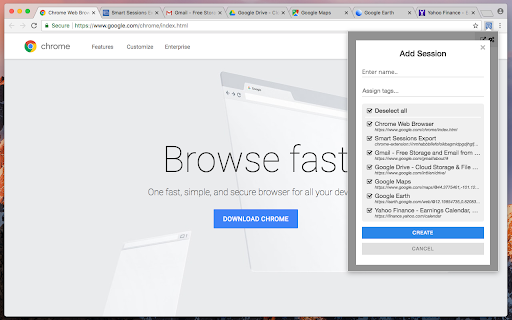
Save & restore your browser sessions. Auto saving, multiple sessions and more. With this tab manager you can group your tabs into a session. Any changes are automatically saved. Close & restore when needed. - Online synchronization with your CHROME account - Multiple active sessions - Persistent size and position of session windows - Multiple windows in a session (you can drag a tab out from active session) - Auto saving - Tags - Tab groups - Incognito mode (should be explicitly allowed for extension) - Search - Export/Import (html document) - Tab navigation/closing To start, click "create" in the top bar, enter new session name and select few tabs. After creation, those tabs will be moved to a new window and all changes to its tab list will be recorded, window size and position too. You can also move any tab out of active session, extension can easily track two or more windows. Apr 22, 2022 (1.6) - Support for tab groups - Incognito mode - Bug fixes Jan 26, 2020 (1.4) - Dark Theme - Improved Search - Export Single Session - Page Context Menu "Add To Session" - Small improvements

Tab Manager v2
Search, group, move, and clean up tabs across browser windows with a keyboard-first workflow See every tab across every window, find what you need fast, move matching tabs in bulk, manage native tab groups where supported by the browser, and clean up duplicates without window hopping. - Search open tabs by title or URL, with optional browser history results in the same search box - Select matching tabs and move, group, or close them in bulk - Manage native tab groups directly where supported by the browser: rename, recolor, collapse, and ungroup them in place - Reorder tabs with drag and drop across windows from one focused view - Highlight duplicate tabs and clean them up quickly, with an option to ignore URL hashes - Stay on the keyboard with shortcuts, focus mode, and the command palette - Adjust theme, tab width, font size, toolbar visibility, URL display, and more - Support Firefox container-aware workflows when the browser exposes those APIs Free and open source. Core functionality runs locally in your browser. Open source: https://github.com/xcv58/Tab-Manager-v2 Support and issues: https://github.com/xcv58/Tab-Manager-v2/issues

Save Tabs - Browser Session Manager
A password-protected tab saver and session manager to store tabs in the current window, or all windows with tab grouping support This extension saves tabs for later to prevent cluttering of the tab area. You can request to store tabs and close them to free the memory usage of these tabs when they are not needed. This extension uses the built-in sync API to allow storing in a machine and restoring in another one. Also, it is possible to protect stored tabs with a password. The extension uses the built-in crypto method to encrypt your tab data with the SHA-256 encryption key before storing them in your browser storage to protect data. Stored tabs keep their active and pinned states. Features: 1. Save and store window dimensions 2. Save and restore incognito states 3. Save and restore tab's pinned state 4. Save and restore tab groupings and their properties (color, name, and collapsed state) Notes: 1. There is no way to restore tabs if they are password protected and the password is forgotten. 2. By default, when a new session is restored, the session gets erased from the storage. You can use the Shift key while pressing a session to keep the session in storage. 3. This extension uses synced storage to allow the user to store and restore from multiple computers. 4. you can restore all session tabs in the current window by pressing the Ctrl (Command) key while restoring the session 5. You can edit a session from the popup view or ask the extension to update a session from the currently open tabs. This feature makes it possible to use the extension as a browser session manager. 6. This extension saves and restores tab groups and their properties.

Session Switcher & Account Manager
"Session Switcher & Account Manager" extension allows users to store and switch between multiple sessions on multiple websites. This extension can also be used as a developer tool. A user can store multiple sessions and switch between any of the stored sessions using "Session Switcher & Account Manager" chrome extension. Limitations: This extension does not work well for complicated URLs such as a.b.c.d.example.co.in, because it is not possible to detect domain name for complicated URLs. You can store up-to 5 sessions in free version of "Session Switcher & Account Manager", however if you want to store more sessions than that then you must purchase license. Following data can not be stored or retrieved using our extension: - Indexed DB - WebSQL - App cache - Browser cache Privacy notice: This software neither collects nor transmits any personally identifiable information. This software does not track your browsing behavior. Information necessary for functioning of this software is stored on the devices of the end user, our servers do not have access to this information.

TabPlus
The most feature-packed tab manager. Save & organize your tabs, sync across devices! Tab++ allows you to save your tabs for later. You can organize, categorize, and name them, then restore individual tabs or tab groups at any time. You can even sync them across devices! Tab++ is inspired by similar extensions like OneTab, only with WAY more features... Like folders, cloud-syncing, easy backup and restore, and more! # Note: Usage help can be found in the options page. # NEW IN v1.7.3 - Dark mode, woot! - Implemented more settings in the options page - Confirmation prompt before clearing all data - Don't save pinned tabs by default (configurable) - Bug fixes & improvements to automatic corruption recovery
