
bpbkeoboacafeolmjaidheedfeapfike

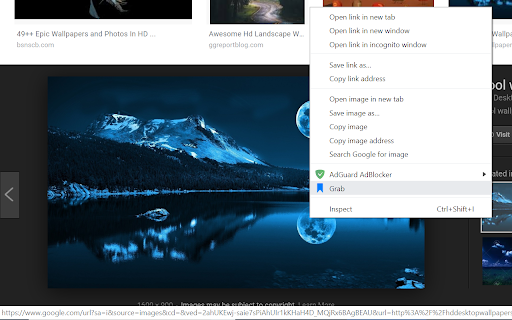
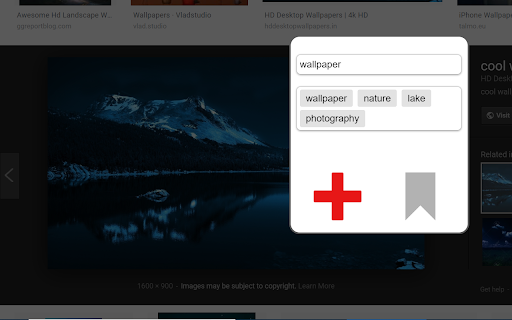

Bookmark sites, images, and videos to a gallery. Supports downloading videos from most sites. This extension allows you to bookmark your favorite sites, images, and videos. Instead of keeping a long list of unorganized bookmarks, you can add them to a visually appealing and navigable gallery. Simply open the context menu on a webpage, an image, or a video to bookmark it. Add tags to your bookmarks and quickly find them through a simple search interface. You can also download videos you bookmark. Most videos can be downloaded. Due to chrome store policy, youtube videos cannot be downloaded, although they can still be bookmarked.

Better Bookmarks | Streamline Your Favorites
Effortlessly organize bookmarks with advanced sorting, powerful search, bulk actions, and seamless import/export. Better Bookmarks is the perfect solution for users looking to efficiently organize, manage, and retrieve their bookmarks. With its sleek design and advanced features, Better Bookmarks replaces your browser's default bookmark manager, providing enhanced controls, faster search capabilities, and seamless functionality. Say goodbye to cluttered bookmarks and hello to streamlined organization. (1) Advanced Sorting Options (2) Powerful Custom Bookmark Search (3) Bulk Operations for Editing, Moving, and Deleting (4) Enhanced Bookmark Folder Organization (5) Optimized Bookmark Index View (6) Comprehensive Import and Export Options (7) Dark and Light Themes (8) Secure Bookmark Deletion with Undo Function (1). Advanced Sorting Options Organize your bookmarks your way: • By Date: Keep your most recent bookmarks on top. • By Name: Arrange them alphabetically for easy navigation. • Chrome Default Order: Maintain the default sorting for a familiar browsing experience. (2). Powerful Custom Bookmark Search Locate bookmarks instantly with our advanced search functionality. • Real-Time Results: Get results as you type for faster retrieval. • Efficient Search Filters: Narrow down your search to pinpoint the exact bookmark. (3). Bulk Operations for Efficient Management Manage multiple bookmarks effortlessly with powerful bulk actions: • Select Multiple Bookmarks: Easily select and perform actions on several bookmarks at once. • Open in New Tabs/Windows: Open multiple bookmarks simultaneously in new tabs, new windows, or private mode. • Edit Bookmarks: Update bookmark titles and URLs to keep them accurate. • Move Bookmarks: Reorganize bookmarks into appropriate folders quickly. • Delete Bookmarks: Remove unwanted bookmarks individually or in bulk. • Export Bookmarks: Save your bookmarks in HTML or CSV formats for backup or sharing. • Copy URLs to Clipboard: Select multiple bookmarks and copy their URLs to the clipboard for easy sharing with anyone. (4). Enhanced Bookmark Folder Organization • Folder View: See all folders along with the number of bookmarks in each. • Parent Folder Display: Every bookmark shows its parent folder name for better context. (5). Optimized Bookmark Index View • Comprehensive Overview: View all bookmarks in a neatly arranged list with folder names, URLs, favicons, and titles. • Better Navigation: Quickly identify and access bookmarks related to specific projects or categories. (6). Comprehensive Import and Export Options • HTML and CSV Formats: Import/export bookmarks for backups or sharing. • Seamless Sync: Sync bookmarks via your Chrome profile—no additional login required. • Data Safety: Always have a backup to ensure your bookmarks are secure in case of accidental deletion. (7). Dark and Light Themes Choose between dark and light themes to suit your preferences and reduce eye strain during extended use. (8). Secure Bookmark Deletion with Undo Function Accidentally delete a bookmark? No problem! Easily restore deleted bookmarks with the undo function. ⭐ Active Support Center At Better Bookmarks, we care deeply about our users. We continually improve the extension based on your feedback. Feature Suggestions: Share your ideas and requests for new features. Support Assistance: Need help? Our team is ready to assist you. ↪ Submit a Request: https://betterbookmarks.io/contact/?reason=feature ⭐ Privacy Policy Your privacy is our priority: • No Data Tracking: We don’t track your browsing data, website usage, or any personal information. • Local Storage Only: All data is securely stored in your browser. We don’t access or share your data. • Anonymous Analytics: We use Google Analytics solely for anonymous error reporting to improve extension quality. Have questions or concerns about your privacy? Contact us anytime: ↪ Contact Us: https://betterbookmarks.io/contact/?reason=general

Folderwise Bookmarks: Search & Sessions
Search for Bookmarks by Folder Name, and save Sessions in Bookmark Folders With its searchable folder-centric approach, Folderwise Bookmarks rewards you for your well-maintained hierarchy of Bookmarks! Search for Folders by Name, by Path, or by the Bookmarks they contain; expand a folder panel to see its Bookmarks. Click a Bookmark to open it, or use the buttons in the folder panel to open all Bookmarks. Hold Shift to open in a new window. If you have too many tabs open and want to de-clutter, or if you want to save your work and pick up on a different computer, click the Save button at the foot of the popup. Folderwise Bookmarks saves sessions as Bookmarks, so they will be available on all your devices and can be reopened from the popup. ⚠ To use the Sessions feature, you will be required to grant a new permission to the extension: "Read your browsing history". This permission will be used only to access the addresses and titles of your open tabs, specifically to create Bookmarks for the saved Session. Leaving in a hurry? Right-click the toolbar icon to save and close the current window. "Places folder favorites Icon" by Oxygen Team is available from http://www.iconarchive.com/show/oxygen-icons-by-oxygen-icons.org/Places-folder-favorites-icon.html and used under the GNU Lesser General Public License Icons used in promotional images are in the public domain and available from http://paomedia.github.io/small-n-flat/

Bookmark manager
Optimize your browsing with Bookmark Manager extension. Easily organize and manage bookmarks for a seamless browsing experience. 😎 Looking for the ultimate solution to tame your unruly bookmarks? 💎 Our Chrome Bookmark Manager is here to save the day! 💪 We understand the frustration of dealing with a cluttered bookmarks bar. That's why we've developed a powerful extension to help you organize and manage it with ease. 👋 With our Chrome extension, you can say goodbye to endless scrolling and searching for your favorite sites. Our intuitive interface makes it easy to categorize, tag, and sort your bookmarks, so you can find what you need when you need it. Whether you're a casual internet user or a seasoned researcher, our extension is your key to a clutter-free browsing experience. Here's why our Chrome extension sets itself apart from others in its category: 1️⃣ Effortless Organization: Our extension allows you to create custom folders and subfolders to keep your bookmarks organized. Whether you're categorizing by topic, project, or priority, our intuitive interface makes it easy to stay organized and productive. 2️⃣ Seamless Integration: Our Bookmark Manager seamlessly integrates into your Chrome browser, so you can access it with just a few clicks. No need to switch between tabs or windows – manage your bookmarks directly from your browser window! 3️⃣ Sync Across Devices: Never lose track of your bookmarks again! Our extension syncs seamlessly across all your devices, so you can access your bookmarks anytime, anywhere. Whether you're browsing on your laptop, tablet, or smartphone, your bookmarks are always at your fingertips. 4️⃣ Advanced Features: Take your bookmark management to the next level with our advanced features. From bookmark tagging and searching to bulk editing and sorting, our extension offers a range of tools to help you stay organized and productive. 5️⃣ Customization Options: Personalize your bookmarking experience with our customizable options. Choose your preferred layout, theme, and display settings to create a bookmark manager that suits your unique needs and preferences. 📌 Tired of losing track of important web pages? 📌 Our extension is your ultimate tool for organizing web clutter. 📌 Quickly access your favorite sites with the best bookmark manager for Chrome. 🚀 Streamline Your Work ➤ Boost productivity by managing bookmarks efficiently. ➤ Use the chrome extension to save time and effort. ➤ Enhance your browsing environment effectively with a robust bookmark organizer. 📂 Personalize Your Browsing ✨ Customize your browser with the bookmark editor. ✨ Our chrome extension provides a personal touch to your bookmark collection. ✨ Organize, edit, and manage bookmarks Chrome effortlessly. 🔄 Sync and Access • Easily synchronize bookmarks across devices with the google bookmark manager. • Use the extension to ensure your links are always handy, no matter where you log in from. • Chrome manage bookmarks feature keeps your browsing seamless. ✔ Save time with the quick search feature. ✔ The Bookmark manager helps you locate any bookmark swiftly. ✔ Managing and finding bookmarks is easier than ever. 1. Sorting large collections of links? The Bookmark manager makes it simple. 2. Use it to categorize by topic, project, or interest. 3. Chrome bookmarks manager assists in decluttering your browser space. ✅ Never lose important research or read-later articles. ✅ Implement the bookmark saver functionality to secure your must-keep data. ✅ Bookmark manager for Chrome means your valuable links are always safeguarded. — Regular clean-up is a breeze with a bookmark manager chrome. — Keep your links relevant and organized with automatic suggestions for unneeded links. — With the Bookmark manager, your browsing is tidy and efficient. 🔺 Access favourite links faster than ever with intuitive placement options. 🔺 Implement bookmarks manager chrome that adapts to your workflow. 🔺 Customize and utilize shortcuts within the Bookmark manager for supreme efficiency. ☑ Share important links with colleagues or friends. ☑ Support team collaboration by managing links in Chrome. ☑ Enhance group productivity with streamlined sharing features. 💥 This Google Chrome extension redefines your browsing by efficiently managing a massive array of links with ease. Save, organize, edit, and access all your important links without ever slowing down. Turn chaos into order with our chrome extension — designed not just to store but to enhance your online navigation significantly.

Bookmarks HotList
A Speed Dial in your toolbar, with easy set-up and keyboard shortcuts Set up your HotList in the Bookmark Manager, access it from the toolbar in a choice of layouts and colours. For keyboard access, the default shortcut to open the extension is Alt+B (or Command+B). To change the shortcut, paste this into the address bar: chrome://extensions/shortcuts When the extension is open, shortcut keys (1-9 and A-Z) are available for each bookmark. Hold down the Space Bar to reveal hints. Open multiple tabs: 1 click will open a bookmark in a background tab, but the Popup stays open. A 2nd click on that bookmark will close the Popup and activate the tab, or you can open other bookmarks instead. The only automated modification to your bookmarks will be the creation of a new folder to contain those displayed by this extension, and a bookmark to get you started. The Star icon is “Actions bookmark new list Icon” by Oxygen Team, available from Icon Archive under the GNU Lesser General Public License: http://www.iconarchive.com/show/oxygen-icons-by-oxygen-icons.org/Actions-bookmark-new-list-icon.html Icons used in promotional images are in the public domain and available from http://paomedia.github.io/small-n-flat/
