
nnpljppamoaalgkieeciijbcccohlpoh

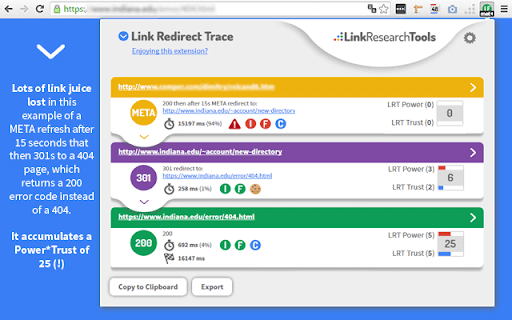
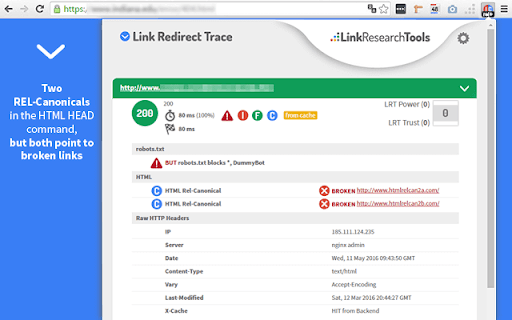


The all-in-one redirect path analyzer. It also analyzes protocol headers, REL-canonicals, robots.txt, backlink power, and trust! Perform advanced, comprehensive, and correct analysis of redirects and REL-canonicals. Get the complete picture on every redirect. Use this extension for your SEO analysis, On page SEO, Off-page SEO, competitor analysis, and more. - if robots.txt blocks crawlers from a redirect (checked via robots.txt for or X-Robots-Tags in HTTP header); - which URL drops cookies; - the LRT Power and LRT Trust of each URL; - supports NOINDEX/NOFOLLOW tags on every redirect step; - check for other technical issues like Bot-specific blocking. Full Description: https://smart.linkresearchtools.com/seo-tools/link-redirect-trace-extension

GSC Guardian
Stay on top of your website's health. Check for incidents in your Google Search Console data with a simple graph. GSC Guardian 2.10 - Enhanced Google Search Console with Visual Algorithm Tracking 🔒 Security Verified: This extension has been independently reviewed for security to ensure that your data is not being uploaded to any unauthorized third parties: https://manus.im/share/VTfoAgDalRZmVeBU7ePuX2?replay=1 New: Bulk CSV Import - Upload historical annotations and migrate data efficiently ⭐ Trusted by 15,000+ SEO professionals worldwide 🏆 US Search Awards - Best Search Software Finalist ⭐ Please support us with a rating if GSC Guardian helps your workflow! ⭐ SECURITY ENHANCEMENTS • Complete security audit and code review completed • Enhanced security measures with independent verification • Public security transparency implemented for all future releases • Streamlined codebase for improved performance and reliability BULK ANNOTATION IMPORT • Upload CSV files containing hundreds of annotations at once • Preview annotations before importing to ensure accuracy • Download our CSV template to get started immediately • Ideal for migrating historical data or team handovers ENHANCED USER EXPERIENCE • Status messages now auto-hide for a cleaner interface • Annotations are filtered by Search Console property • New "Show All Resources" option for multi-property views • Improved visual hierarchy with dashed annotation lines JULY 2025 STABILITY UPDATE • Fixed compatibility issues with recent Google Search Console changes • Resolved date range switching bugs • Improved annotation property association ALGORITHM UPDATE VISUALIZATION See Google's algorithm updates as visual overlays on your traffic graphs. Instantly understand if traffic changes correlate with known updates. COMPREHENSIVE ANNOTATION SYSTEM • Add context to traffic changes with timestamped notes • Import/export annotations for team collaboration • Search and filter annotations by date or keyword • Maintain historical records of site changes and optimizations DARK MODE Reduce eye strain during extended analysis sessions with a carefully designed dark theme. MULTI-LANGUAGE SUPPORT Available in 9 languages: English, Spanish, Dutch, French, Portuguese, German, Italian, Japanese, and Russian. DATA PORTABILITY Export all annotations and incidents to CSV or Google Sheets for reporting, backup, or migration purposes. FOR SEO & MARMETING AGENCIES • Track client site changes across multiple properties • Document optimization efforts with timestamped annotations • Export visual reports showing algorithm impacts • Onboard new team members with historical context via CSV import FOR IN-HOUSE SEO & MARKETING TEAMS • Correlate development releases with traffic changes • Maintain audit trails of SEO implementations • Share insights across departments with exportable data • Track seasonal patterns with historical annotations FOR WEBSITE OWNERS • Understand traffic fluctuations in context • Document when content was published or updated • Track marketing campaign launches against organic performance • Build institutional knowledge about site performance FOR SEO CONSULTANTS • Quickly assess algorithm impact during site audits • Import client annotations for comprehensive analysis • Generate visual reports for client presentations • Maintain detailed records across multiple client projects 1. Install the extension from Chrome Web Store 5. Use import/export features for bulk operations IMPROVE ANALYSIS • See patterns between updates and performance • Maintain comprehensive historical context • Make data-driven decisions with complete information PROFESSIONAL REPORTING • Export annotated data for client presentations • Create visual timelines of SEO efforts • Document ROI of optimization work • API integrations with project management tools • Automated annotation rules • Multi-account management dashboard • Advanced filtering and analytics • Actively maintained with regular updates • Responsive support team • Your data remains within Google's ecosystem • No external servers or data collection • Independent security verification with public audit available • Open to feature requests from the community Install GSC Guardian to add powerful visualization and annotation capabilities to Google Search Console. Questions or feedback? We're here to help make your SEO workflow more efficient.

Redirect Check
Checks redirects on all selected links in the page and validates the syntax. This extension was specifically designed for HTML email quality assurance, but should work fine on any HTML page. It will show you a list of URLs pulled from the active tab and runs a redirect and URL syntax validation check on those selected. It also includes an option to open all URLs in a new window and audit images. What's New: * Added Redirect Check to right-click link context menu * Added tallies for total errors and warnings detected * Added all of the 400 and 500 HTTP error codes with descriptions on tool tip * Added check for alt and title check mismatch and added a warning for alt text without title text * Fixed bug with checking a single link in plain text * Fixed bug where script failed if there was no title element * Updated redirect check API to return more accurate error codes

LRT Power*Trust – PageRank Replacement
The LRT Power*Trust metric helps you evaluate the quality and trustworthiness of a domain or page you are currently visiting. Ever since Google announced that they would not update PageRank anymore, SEOs and webmasters from all around the world have been looking for the best replacement. LinkResearchTools developed the perfect alternative for Google’s toolbar PageRank: the LRT Power*Trust Extension. LRT Power*Trust (previously known as CEMPER Power*Trust) is a unique metric that measures the overall quality of a page or domain. LinkResearchTools launched this metric shortly after the first Google Penguin update in 2012. With the LRT Power*Trust extension you can: • see the Power and Trust of a domain • see the Power and Trust of a page • discover great places to build links to • see the NoFollow links on the pages you browse (we highlight them for you) • understand if a link is worth keeping • see which links must go in your disavow file • quickly reply to your clients on the most important SEO questions There are a bunch of SEO applications and toolbars out there that still have the classic Google Toolbar PageRank as the main metric to indicate the quality of a page or domain. Google's Toolbar PageRank was never a reliable metric, since Google only updated the data when they felt like it. Usually, the updates were done quarterly. But since April 2016, Google officially removed the Toolbar PageRank. Update 1.3.0 We removed the sign in requirements. Now anyone can use the extension and see the LRT Power*Trust value for both Domain and Page while browsing the web. Update 1.3.3 We removed the "Terms and Conditions" install step and included all the information in our official Privacy Policy: http://www.linkresearchtools.com/browser-extensions-privacy-policy/ Update 1.3.4 Bugfixes and Try LinkResearchTools button Update 1.4.0 Improved layout, added option to show metrics for rel-canonical target of the URL, added page and domain backlink count metrics

Seerobots
SeeRobots conveniently displays the meta robots information of the website you are viewing - For more info visit www.seerobots.com SeeRobots will conveniently show you the information meta robots tag in the head section of the website your are viewing at that moment. Depending on this information colors in the browserbar will change. 1. If the SeeRobots field is all green it means that this page has "index, follow" as robots attributes. 2. If the SeeRobots field is all red it means that this page has "noindex, nofollow" as robots attributes. 3. If the SeeRobots field is green on the left and red on the right it means that this page has "index, nofollow" as robots attributes. 4. If the SeeRobots field is red on the left and green on the right it means that this page has "noindex, follow" as robots attributes.
