
cibpemjiajilcpecpimbpbgmoebcojej
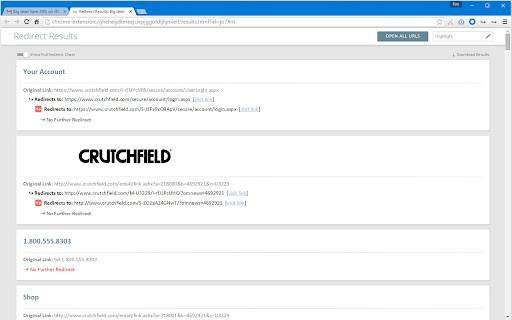
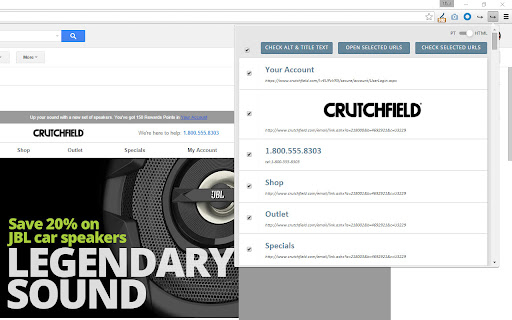
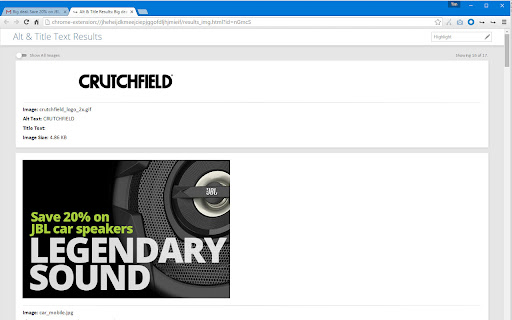
Checks redirects on all selected links in the page and validates the syntax. This extension was specifically designed for HTML email quality assurance, but should work fine on any HTML page. It will show you a list of URLs pulled from the active tab and runs a redirect and URL syntax validation check on those selected. It also includes an option to open all URLs in a new window and audit images. What's New: * Added Redirect Check to right-click link context menu * Added tallies for total errors and warnings detected * Added all of the 400 and 500 HTTP error codes with descriptions on tool tip * Added check for alt and title check mismatch and added a warning for alt text without title text * Fixed bug with checking a single link in plain text * Fixed bug where script failed if there was no title element * Updated redirect check API to return more accurate error codes

Rich Results - Structured Data Test Plugin
Extension checks the current URL in browser with Google's Rich Results Test Tool Elevate your website's visibility in Google Search with our comprehensive "Rich Results Checker" extension. Designed for SEO professionals and website owners alike, this tool seamlessly integrates into your Chrome browser, providing immediate, in-page analysis of structured data and SEO effectiveness. Instant Rich Results Analysis: With just one click, assess whether the current webpage adheres to the criteria necessary for displaying Rich Results in Google's SERPs. Optimize your content effectively by understanding exactly how Google views your structured data. Schema Markup Validation: Validate the schema markup of any webpage instantly. Ensure your site's structured data is correctly formatted and ready to be recognized by search engines, enhancing your chances for Rich Results. - Install the extension with a single click – no complex setup required. - Navigate to any webpage and click on the extension icon to reveal a user-friendly interface. - Utilize the "Check Rich Results for this page" and "Check Schema for this page" buttons to evaluate the structured data of the page. Empower your SEO strategy with the Rich Results Checker extension. Start optimizing your webpages with precision and achieve the visibility your content deserves.

Broken Link Checker
A SEO tool to find broken (404) and redirected (301, 307, 308) links in all frames A simple tool to find broken (404 code) and redirected (301, 307, 308 codes) links in the current page. This tool examines all links in the current page (top frame and all sub-frames) and returns the status code and its meaning for each link. You can optionally ask the extension to check links inside about:blank frame elements are well. All broken links are placed in a separated category for easier detection. Beside each link, there is an inspect button which focuses the link to the center of the page to help to find the links faster. Note that to increase link validation speed, the extension evaluates 5 links simultaneously. Note that you can open the validation UI in a new popup window or as an embedded frame inside the page. Note that this extension also notifies you about the links that are skipped like none HTTP links or mailto links Features: 1. Deep search: search deep inside a website. If this mode is enabled, the extension parses all links of the same domain and extract links from them. 2. Filter: Ignore URLs that match with the user-specified keywords. This way you can increase the searching speed by ignoring particular URLs. 3. Filters to show and hide links with 2XX, 3XX, 4XX, and 5XX status codes

Analytics Debugger
Your Single Source of Truth (SSOT) for debugging analytics implementations Formerly known as "GTM/GA Debugger," our tool is your ultimate Single Source of Truth (SSOT) for debugging analytics implementations! Are you a developer, analyst, or marketer committed to achieving top-tier web analytics and tracking results? Look no further! Our powerful debug tool is meticulously crafted to simplify your life. Analytics Debugger streamlines your daily debugging tasks, boasting user-friendliness for all while delivering in-depth insights to advanced users. v2.4.6 - Adds support for Chartbeat - Fixed Amplitude Regional Collection Endpoints 🛠️ Wide Compatibility: Our tool seamlessly supports a variety of analytics and tracking tools, including: - Google Tag Manager - Google Analytics - Tealium - Piwik Pro / Matomo - Adobe tools - and most commonly used Marketing Pixels. to mention some of them (Check the full list here) 🔒 Privacy Enhancement: Rest assured, our tool injects code only after DevTools has loaded, with no background monitoring. 🚀 Tools: Supercharge your tracking implementation with a rich toolkit including - GTM Preview Enhancer: USe this tool to bypass all the limitations from the original Preview Mode - Google Analytics Debug Libraries Loader - Block GA3/GA4 Hits: Prevent your - Export Features - Real-Time Data - Enhanced Ecommerce Reports - Data Filtering for Focused Insights - Clicks Blocker: Prevent being redirected to next page - and much more! Get started today and elevate your analytics debugging and optimization process effortlessly. Unlock the full potential of your analytics and tracking endeavors – streamline your workflow, enhance privacy, and gain profound insights seamlessly. Download now and experience the transformation! Changelog: You can check out our latest updates on our GitHub repository. https://github.com/analytics-debugger/analytics-debugger-browser-extension Support / Feedback: Offered via the Store or using the Github Repository Official Documentation: For detailed guidance, visit our official documentation at https://www.analytics-debugger.com/tools/browser-extension Don't miss out on this game-changing tool. Elevate your analytics game today!

Inspect Canonical
Easily check the canonical tag of a page A lightweight and extremely easy Chrome extension that tells you the canonical source of any URL you are on. No more combing through the source code to understand if/when canonical tags point to a new destination. This extension does all the heavy lifting for you. This extension will display one of three values. GREEN (self canonical) AMBER (Canonicalized) or RED (error) Below are the conditions Inspect Canonical tests for, in the order it tests for them: RED: 1. Page contains noindex robots meta Message: "Page contains robots 'noindex' tag. Canonical tags are ignored. Click to view source" 2. No canonical in head but there is one elsewhere Message: "Canonical tag exists but not in . Click to view source" 3. No canonical tag at all Message: "Page has no canonical tag. Click to view source" 4. More than one canonical tag on page Message: "Multiple ([X]) canonical tags found. Click to view source" 5. Canonical exists but is missing the href attribute Message: "Canonical tag is missing 'href' attribute. Click to view source" - This is an unlikely case but still something I wanted to check for AMBER: 6. Canonical present but differs to current URL Message: "Canonical tag points to another URL. Click to visit URL: [URL]" GREEN: 7. Canonical is present and correct Message: "Canonical tag points to current URL. Click to view source" So that's 7 hurdles to jump through to get a green status.
