
gmehpcfpaonknlejnigoloimmpcibhfc

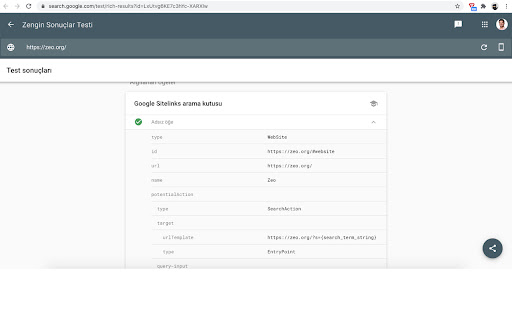
Extension checks the current URL in browser with Google's Rich Results Test Tool Elevate your website's visibility in Google Search with our comprehensive "Rich Results Checker" extension. Designed for SEO professionals and website owners alike, this tool seamlessly integrates into your Chrome browser, providing immediate, in-page analysis of structured data and SEO effectiveness. Instant Rich Results Analysis: With just one click, assess whether the current webpage adheres to the criteria necessary for displaying Rich Results in Google's SERPs. Optimize your content effectively by understanding exactly how Google views your structured data. Schema Markup Validation: Validate the schema markup of any webpage instantly. Ensure your site's structured data is correctly formatted and ready to be recognized by search engines, enhancing your chances for Rich Results. - Install the extension with a single click – no complex setup required. - Navigate to any webpage and click on the extension icon to reveal a user-friendly interface. - Utilize the "Check Rich Results for this page" and "Check Schema for this page" buttons to evaluate the structured data of the page. Empower your SEO strategy with the Rich Results Checker extension. Start optimizing your webpages with precision and achieve the visibility your content deserves.

Datalayer Checker
The easiest way to debug and check the dataLayer implementations without having to use the browser console! We are happy is happy to release Datalayer Checker 3 with several new features and a revamped design! NEW VERSION AVAILABLE! 🔹 Redesigned interface and intuitive user experience 🔹 Integrated event search engine 🔹 Flexible variable visualization: table format or JSON object 🔹 Google Tag Manager container injection removed (to respect manifest v3 rules) EXCLUSIVE FEATURES: 🔹 Capture what matters! Save up to 100 dataLayers with our revolutionary "Snapshot" function 🔹 Deep analysis! Verify your dataLayers in batches by methodically inspecting your captures 🔹 Organize efficiently! Structure your workspace with intelligent filters by domain, dataLayer name, or specific search (e.g.: event_name) to automatically classify your snapshots 🔹 Stay up-to-date! Reopen all your snapshot URLs to capture new data and compare them instantly Transform your analytics experience with Datalayer Checker! Because we're passionate about analytics...

SEOMarkup Structured Data Schema Inspector
View and analyze JSON-LD structured data on any webpage. Built for SEO professionals, web developers, and data analysts. Inspect, copy, and validate every piece of JSON-LD structured data on any page — in one click. SEOMarkup Inspector parses every block, flattens @graph arrays into individual schemas, and gives you an organized tree view with full-text search. No more squinting at View Source. ━━━━━━━━━━━━━━━━━━━━━━━━━ WHAT YOU GET ━━━━━━━━━━━━━━━━━━━━━━━━━ • One-click inspection of all JSON-LD on the active page • Expandable tree view with full-text search and match cycling • Per-schema actions: copy as JSON, copy as tag, download as .json • Click a schema type to jump straight to its Schema.org documentation • Inline error banner when JSON-LD is malformed — see exactly which block broke and why • Microdata and RDFa detection so you know when other structured-data formats are present • One-click validation via Google Rich Results Test and validator.schema.org (pre-filled with the current URL) • Works on any website — no setup, no account, no signup ━━━━━━━━━━━━━━━━━━━━━━━━━ WHO IT'S FOR ━━━━━━━━━━━━━━━━━━━━━━━━━ • SEO professionals — audit a client site in seconds. See every Product, Article, Organization, FAQ, BreadcrumbList, and more without leaving the page. • Web developers — debug your structured data before it ships. Catch malformed JSON-LD before Search Console does. • Content auditors and competitive researchers — see what schema your competitors use, copy it as a starting template, and validate before deploying. • Zero configuration — install and click • Tiny footprint — under 50KB total • Fast — opens instantly, no external requests • Private by design — see the privacy section below No data leaves your browser. We use the activeTab permission only, which means SEOMarkup Inspector can read structured data on the page you're currently looking at — and only when you click the icon. We do not collect, store, transmit, or sell any data. There is no analytics, no telemetry, no remote code, no third-party requests.

SEO META in 1 CLICK
Displays all meta data and main SEO information for the best SEO SEO META in 1 CLICK is a tool that displays all meta tags/data and main seo information clearly. By using this tool, we hope you can better manage and improve your SEO and visibility on Internet We focus on displaying: ✔ title and its length, ✔ description and its length, ✔ URL (and meta-canonical url too), ✔ meta-robots, ✔ displaying headers in order of their appearance in HTML (H1, H2, H3, H4, H5 and H6), ✔ number of images with and without ALT, ✔ the number of links (internal, unique, ...) ✔ Open Graph and twitter social data ✔ Robots.txt and sitemap.xml ✔ and much more... (See printscreens) You can also via ETERNAL TOOLS analyse your site and know how improve it (html, css, Google Rich Snippet, PageSpeed...)

Robots Exclusion Checker
Checks robots.txt, meta robots, x-robots-tag with URL alerts. Canonical warnings, HTTP header info. An SEO extension, robots tester. Robots Exclusion Checker is designed to visually indicate whether any robots exclusions are preventing your page from being crawled or indexed by Search Engines. ## The extension reports on 6 elements: 1. Robots.txt 2. Meta Robots tag 3. A.I. Bots 4. X-robots-tag 5. Rel=Canonical 6. UGC, Sponsored and Nofollow attribute values If a URL you are visiting is being affected by an "Allow” or “Disallow” within robots.txt, the extension will show you the specific rule within the extension, making it easy to copy or visit the live robots.txt. You will also be shown the full robots.txt with the specific rule highlighted (if applicable). Cool eh! Any Robots Meta tags that direct robots to “index", “noindex", “follow" or “nofollow" will flag the appropriate Red, Amber or Green icons. Directives that won’t affect Search Engine indexation, such as “nosnippet” or “noodp” will be shown but won’t be factored into the alerts. The extension makes it easy to view all directives, along with showing you any HTML meta robots tags in full that appear in the source code. Checks whether a website's robots.txt file blocks A.I. companies from accessing its content. It monitors 14 bots across 6 companies - OpenAI, Anthropic, Google, Perplexity, Meta, and Apple, covering three types of access: training data collection, search indexing, and real-time browsing. If any bot exclusions are detected, an "AI" label will appear over the Robots Exclusion Checker icon in your browser. This feature can be deactivated within settings if preferred. Spotting any robots directives in the HTTP header has been a bit of a pain in the past but no longer with this extension. Any specific exclusions will be made very visible, as well as the full HTTP Header - with the specific exclusions highlighted too! Although the canonical tag doesn’t directly impact indexation, it can still impact how your URLs behave within SERPS (Search Engine Results Pages). If the page you are viewing is Allowed to bots but a Canonical mismatch has been detected (the current URL is different to the Canonical URL) then the extension will flag an Amber icon. Canonical information is collected on every page from within the HTML and HTTP header response. - UGC, Sponsored and Nofollow A new addition to the extension gives you the option to highlight any visible links that use a "nofollow", "ugc" or "sponsored" rel attribute value. You can control which links are highlighted and set your preferred colour for each. I’d you’d prefer this is disabled, you can switch off entirely. Within settings, you can choose one of the following user-agents to simulate what each Search Engine has access to: This tool will be useful for anyone working in Search Engine Optimisation (SEO) or digital marketing, as it gives a clear visual indication if the page is being blocked by robots.txt (many existing extensions don’t flag this). Crawl or indexation issues have a direct bearing on how well your website performs in organic results, so this extension should be part of your SEO developer toolkit for Google Chrome. An alternative to some of the common robots.txt testers available online. This extension is useful for: - Faceted navigation review and optimisation (useful to see the robot control behind complex / stacked facets) - Detecting crawl or indexation issues - General SEO review and auditing within your browser ## Avoid the need for multiple SEO Extensions Within the realm of robots and indexation, there is no better extension available. In fact, by installing Robots Exclusion Checker you will avoid having to run multiple extensions within Chrome that will slow down its functionality. 1.0.3: Various bug fixes, including better handling of URLs with encoded characters. Robots.txt expansion feature to allow the viewing of extra-long rules. Now JavaScript history.pushState() compatible. 1.0.4: Various upgrades. Canonical tag detection added (HTML and HTTP Header) with Amber icon alerts. Robots.txt is now shown in full, with the appropriate rule highlighted. X-robots-tag now highlighted within full HTTP header information. Various UX improvements, such as "Copy to Clipboard” and “View Source” links. Social share icons added. 1.0.5: Forces a background HTTP header call when the extension detects a URL change but no new HTTP header info - mainly for sites heavily dependant on JavaScript. 1.0.6: Fixed an issue with the hash part of the URL when doing a canonical check. 1.0.7: Forces a background body response call in addition to HTTP headers, to ensure a non-cached view of the URL for JavaScript heavy sites. 1.0.8: Fixed an error that occurred when multiple references to the same user-agent were detected within robots.txt file. 1.0.9: Fixed an issue with the canonical mismatch alert. 1.1.0: Various UI updates, including a JavaScript alert when the extension detects a URL change with no new HTTP request. 1.1.3: Added UGC, Sponsored and Nofollow link highlighting. 1.1.4: Switched off nofollow link highlighting by default on new installs and fixed a bug related to HTTP header canonical mismatches. 1.1.6: Extension now flags 404 errors in Red. 1.1.7: Not sending cookies when making a background request to fetch a page that was navigated to with pushstate. 1.1.8: Improvements to the handling of relative vs absolute canonical URLs and unencoded URL messaging. 1.2.0.11: Updating to Google's new manifest V3 and fixing small bugs. 1.2.0.12: Added a Spanish language version and made improvements to existing translations. Linking to new website https://www.checkrobots.com 1.2.0.13: Fixed pushState navigation data extraction, resolved inconsistent icon display, and added security protections to prevent logout issues with enterprise websites. 1.3.0: Introduced A.I. bot checking to monitor robots.txt exclusion rules for 14 bots across 6 companies including OpenAI, Anthropic, Google, Perplexity, Meta and Apple, with training, search indexing and real-time browsing bots tracked. New site exclusion feature lets you skip checking for specific domains. Fixes for SPA/back-forward navigation, x-robots-tag case sensitivity for Bingbot and Yahoo and improved allow/disallow rule precedence. Redesigned settings page with collapsible sections.
