
nnpkmeadcahjgbmiemkbdlbnkhkoinff
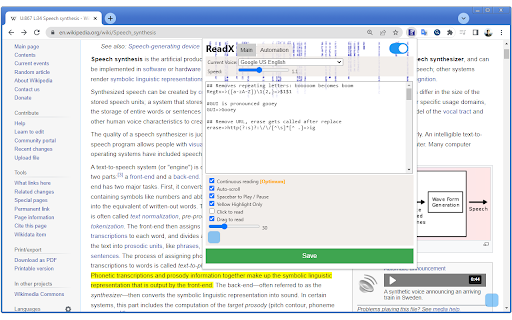
Text to Speech Extension Text to Speech Reader – Read Web Pages Aloud (TTS) Text to Speech (TTS) reader that reads web pages aloud. Listen to articles, blogs, and selected text using Google voices, offline system voices, or AI-generated voices. Features Read web pages aloud instantly from any point on the page Select text to start reading or use keyboard shortcuts Replace words and abbreviations to fix pronunciations Works online and offline Custom play/pause keys, highlight color, and reading speed Displays reading progress, estimated time, and percent read non-DRM EPUB reader non-DRM MOBI reader Tesseract OCR (Optical Character Recognition) Voice Support Google text-to-speech voices System voices (offline support) OpenAI-based Text-to-Speech API Local AI-generated voices with Piper ONNX How to Use Click anywhere on a page to start reading from that point, or select text and press the play shortcut. Options allow disabling click-to-read and customizing controls for your workflow. ----------------------------------- New in Version 1.4.3: -added support for 7zip and RAR for EPUB loading New in Version 1.4.2: - updated automation to handle elements which include Tailwind classes. - fixed highlight color brightness detection New in Version 1.3.9: - Added support for non-DRM EPUB and MOBI files. Access it by clicking the EPUB/MOBI text reader button in the Extension popup. New in Version 1.3.7: - Added UI translations for 15 Google Voice languages (AI-assisted). - Selecting a voice from the dropdown now changes most of the UI text to that language. New in Version 1.3.4: - Added Tesseract OCR (Optical Character Recognition) to read text or books from images. Runs entirely locally on your device. New in Version 1.3.2: - Kokoro can read phonemes as well as plain text. (v 1.3.1) - Fixed major bug I introduced in previous version of Kokoro phonemization. - Piper voices now read the bit-rate and language settings from the JSON file. - Minor other bug fixes. New in Version 1.2.9: - On secure pages, when using non-system voices, setting #playInPopup:no will open the player in a new tab rather than a popup. - Using {Lcase}, allows you to convert words with 5 or more uppercase letters in this example to lowercase: RegEx=>\b\p{Lu}{5,}\b=>{Lcase}=>gu New in Version 1.2.6: - Added support for Azure voices, remote parameters now accept XML when the first character is a '

ReadText (Text to Speech Reader)
Single-click text-to-speech magic directly in your browser. Multi-task and customize in 30+ languages, effortlessly and for free. Ever feel like there's just too much to read and not enough time? I get it. That's why I created ReadText during my weekends – to help folks like us who love to learn, want to get work done faster, and hate the eyestrain. == Here's what ReadText can do for you == ➤ Turn any webpage into your personal audiobook Just click the ReadText icon, and boom – your browser starts reading to you. It's like magic, but without the pointy hat. ➤ Jump around the text like a pro See an interesting bit? Hover, click, and ReadText starts right there. No more losing your place or scrolling endlessly. ➤ Make it sound just right Speed it up when you're in a hurry, slow it down when you need it to. Change voices when you get bored. It's all right there in the reading bar. ➤ Your browser just learned new languages With over 30 languages and 100 accents, ReadText is ready for your next international adventure. (Also, there is way to add new languages seamlessly by you) ➤ All the good stuff, none of the bad Everything's free. No ads, no sneaky upgrades, no "premium" features. Just straightforward, helpful tech. ➤ Your secrets are safe with You! We don't know what you're reading, and we don't want to. Your data stays on your computer where it belongs. Also!, I'm just one person working on this in my spare time because I believe reading should be easier for everyone. If you run into any problems or have ideas to make ReadText even better for you and your friends, let me know! I'll do my best to fix issues and add cool new stuff as quickly as I can.

Text to Speech Extension - Panopreter.com
Read web page text out with natural voices. This text-to-speech extension reads text on any web page out with natural voices. People can listen to the text content on the go while doing other things, no need to stare at the screen or page. The text-to-speech extension by Panopreter is an easy-to-use tool to read the web page content out. Just click on the pop up menu, the selected text or all the text on the web page will be read out with natural sounding voices. The speech synthesis occurs locally on your computer and the text will never be sent to the internet. Users can pause or resume the speech, adjust the volume and speed of the speech. Here is the detail for installing the text to speech add-on for Chrome web browser: https://www.panopreter.com/en/products/panopreter/browseraddon.php Be sure to visit this page to download and install the additional required native app, otherwise the extension will not work as you expect.

Troubadour - web reader
Instantly read aloud web content with text-to-speech. Watch and listen. Listen to the current web-page article with one click, using text to speech (TTS). Troubadour is intended for anyone who prefers to listen rather than to read. It works on a variety of websites, including news sites, blogs, fan fiction, and many more. By installing the extension, you agree to Troubadour's Terms and Conditions (https://troubadour.ai/legal/) and acknowledge that you have read Troubadour's Privacy Policy (https://troubadour.ai/privacy/)

Text to Speech - Modern
Convert selected text to speech with multiple languages and playback controls. This Chrome extension allows users to easily listen to selected text in the world's 10 most popular languages. By integrating a simple and user-friendly interface, you can select your preferred language from a dropdown menu and hear the text spoken aloud using a high-quality Text-to-Speech (TTS) service. The extension supports English, Chinese (Mandarin), Hindi, Spanish, French, Arabic, Bengali, Portuguese, Russian, and Japanese, enabling you to experience content in multiple languages with just a click. Perfect for language learners, global travelers, or anyone looking to understand content in another language. Key Features: Listen to any selected text in 10 of the world's most widely spoken languages. Choose your preferred language using an intuitive dropdown menu with country flags. Seamless integration with Google’s Text-to-Speech service for high-quality audio. User-friendly interface with quick language switching. Ideal for language practice, accessibility, or learning pronunciation in different languages. How to Use: Select the text you want to hear on any webpage. Open the extension and choose your desired language from the dropdown menu. The extension will play the selected text in your chosen language. Enhance your browsing experience by listening to content in multiple languages!
