
aononmkoehhgplkolnppkhojhoagjjfp
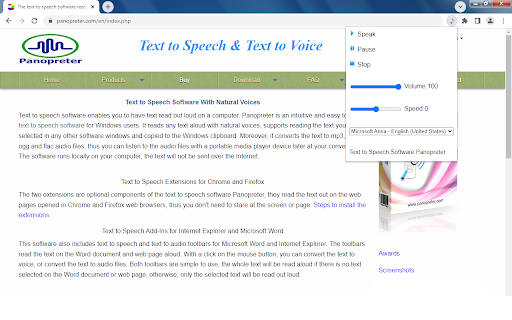
Read web page text out with natural voices. This text-to-speech extension reads text on any web page out with natural voices. People can listen to the text content on the go while doing other things, no need to stare at the screen or page. The text-to-speech extension by Panopreter is an easy-to-use tool to read the web page content out. Just click on the pop up menu, the selected text or all the text on the web page will be read out with natural sounding voices. The speech synthesis occurs locally on your computer and the text will never be sent to the internet. Users can pause or resume the speech, adjust the volume and speed of the speech. Here is the detail for installing the text to speech add-on for Chrome web browser: https://www.panopreter.com/en/products/panopreter/browseraddon.php Be sure to visit this page to download and install the additional required native app, otherwise the extension will not work as you expect.

Offline Text To Speech
Convert your text to speech! Offline Text To Speech, converts your text to speech!

Text to Speech - Modern
Convert selected text to speech with multiple languages and playback controls. This Chrome extension allows users to easily listen to selected text in the world's 10 most popular languages. By integrating a simple and user-friendly interface, you can select your preferred language from a dropdown menu and hear the text spoken aloud using a high-quality Text-to-Speech (TTS) service. The extension supports English, Chinese (Mandarin), Hindi, Spanish, French, Arabic, Bengali, Portuguese, Russian, and Japanese, enabling you to experience content in multiple languages with just a click. Perfect for language learners, global travelers, or anyone looking to understand content in another language. Key Features: Listen to any selected text in 10 of the world's most widely spoken languages. Choose your preferred language using an intuitive dropdown menu with country flags. Seamless integration with Google’s Text-to-Speech service for high-quality audio. User-friendly interface with quick language switching. Ideal for language practice, accessibility, or learning pronunciation in different languages. How to Use: Select the text you want to hear on any webpage. Open the extension and choose your desired language from the dropdown menu. The extension will play the selected text in your chosen language. Enhance your browsing experience by listening to content in multiple languages!

AdFreeIn: No Noise, Just Real Connections
Block clutter and focus on real updates from your network. Note: Features marked with a lock icon are currently under development and will be rolled out in future updates. Why AdFreeIn? LinkedIn is noisy. From ads to irrelevant suggestions, your feed is cluttered. AdFreeIn helps you reclaim it—starting with the sidebar and expanding soon to block even more. As development progresses, locked features will be unlocked via automatic updates. FAQs Q: What does AdFreeIn do? AdFreeIn blocks all ads, job postings, and suggested content on LinkedIn, so you only see posts from your 1st-degree connections. Q: Why aren't all features working right now? Some advanced features like ad-blocking and job ad suppression are under development. They're visible in the UI but currently locked. Once they're ready, they'll be unlocked automatically in future updates. Q: What features are available now? Currently, the ability to hide the right sidebar is live. More features—including ad blocking and feed filtering—are coming soon. Q: Will the locked features require payment later? No. AdFreeIn will remain free. All listed features, including those currently locked, will be part of the free extension once released. Q: Does AdFreeIn collect my data? No. AdFreeIn only modifies LinkedIn's layout—it never stores or sells your data. Q: Does AdFreeIn work with other ad blockers? Yes, but it's optimized for LinkedIn. For best results, disable other blockers on LinkedIn. Q: Will LinkedIn ban me for using AdFreeIn? No. AdFreeIn simply hides ads—it doesn't violate LinkedIn's terms. Q: Can I customize what AdFreeIn blocks? Yes, you can toggle on and off to see the content you like. Q: How do I uninstall AdFreeIn? Go to your browser's extensions page and click Remove. No traces left behind! Q: Does AdFreeIn work on LinkedIn's messaging/InMail system? No, AdFreeIn currently focuses on cleaning up your main feed and right sidebar - it doesn't modify LinkedIn's messaging features. Q: Will AdFreeIn block sponsored InMail messages? Not at this time. The extension primarily targets feed ads, job postings, and sidebar promotions rather than direct messages. Q: Can I use AdFreeIn with LinkedIn Premium? Yes! AdFreeIn works alongside LinkedIn Premium - it will still remove ads even if you're a paying Premium member. Q: Why don't I see any posts after installing AdFreeIn? This likely means your 1st-degree connections haven't posted recently. Try adjusting your network or check back later - AdFreeIn doesn't remove legitimate connection posts. Q: Does AdFreeIn update automatically? Yes, the extension receives automatic updates through your browser's extension store to ensure continued compatibility. Q: Will AdFreeIn work if I'm using LinkedIn in a different language? Absolutely! AdFreeIn functions the same regardless of which language you use for LinkedIn's interface. Q: Can I use AdFreeIn on multiple devices? Yes, but you'll need to install it separately on each browser/device where you want to use it. Q: Does AdFreeIn work with LinkedIn Sales Navigator? Currently, AdFreeIn is optimized for the main LinkedIn platform and may not fully support all Sales Navigator features.

ReadText (Text to Speech Reader)
Single-click text-to-speech magic directly in your browser. Multi-task and customize in 30+ languages, effortlessly and for free. Ever feel like there's just too much to read and not enough time? I get it. That's why I created ReadText during my weekends – to help folks like us who love to learn, want to get work done faster, and hate the eyestrain. == Here's what ReadText can do for you == ➤ Turn any webpage into your personal audiobook Just click the ReadText icon, and boom – your browser starts reading to you. It's like magic, but without the pointy hat. ➤ Jump around the text like a pro See an interesting bit? Hover, click, and ReadText starts right there. No more losing your place or scrolling endlessly. ➤ Make it sound just right Speed it up when you're in a hurry, slow it down when you need it to. Change voices when you get bored. It's all right there in the reading bar. ➤ Your browser just learned new languages With over 30 languages and 100 accents, ReadText is ready for your next international adventure. (Also, there is way to add new languages seamlessly by you) ➤ All the good stuff, none of the bad Everything's free. No ads, no sneaky upgrades, no "premium" features. Just straightforward, helpful tech. ➤ Your secrets are safe with You! We don't know what you're reading, and we don't want to. Your data stays on your computer where it belongs. Also!, I'm just one person working on this in my spare time because I believe reading should be easier for everyone. If you run into any problems or have ideas to make ReadText even better for you and your friends, let me know! I'll do my best to fix issues and add cool new stuff as quickly as I can.
