
ecnibbdjecjgllmkodkjnodmblmffkkp
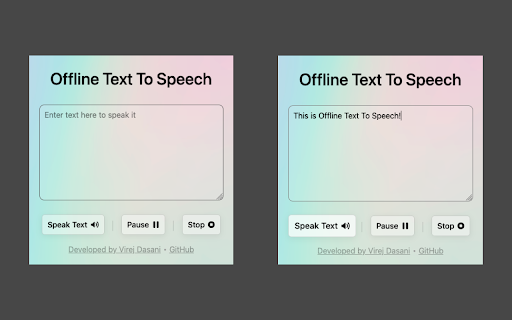
Convert your text to speech! Offline Text To Speech, converts your text to speech!

Playtext — Text to Speech
Playtext – Turn any webpage into an audiobook with AI voices. 1. Save any page. 2. Press play. 3. Listen at up to 3x speed. — What can you do with Playtext? 🎧 Read + Listen Together – Follow along as you listen. Dual input helps you retain more of what you read. ✨ Distraction-Free Reader – A clean, focused reading environment. No ads, no clutter. 🚀 Speed Up Your Reading – Adjust playback up to 3x to get through content faster. 💻 Keyboard Shortcuts – Control playback without leaving the keyboard. 🌎 6 Languages – English, Spanish, Portuguese, German, Italian, and French.

Text to Speech (TTS)
A text to speech tool with natural sounding voices. Text to Speech (TTS) is a text-to-speech extension with natural-sounding voices by using two different TTS engines. The 1st engine is the HTML5 native web speech API for speech synthesis. It is active in all modern browsers by default (more info: https://webaudio.github.io/web-speech-api/). The 2nd API is the Kokoro AI engine, which uses a new artificial intelligence method to synthesize text (more info: https://huggingface.co/onnx-community/Kokoro-82M-v1.0-ONNX). Please note that when you choose Kokoro AI, the app needs to download training data (~300MB) for the AI engine. So please be patient while the app is loading. You can use this extension in a standalone interface or within web pages. If you press the toolbar button, the first interface opens up where you can enter the desired text for TTS. On the other hand, within a webpage, once you select a text, a placeholder speaker icon appears. Once you click the speaker icon, the text-to-speech starts. For the highlight feature to work correctly, please select text paragraph by paragraph. Please note that the highlight feature is still in Beta and may not work properly on all websites. There are also a few options related to the in-page text-to-speech, which can be adjusted from the extension settings page. Note 1: For TTS in webpages, the app only uses the Web Speech API. Kokoro AI engine is only available within the standalone interface. Note 2: Kokoro AI engine, once loaded, can work fully offline. Moreover, you can save the output TTS audio as a .wav file to your machine. When text-to-speech is completed, please press the audio icon on the right toolbar. To report Bugs, please visit the addon's homepage (https://mybrowseraddon.com/text-to-speech.html) and fill out the bug report form.

Talkie: text-to-speech (TTS)
New voices, languages, dialects can be downloaded for FREE for your operating system from for example Microsoft, Apple, and Google. Once installed correctly, Talkie will auto-detect them. 1. Select desired text on any web page. 2. Click the Talkie button in your browser bar You can also select the text, then right click on it, and choose Talkie in the menu. This way also works in PDF-files and some special types of pages in Chrome. A convenient option is to use the Talkie shortcut keys: ☑ ⌘+Shift+A on macOS ☑ Ctrl+Shift+A on Windows, Linux, Chrome OS ☑ ⌘+Shift+1 or Ctrl+Shift+1 to read text from the clipboard in any program (Talkie Premium feature) If the key does not work, please check that it is not already in use by another extension. How to check or change the Talkie shortcut key: ☑ Lets you listen to the selected text on any part of a page -- a short snippet or an entire news article. Just highlight what you want to hear read aloud and hit play. ☑ Automatically detects the text language per-page, and chooses a voice in the same language to match it. ☑ Uses your browser's built-in Web Speech API for text-to-speech (TTS) known as Speech Synthesis. ☑ All text and speech is processed internally by your browser. While ultimately depending on your specific browser, all processing is expected to be done on your own machine and not use a server. ☑ The available voices may differ depending on your operating system, browser, browser version, and any other installed extensions/software. ☑ Select your favorite voice per language! ☑ Adjust the speed and pitch per language! ☑ Read text from the clipboard in any program! For open source code (GPL-3.0) and more, see the project web page:

Text to Speech
Text to Speech Hewizo removes ads and reads articles in over 30+ languages using state of the art AI text to speech engine TTS Text to speech (TTS) Hewizo extension that reads articles aloud in multiple languages using state of the art AI. Hewizo is not only a text to speech (TTS) application, the extension offers multiple productivity features like, cleaning ads, saving articles for later use and aggregating top news from around the world. Features - Text to Speech Article reader - Listen to articles using a natural reader to produce the most human sounding voice in over 30+ languages - Convert article URLs to audio - Text to speech TTS feature that converts article URLs to audio - Conveniently opens/saves web articles on hewizo.com from our chrome extension - Syncs progress across multiple devices - Start reading on your laptop, continue where you left off on your phone - Dark mode helps you with eye strain - Allows personal customization - Only see news you care about - Offers a clean reader view by removing ads from webpages so you can enjoy your articles distraction free - Save your favorite articles and enjoy them right from your pocket whenever you choose - You can use Hewizo text to speech as a podcast for your articles collection what makes Hewizo different Our Text to speech application offers a complete package in that you can use it more like a traditional podcast. Just open an article on Hewizo, and it will automatically be saved and your reading position will be synced on all your devices. Next time you login on hewizo.com you will continue from where you left off. You may use Hewizo text to speech TTS for personal or commercial use, including but not limited to podcast, course materials, distribution, presentations or any other text to speech application as long as you abide by our terms of service and you don't violate your local laws. Change log 2.1.0 - Add Ability for text to speech to be skipped to any part of a paragraph from anywhere on the page - Add Ability to go to hewizo.com from the text to speech extension - Visual polish 2.0.0 - New revamped functionality that allows you to read websites without leaving the page 1.0.4 - Text to speech works with older android devices 1.0.3 - Text to speech (TTS) improvements, more language support added - Fix auto language Text to speech (TTS) detection and selection for Iphone - Fix auto stopping Text to speech (TTS) error on non premium voice s 1.0.0 - Hewizo launches with best text to speech (TTS) engine on the market for any questions contact us at https://hewizo.com/support
