
mojkclddjbciilajchadljngchlgfapp

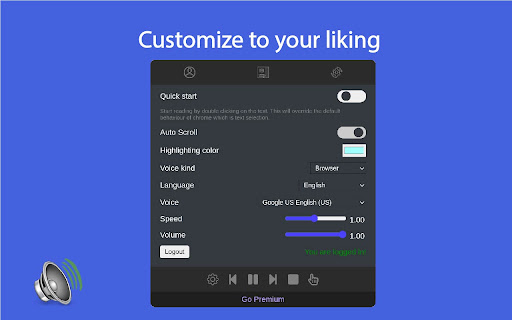
Instantly read aloud web content with text-to-speech. Watch and listen. Listen to the current web-page article with one click, using text to speech (TTS). Troubadour is intended for anyone who prefers to listen rather than to read. It works on a variety of websites, including news sites, blogs, fan fiction, and many more. By installing the extension, you agree to Troubadour's Terms and Conditions (https://troubadour.ai/legal/) and acknowledge that you have read Troubadour's Privacy Policy (https://troubadour.ai/privacy/)

Read Out Loud
Use Read out loud to read aloud on any site. This online TTS tool lets you enjoy text to speech and read text out loud easily. 🎧 Try Read out loud – your friendly voice that reads everything for you Tired of staring at screens for hours? Let Read out loud take over and turn any text into speech. Whether it’s an article, a document, or a long email – this Chrome extension to read text out loud is here to help. With a few simple clicks, enjoy natural voices reading your content back to you. Why is Read out loud good? 🎤 It sounds real: Enjoy human-like voices for a smoother listening experience. 🎤 It’s easy: Just a few clicks and it starts reading out loud. 🎤 It’s private: We don’t use or share your personal data. 🎤 It works where you work: Supports PDFs, Google Docs, and more. What can it read? 1. Long articles and blog posts 2. Emails and newsletters 3. Google Docs and PDFs 4. School essays and reports 5. Any passages on websites How to use it? 1️⃣ Install Read out loud from the Chrome Web Store — it takes seconds. 2️⃣ Click the extension icon on any website, PDF, or Google Doc you want to read. 3️⃣ Choose language or adjust the speed by clicking on the widget. 4️⃣ Click “Play” in the widget / Select the excerpt you want to hear and right-click it. 5️⃣ Listen as the passage is read aloud with clear, natural voice. Who is it for? 💡 Students who want to read essay out loud before submitting 💡 Professionals who prefer listening to reports via a text reader tool 💡 People with dyslexia or visual impairments using a voice generator for accessibility 💡 Language learners who want to hear pronunciation while reading text out loud Key use cases ⭐️ Reading out loud your notes before a presentation ⭐️ Listening to long blog posts while doing chores ⭐️ Using it as a voice generator for proofreading ⭐️ Text to voice conversion for efficient learning ⭐️ Turn articles into audio for long commutes Features you’ll love 📚 Adjustable reading speed 📚 Choose your favorite voice 📚 Highlight as it narrates 📚 Resume where you left off Reasons to use Read out loud extension With just a few clicks, turn text to speech using natural voices that actually sound human. Whether you need to listen to a website, a document, or just want the internet to read my text out loud while you do something else — we’ve got you covered. Use Read out loud to… - Narrate your essay before submitting it to catch typos or awkward phrasing - Turn text to voice during revision, helping you absorb the content better - Read text aloud while cooking or cleaning, so you can stay productive - Use it as a simple way to reduce eye strain and improve focus when reading Multiple ways to listen ▸ Read text out loud from almost any webpage ▸ Read aloud text to speech for documents ▸ Online TTS with real-time voice ▸ Your personal text to speech reader Why Read out loud stands out 🌟 Delivers realistic text to voice quality that sounds natural and easy to listen to 🌟 Respects your privacy — no data is collected or shared with third parties 🌟 Works instantly with no setup or learning curve needed 🌟 A read aloud extension designed to be simple, helpful, and user-friendly 🌟 Supports text to speach in PDFs, Google Docs, and many other formats Customize your reading experience ➤ Choose text to read out loud ➤ Find your comfortable pitch and pace ➤ Listen to websites in different languages ➤ Use it like a mini TTS reader right in your browser FAQ – Frequently Asked Questions Q: Does Read out loud work in Google Docs? A: Yes! You can read document directly from Google Docs. Q: Can it read my PDF files? A: Absolutely. Use it to read PDF out loud with just a click. Q: Is my data private? A: Absolutely. We don’t track, store, or sell anything. Read out loud works without any personal data. Q: Do I need an account to use it? A: Nope. No account, no signup. Just install and start reading text out loud. Q: Can I choose different voices? A: Yes, we have a variety of languages and voices, find your match! Q: Will it work offline? A: This extension requires an internet connection to work properly. Q: Is it safe for children or students to use? A: Definitely. It’s ad-free, tracks nothing, and makes reading text out loud easier for learners of all ages. Q: What is this tool exactly? A: It’s a read out loud extension and a tts reader. It's great if you want text to speech, a natural reader, or just someone to read to me. Ready to listen? Download Read out loud - text to speech online tool now and start enjoying the freedom to listen to websites anywhere, anytime. Whether you need a natural reader while you do your chores or simply to have a break from screen fatigue — just click and ask to read it to me.

Read Aloud: A Text to Speech Voice Reader
Read aloud the current web-page article with one click, using text to speech (TTS). Supports 40+ languages. Read Aloud uses text-to-speech (TTS) technology to convert webpage text to audio. It works on a variety of websites, including news sites, blogs, fan fiction, publications, textbooks, school and course materials. Read Aloud helps users who prefer to listen to content instead of reading, including children learning to read and those with dyslexia or other learning disabilities. Read Aloud allows you to select from a variety of text-to-speech voices, including native voices provided by the browser and AI voices from cloud providers such as Google Wavenet, Amazon Polly, IBM Watson, Microsoft Azure, and OpenAI. Cloud-based voices may require additional in-app purchase or bringing your own API key to enable. Read Aloud can read PDF, Google Docs, Google Play books, Amazon Kindle, and EPUB (via the excellent EPUBReader extension from epubread.com). To use Read Aloud, navigate to the web page you want to read, then click the Read Aloud icon on the browser menu. You can also use the shortcut keys ALT-P, ALT-O, ALT-Comma, and ALT-Period to activate the extension. If some text is selected, Read Aloud will read only the selected text. Additionally, you can right click the text selection and start Read Aloud from the context menu. To change the voice, reading speed, pitch, or enable text highlighting, go to the Options page via the Gear button on the extension popup (you'll need to stop playback to see the Gear button). You can also access the Options page from the context menu by right clicking the extension icon. On the extension popup, there are buttons to increase/decrease the the size of the popup window, the font size, as well as toggle dark mode. Read Aloud is an open-source project. If you wish to contribute bug fixes or translations, please visit the GitHub page at https://github.com/ken107/read-aloud

Audio Transcriber
Try audio transcriber – easily transcribe audio to text in seconds. Fast, accurate transcription right from your browser. 🚀 Transform your productivity and workflow with the Audio transcriber Chrome extension – your go-to solution to transcribe audio to text with ease, speed, and accuracy. Whether you're a student, journalist, content creator, researcher, or just someone looking to transcribe audio recordings to text, this extension is built for you. Say goodbye to manual note-taking and the hassle of pausing and rewinding recordings. With our smart, AI-powered transcription tool, you can transcribe from audio to text in seconds. 🧠 With one simple click, transcribe audio files directly from your browser. Upload or drag-and-drop your audio file to text converter, and let our transcription software do the rest. You can finally focus on what matters – understanding, analyzing, and sharing insights from your recordings. ❤️ Why You’ll Love This Audio Transcriber Extension: 1️⃣ Fast and Accurate – Get high-quality audio transcription with AI-backed precision 2️⃣ User-Friendly Interface – No technical skills required to transcribe an audio file 3️⃣ Multiple Formats Supported – Convert to text from MP3, WAV, M4A, and more 4️⃣ Secure and Private – Your data is encrypted and never shared Whether you're handling interviews, podcasts, meetings, or lectures, this tool is your ideal audio to transcript assistant. Discover how effortless it is to transcribe recorded audio to text using AI. 🔝Features at a Glance: ➤ AI-powered audio transcriber engine ➤ Timestamps for easy navigation ➤ One-click convert sound to text ➤ Support for multiple languages ✨ Ever wondered how to transcribe an audio file without expensive transcription services? Now you can. This Chrome extension brings industry-grade ai transcription directly to your browser. No downloads, no external tools, just seamless transcribing audio anytime, anywhere. Need to translate audio to text for a report or an article? Done. Want to transcribe from audio recordings for research? Easy. Trying to figure out how can I transcribe an audio file for your team meeting? We've got you covered. 👀 Who Is This Audio Transcriber For? • Journalists transcribing interviews • Students recording lectures • Podcasters creating show notes • UX-researchers converting field recordings Whatever your role, if you need to convert audio to text, our extension simplifies the process with an intuitive interface and powerful engine. 🎁 Benefits of AI Transcription in Your Workflow ▸ Save hours of manual work ▸ Improve accessibility for your content ▸ Boost content creation with ready-to-use transcripts ▸ Quickly convert sound to text for blogs or reports ▸ Enhance productivity through automation Using this audio transcriber, you can transcribe audio up to 5x faster than manual typing. Perfect for tight deadlines.. ⛏️ How to Use the Extension 1. Add the extension to Chrome 2. Upload or drag your audio file to text converter 3. Click "Transcribe" 4. Done! 🎉 It's that simple. You'll never need to ask how to transcribe audio again. No more stress. Just results. 🔉 Supported Audio File Types • MP3 • WAV • M4A • WebM • mpeg ❓ Frequently Asked Questions Q: How can I transcribe an audio file from my phone or desktop? A: Use our extension to easily transcribe audio file formats directly from Chrome, without switching apps. Q: Is this an automatic or manual tool? A: It’s fully automatic audio transcriber, powered by advanced AI transcription algorithms for speedy results. Q: Can I translate audio to text in multiple languages? A: Yes! Our audio to text converter supports various languages. 🧠 The Smarter Way to Convert Audio to Text Never lose key insights again. Whether you're capturing a fleeting thought or archiving an entire conversation, our converter sound to text tool is built to perform. From small clips to full-length recordings, this audio to transcript extension scales with your needs. Use it to: - Take notes from meetings - Generate subtitles for videos - Archive audio messages - Prepare for presentations - Build searchable text databases 💡 The future of audio to text transcription is here – fast, affordable, and within reach. It’s the perfect blend of automation and accuracy for anyone who works with sound. 😊 Join Happy Users Professionals around the world trust our transcriber audio to text tool. From bloggers to ux-researchers, people are finding smarter ways to transcribe audio recording to text with just one click. Experience it for yourself and see how to transcribe audio faster than ever before. All from your browser. ✅ Install the extension now and start transcribing smarter, not harder.

Read Aloud
Use Read Aloud Chrome Extension for fast text to speech as your screen narrator and voice reader on any webpage 🗣️ Read Aloud Chrome Extension is a powerful text-to-speech tool designed to transform any webpage into clear, natural audio. With this chrome extension read aloud solution, users can enjoy articles, documents, or long pages while multitasking or resting their eyes. This read aloud extension chrome helps improve accessibility and reading comfort for millions of users worldwide. 💡 The read aloud extension for chrome is easy to use and turns any paragraph into spoken content instantly. Whether you need a chrome read aloud extension for studying, working, or entertainment, the tool adapts to your needs. Many people choose the free read aloud chrome extension because it works quickly, smoothly, and without limitations. 📍 chrome extensions read aloud tools are becoming essential for productivity. This google chrome read aloud extension stands out due to its clean interface, stable operation, and compatibility with many websites. It also supports naturalreader text to speech and voice reader modes for enhanced clarity. read aloud a text to speech voice reader chrome extension gives you the flexibility to listen to articles at your own pace. Use this read aloud text to speech chrome extension to turn blogs, research, PDFs, and even emails into audio you can follow effortlessly. 📲 Key benefits of using this chrome extension that will read aloud any webpage text: ➤ smooth text-to-speech generation ➤ clear voice aloud reader mode ➤ support for multiple speeds and voices ➤ ability to read my text from various content sources ➤ compatibility with pdf voice reader features 🌟 Why users choose this read aloud chrome extension Simple interface Natural and stable text-to-speech Support for long reading sessions Works with articles, blogs, PDFs Helps boost productivity 🎧 Extra features included in this read aloud extension for chrome • integration with natural reader text to speech engines • speech to text free tools for added flexibility • support for google speech to text and speech speech to text workflows • automatic detection of text reader content • useful for pdf document reader voice tasks 📘 Many users call it the best read aloud extension for chrome because it merges accessibility and convenience. Others appreciate that it’s also a best free read aloud chrome extension alternative, helping convert text into audio with minimal effort. With this chrome extension read aloud setup, your online reading becomes easier and more enjoyable. 📌 Use cases for the read aloud text to speech chrome extension 1️⃣ studying and note-taking 2️⃣ reading digital books 3️⃣ multitasking while listening 4️⃣ improving focus 5️⃣ learning languages with natural voices ▸ It works great as a voice reader for long documents ▸ Helps transform articles into free text to speech ai audio ▸ Acts as a speech to text app companion for people who switch between reading and dictation 📄 Many users also rely on the google chrome read aloud extension for accessibility needs, especially when dealing with long research documents. Combined with voice aloud reader features, this chrome extension that will read aloud any text becomes an essential tool. 🧩 The read aloud a text to speech voice reader chrome extension integrates seamlessly into your workflow. Whether you use naturalreader text to speech daily or just need a quick text reader for a PDF, this tool handles it with ease. enhances productivity for students and professionals 🧠 This chrome read aloud extension is built for anyone who wants to make digital reading more comfortable. By using chrome extensions read aloud features, your browser becomes a complete audio reading assistant. 📌 What can the read aloud chrome extension do? ➤ It converts any webpage into spoken audio using advanced text-to-speech technology. 📌 Can it read PDFs? ➤ Yes, it works as a pdf voice reader and pdf document reader voice tool. 📌 Does it support natural voices? ➤ Yes, it integrates with natural reader text to speech and naturalreader text to speech engines. 📌 Can it help with eye strain? ➤ Absolutely, the read aloud extension chrome lets you listen instead of reading. 📌 Is it free? ➤ Yes, it works as a free read aloud chrome extension with no hidden fees.
