
nnlgliehckiimkbbakmkdpmjimllkolj
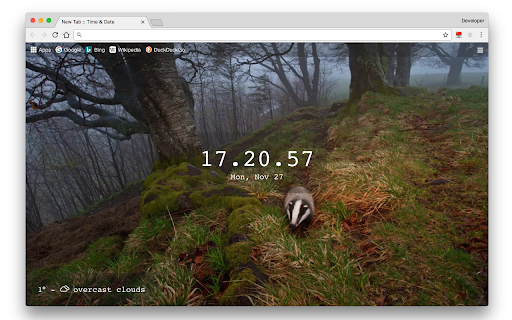

Displays the current date and time with Bing's daily wallpaper on new tabs, with an optional weather widget This extension provides users with a clean and distraction-free "new tab" page experience by replacing the default one. Instead of the cluttered default page, it presents a simple time and date view accompanied by Bing's daily wallpapers, which are automatically updated once per day. Key Features: 1. Automatic updates of wallpapers from Bing's daily collection. 2. Access to the items on your bookmarks bar. 3. Support for adding new links to the bookmarks bar through drag-and-drop functionality. 4. Optional weather widget integration. 5. Customizable wallpaper options. It's important to note that while the bookmarks bar remains accessible, the top-sites section is removed to avoid clutter on the new tab page. To perform searches, use the address bar (there is no need for a separate search box). Type your search query in the address bar and press the "Enter" key. Users can add a weather widget to the user interface. Click on the hamburger icon to option the options sidebar, then enable the weather widget. This widget uses the OpenWeatherMap API to retrieve and display the current weather conditions.

Foxy Tabs - Modern new tab start page
Awesome new tab start page with your bookmarks FOXY TABS replaces default Chrome homepage with modern dashboard with bookmarks. If you want an extension to: • Keep all of your bookmarks in one place • Organize them in the most intuitive way • Not be distracted by a million widgets eating your RAM and CPU FOXY TABS is for you! ✔ Super fast and sleek UI ✔ SAFE: we don't collect or keep ANY of your data ✔ FREE forever ✔ Minimalistic but powerful ✔ Keep infinitely many bookmarks ✔ Organize them in groups and subgroups ✔ Choose between full and compact view for each group ✔ Lightning fast search ✔ Automatically added logotypes or upload your own ✔ Customizable colors, tile sizes and more ✔ Dark and light themes ✔ Select one of carefully selected HD wallpapers or set your own background ✔ Import and export bookmarks and settings ✔ Cloud Sync (in future versions) ✔ Fast access to internal Chrome pages Don't forget to give us 5 stars and to suggest your ideas on how we can make this extension even better! If you want to see Foxy Tabs in your language, but it's not available yet: • Download txt file from this link: https://tinyurl.com/y8czl6l2 • Translate it (but don't translate the code words in the brackets) • Send it to our email: ildar.dev9@gmail.com • We'll add your language in the next release!

Date Today for Google Chrome
The best clock to see the current day and time at a glance, with an option to display a digital clock. Stay organized and never lose track of time with Date Today, the perfect browser extension for displaying an analog clock in your toolbar bar. In a single blink, effortlessly access the current date and time, helping you manage your schedule seamlessly. Date Today is a lightweight and useful add-in designed to know the current time in hours and minutes. With the current day of the week, day number and current month. Are you asking yourself 'what day is it today' or 'what is the time today'? With one single click on the button you get this information, and if you click again in the popup window. You copy the current timestamp in your clipboard. So, you can paste it in your online Google Doc, Microsoft Word Document or your new Gmail email message. Browser extension features: ◆ Popup Panel: View the current date and time in a convenient popup window for quick reference. ◆ Clock format: Choose between a 12-hour or 24-hour clock system to suit your preference. ◆ Browser Button Options: Opt to showcase either the Analog or Digital Clock in the browser button for added flexibility. ◆ Customize Day Theme: Personalize the color of the hour and minute hands to match your style. ◆ Customize Night Mode theme Activate Night Mode for a visually comfortable clock display during darker hours. ◆ Color Personalization: Make it yours by customizing the number and text color to reflect your unique taste. ◆ Font Family Customization: Modify the font family with options such as Arial, Impact, Sans-serif, Times New Roman, and Verdana. ◆ Picture-in-Picture Mode: Experience enhanced visibility with the Picture-in-Picture mode, showcasing the Date Today panel in a convenient floating popup window. Stay informed about the date and time without disrupting your browsing experience. ◆ Badge Customization: - Current Date Badge: Enhance your experience with the inclusion of a Current Date badge, prominently displaying the current date in a clear and concise format. - Current Time Badge: Keep track of the current time with a dedicated badge, providing quick access to this essential information. - Day Number and Month Badge: Display a customized badge featuring the day number, seamlessly integrated with the month. Choose whether to position it at the top or bottom, depending on your web browser's layout. - Day Name of the Week Badge: Elevate your toolbar with the inclusion of a dynamic Day of the Week badge. Stay informed about the current day effortlessly, ensuring you are always in sync with your schedule. - Customizable Badge Color: Personalize your badges by selecting your favorite colors. Choose hues that resonate with your style and preferences, ensuring a visually appealing and cohesive browsing experience. ◆ Tooltip: Easily monitor the current date and time (hours:minutes:seconds) directly in the toolbar. ◆ Context Menu: Right-click menu functionality to paste the current timestamp in text boxes, text fields, and the address bar. ◆ Support for Dark Mode Project Information: https://www.stefanvd.net/project/date-today/browser-extension/ Required Permissions: ◆ "contextMenus": Add web browser context menu to paste the current timestamp. ◆ "activeTab": This to execute the context menu action on the currently open tab. ◆ "alarms": This to run the clock time in the background. ◆ "storage": Save settings locally and sync with your web browser account. >> Unlock an option feature to protect your eyes at night and focus on the video player, such as YouTube™, by installing Turn Off the Lights browser extension for YouTube and Beyond. https://chromewebstore.google.com/detail/turn-off-the-lights/bfbmjmiodbnnpllbbbfblcplfjjepjdn

Time and date
Extension to display time and date This extension displays the current time, date and day of the week based on your device clock.

Quick Startpage
Advanced Newtab with your bookmarks, apps, tabs and search Quick Startpage is Chrome's advanced newtab with Search, based on your bookmarks. Quick Startpage allows you to quickly access your Tabs, Visited pages, Apps and Search. Also, you can easy save tabs and windows to bookmarks and restore them later.
