
dgbkppglifchfjpombkeaijnpppcfibf


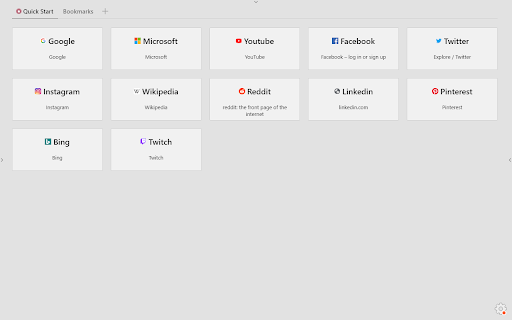

Advanced Newtab with your bookmarks, apps, tabs and search Quick Startpage is Chrome's advanced newtab with Search, based on your bookmarks. Quick Startpage allows you to quickly access your Tabs, Visited pages, Apps and Search. Also, you can easy save tabs and windows to bookmarks and restore them later.

Foxy Tabs - Modern new tab start page
Awesome new tab start page with your bookmarks FOXY TABS replaces default Chrome homepage with modern dashboard with bookmarks. If you want an extension to: • Keep all of your bookmarks in one place • Organize them in the most intuitive way • Not be distracted by a million widgets eating your RAM and CPU FOXY TABS is for you! ✔ Super fast and sleek UI ✔ SAFE: we don't collect or keep ANY of your data ✔ FREE forever ✔ Minimalistic but powerful ✔ Keep infinitely many bookmarks ✔ Organize them in groups and subgroups ✔ Choose between full and compact view for each group ✔ Lightning fast search ✔ Automatically added logotypes or upload your own ✔ Customizable colors, tile sizes and more ✔ Dark and light themes ✔ Select one of carefully selected HD wallpapers or set your own background ✔ Import and export bookmarks and settings ✔ Cloud Sync (in future versions) ✔ Fast access to internal Chrome pages Don't forget to give us 5 stars and to suggest your ideas on how we can make this extension even better! If you want to see Foxy Tabs in your language, but it's not available yet: • Download txt file from this link: https://tinyurl.com/y8czl6l2 • Translate it (but don't translate the code words in the brackets) • Send it to our email: ildar.dev9@gmail.com • We'll add your language in the next release!

Bookmarks New Tab
A New Tab replacement that shows the Bookmarks. Replace the default New Page tab by a Bookmarks tree menu.

BNTP: Bookmarks in New Tab Page
Lightweight New Tab Page with Bookmarks and Top Sites * List bookmarks by folders * Collapse a folder * Move a bookmark by Drag and Drop * Edit a bookmark * Automatic dark mode * Sync the preferences (theme or folder collapse) It will request the following permissions:

Bookmarks HotList
A Speed Dial in your toolbar, with easy set-up and keyboard shortcuts Set up your HotList in the Bookmark Manager, access it from the toolbar in a choice of layouts and colours. For keyboard access, the default shortcut to open the extension is Alt+B (or Command+B). To change the shortcut, paste this into the address bar: chrome://extensions/shortcuts When the extension is open, shortcut keys (1-9 and A-Z) are available for each bookmark. Hold down the Space Bar to reveal hints. Open multiple tabs: 1 click will open a bookmark in a background tab, but the Popup stays open. A 2nd click on that bookmark will close the Popup and activate the tab, or you can open other bookmarks instead. The only automated modification to your bookmarks will be the creation of a new folder to contain those displayed by this extension, and a bookmark to get you started. The Star icon is “Actions bookmark new list Icon” by Oxygen Team, available from Icon Archive under the GNU Lesser General Public License: http://www.iconarchive.com/show/oxygen-icons-by-oxygen-icons.org/Actions-bookmark-new-list-icon.html Icons used in promotional images are in the public domain and available from http://paomedia.github.io/small-n-flat/
