
mhgknbehalhkedjgfhiaindklahhkccc


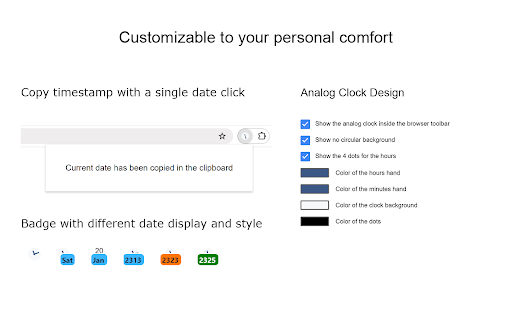
The best clock to see the current day and time at a glance, with an option to display a digital clock. Stay organized and never lose track of time with Date Today, the perfect browser extension for displaying an analog clock in your toolbar bar. In a single blink, effortlessly access the current date and time, helping you manage your schedule seamlessly. Date Today is a lightweight and useful add-in designed to know the current time in hours and minutes. With the current day of the week, day number and current month. Are you asking yourself 'what day is it today' or 'what is the time today'? With one single click on the button you get this information, and if you click again in the popup window. You copy the current timestamp in your clipboard. So, you can paste it in your online Google Doc, Microsoft Word Document or your new Gmail email message. Browser extension features: ◆ Popup Panel: View the current date and time in a convenient popup window for quick reference. ◆ Clock format: Choose between a 12-hour or 24-hour clock system to suit your preference. ◆ Browser Button Options: Opt to showcase either the Analog or Digital Clock in the browser button for added flexibility. ◆ Customize Day Theme: Personalize the color of the hour and minute hands to match your style. ◆ Customize Night Mode theme Activate Night Mode for a visually comfortable clock display during darker hours. ◆ Color Personalization: Make it yours by customizing the number and text color to reflect your unique taste. ◆ Font Family Customization: Modify the font family with options such as Arial, Impact, Sans-serif, Times New Roman, and Verdana. ◆ Picture-in-Picture Mode: Experience enhanced visibility with the Picture-in-Picture mode, showcasing the Date Today panel in a convenient floating popup window. Stay informed about the date and time without disrupting your browsing experience. ◆ Badge Customization: - Current Date Badge: Enhance your experience with the inclusion of a Current Date badge, prominently displaying the current date in a clear and concise format. - Current Time Badge: Keep track of the current time with a dedicated badge, providing quick access to this essential information. - Day Number and Month Badge: Display a customized badge featuring the day number, seamlessly integrated with the month. Choose whether to position it at the top or bottom, depending on your web browser's layout. - Day Name of the Week Badge: Elevate your toolbar with the inclusion of a dynamic Day of the Week badge. Stay informed about the current day effortlessly, ensuring you are always in sync with your schedule. - Customizable Badge Color: Personalize your badges by selecting your favorite colors. Choose hues that resonate with your style and preferences, ensuring a visually appealing and cohesive browsing experience. ◆ Tooltip: Easily monitor the current date and time (hours:minutes:seconds) directly in the toolbar. ◆ Context Menu: Right-click menu functionality to paste the current timestamp in text boxes, text fields, and the address bar. ◆ Support for Dark Mode Project Information: https://www.stefanvd.net/project/date-today/browser-extension/ Required Permissions: ◆ "contextMenus": Add web browser context menu to paste the current timestamp. ◆ "activeTab": This to execute the context menu action on the currently open tab. ◆ "alarms": This to run the clock time in the background. ◆ "storage": Save settings locally and sync with your web browser account. >> Unlock an option feature to protect your eyes at night and focus on the video player, such as YouTube™, by installing Turn Off the Lights browser extension for YouTube and Beyond. https://chromewebstore.google.com/detail/turn-off-the-lights/bfbmjmiodbnnpllbbbfblcplfjjepjdn

Turn Off the Lights
The entire page will be fading to dark, so you can watch the videos as if you were in the cinema. Works for YouTube™ and beyond. Immerse yourself in a cinematic atmosphere while watching videos online with Turn Off the Lights. This powerful browser extension dims everything on the web page except for the video you are watching, bringing your focus to the content that matters most. 🏆🥇 Turn Off the Lights browser extension has also been featured on several popular websites, including Lifehacker, CNET, ZDNet, BuzzFeed, and PC World. With its growing popularity and positive feedback, it is no surprise that the Turn Off the Lights browser extension has become one of the most popular and trusted browser extensions in the market. 🔷 Please share your feedback, suggestions, and thoughts with us https://www.turnoffthelights.com/support Enjoy a simplified browsing experience with the Turn Off the Lights browser extension. With just one click on the lamp button, your page will smoothly fade into darkness, focusing automatically on the video. Another click restores the page to its original state. Explore additional customization options on the Turn Off the Lights Options page to tailor your viewing experience to your preferences. Turn Off the Lights is a lightweight and useful add-on designed for a more comfortable watching experience. It is more than just a dimming tool; it is your gateway to an enhanced viewing experience tailored for three key types of users: + Video Lovers: Whether you are binge-watching your favorite series or catching up on the latest viral clips, Turn Off the Lights creates the perfect ambiance for uninterrupted viewing pleasure. + Dark Mode Enthusiasts: Embrace the dark side of browsing with Turn Off the Lights, converting all websites into your personalized dark mode theme. + Eye Protection Advocates: Shield your eyes from harsh screen glare and blue light emissions. With its accessibility features, Turn Off the Lights helps prioritize your visual health while you enjoy your favorite online content. Plus, keep the dark layer always enabled, even when you click on a hyperlink. Browser extension features: ◆ Effortless Control: Toggle the lights with a simple click, effortlessly enhancing your viewing pleasure, akin to reading a newspaper with a dark reader tint. ◆ Cinematic Experience: Dive into your favorite videos without distractions as everything else fades into the background. ◆ Support multiple video sites: Enjoy distraction-free viewing on YouTube, Dailymotion, Vimeo, Twitch, and more of your favorite platforms. ◆ Enhance your YouTube experience with features like: - Auto HD: Set videos to play in HD automatically. Users can select from highres > 8K > 5K > 4K > 1080p > 720p > 480p > 360p > 240p > 144p > default. - Auto Wide: Automatically adjusts the video to the widest mode for enhanced viewing. - 60 FPS Block: Disable YouTube 60 FPS and watch YouTube Auto HD 30 FPS video quality. - Top Layer: Place elements at the top of the dark layer, such as the number of YouTube subscribers, title, video suggestions, etc. ◆ Multitasking: Watch your video with Audio Visualisation in Picture-in-picture (PiP) mode, maximizing productivity without sacrificing entertainment. ◆ Easter Eggs: Shortcut key: Tap 'T' for a genuine movie theater ambiance, bringing nostalgia to your viewing sessions. T -> Do you like a real movie theater feeling? ◆ Option to make the screen dark when the user clicks on the play button: Enhance immersion by dimming the surroundings when the video starts playing. ◆ Option to turn on/off the fade in and fade out effects: Tailor your experience by toggling the transition effects according to your preference. ◆ Custom Dark Layer: Personalize the dark layer with your preferred color and opacity value. Alternatively, select your own background image to use as the dark layer. ◆ Option to Show Dimness Level Bar: Keep track of the dimness level with a visible indicator for better control. ◆ Eye Protection Options: Ensure comfortable viewing, especially at night, with customizable eye protection settings. - A screen shader that blends the web page with an orange color to reduce eye strain and fatigue, while also supporting your brain's day/night cycle. - An option to click through the dark layer and keep the lights always off. - Whitelist/blacklist filters for greater control over your browsing experience. ◆ Option to show the dark layer on the top of the window: Enjoy enhanced focus by obscuring distractions outside of the video window. ◆ Custom Colors: Personalize the lighting with custom colors to match your mood or aesthetic. ◆ Multimedia Detection: Option to enable flash objects, iframe video elements, and more to appear on top of the dark layer. ◆ Dimness Level Bar: Display a floating dimness level bar at the bottom of the current web page for easy adjustment of the dark layer opacity. ◆ Nighttime Eye Protection: Activate eye protection mode during nighttime browsing with customizable whitelist/blacklist filters. ◆ Atmosphere Lighting: Experience an immersive glow around the video player, adding to the ambiance of your viewing environment. - Vivid Mode: Realistic and lifelike color glow effects match the video content - One solid: 1 Custom color around the video player - Four solid: 4 Custom colors around the video player ◆ Dark Layer Overlay: Choose to show a dark layer overlay on top of the window for enhanced focus. ◆ Shortcut Keys: Ctrl + Shift + L: Toggle the lights Alt + F8: Restore default opacity value Alt + F9: Save current opacity value Alt + F10: Enable/disable the Eye Protection feature Alt + (Arrow Up): Increase opacity Alt + (Arrow Down): Decrease opacity Alt + *: Toggle lights on all open tabs ◆ Mouse Wheel Volume Control: Adjust the volume using your mouse wheel for individual video players. ◆ Video Player Filters: Apply various filters like grayscale, sepia, invert, contrast, saturate, hue rotation, and brightness to the current video player. ◆ Audio Visualization Effects: Enjoy visual effects like blocks, frequency, and music tunnel on top of the current video. ◆ Full Tab Video Player: Expand the video player to fill your entire current tab for immersive viewing. ◆ Video Looping: Loop your current video player for continuous playback. ◆ Night Mode: Transform all websites into your personalized dark mode theme or switch between black and white themes. - Customizable whitelist/blacklist to apply night mode selectively to certain websites. - Timestamp: Activate Night Mode within specified time intervals. - Blackout: Dim the web page and activate Night Mode. - Darker Images: Dim images when dark mode is enabled. - Customizable Colors: Personalize background, text, hyperlink, and button colors to match your preferred dark theme settings. - Option to convert Dark Mode PDF files, network files, and local files ◆ Stop Auto-Playing: Prevent YouTube and HTML5 videos from automatically playing. ◆ Video Screen Capture: Capture snapshots of YouTube and HTML5 videos with customizable filters such as Invert, Blur, Saturation, Grayscale, Hue rotate, etc. And save the screenshot in PNG, JPEG, BMP, or WEBP image format. ◆ Custom Toolbar Icon: Select your preferred toolbar icon in either light or dark mode, adapting to your visual preferences. ◆ Zoom In or Out the Video: Adjust the zoom level of the video player content. ◆ Customizable Video Playback Rate: Adjust the playback rate for optimal viewing. ◆ Game Controller Support: Control the current video player using Xbox and PlayStation game controllers. ◆ Translated into 55 languages ◆ And more… Required Permissions: ◆ "contextMenus": This permission allows the addition of the "Darken this page" menu item to the web browser's context menu. ◆ "tabs": This permission allows us to display the welcome and guide page, detect the currently playing video, take a screenshot of the video, and provide options to dim all open tabs. ◆ "storage": Save settings locally and sync with your web browser account. ◆ "webNavigation": This permission is used to load the Night Mode feature before the web page is fully loaded, providing an instant Dark Mode experience. ◆ "scripting": This permission allows injecting JavaScript and CSS into websites. ◆ "": Control the lamp button on all websites, including http, https, ftp, and file. Free and Open Source: https://github.com/turnoffthelights Licensed under the GNU General Public License Version 2 (GPLv2), we believe in the principles of transparency and collaboration. Compatible with Adblock, AdBlock Pus, Adguard AdBlocker, and uBlock Origin browser extension. Note: YouTube is a trademark of Google Inc. Use of this trademark is subject to Google Permissions. Turn Off the Lights™ is not created by, affiliated with, or supported by Google Inc.

TZ Clock
Calendar and clock showing multiple time zones Adds a clock icon to your toolbar, when clicked it will display a popup with simple calendar and time in several time zones of your choice.

Badge Clock: simple toolbar clock
Keep an eye on the time, even with taskbar hidden, with this animated digital clock in your browser toolbar. 👀 What's new: this update is docs only. Like Badge Clock? Also check out our newest clock, Icon Clock. It uses the icon, instead of the badge, to display time. See it at https://chromewebstore.google.com/detail/icon-clock-tidiest-toolba/jemimfaflibimklmebhllpmhmbihpjma 👀 What is Badge Clock? A badge is the element in a chrome extension which adds a number overlay onto the extension's icon in the toolbar. Badges are typically used to show unread email count, etc. Here, the badge is really the only functional element of the extension, providing a digital clock. 👀 Why would you need it? If you use Chrome on Mac in full screen, or use Windows Taskbar or Mac dock in auto-hide mode, you might not be able to see the OS clock. Badge Clock keeps simple digital time in your direct line of sight, in any mode in which taskbar is still visible. And uses very few resources to do it! 👀 How do you use it? 1. After installation, pin the extension. 2. Drag it to where you like it in the toolbar. 3. Click on the extension's icon to set your preferences. 4. Toggle Animated Eyes off if you find them distracting. 5. Toggle Colon off if you see clipping on Mac. 6. Toggle 24-hour time on if you don't like AM/PM style. 👀 Is this extension safe? This extension does not ask for unnecessary permissions. It doesn't track you. It doesn't save any information about you. You can right click on the extension icon in your toolbar, to see exactly what information it can read from your browser. You can read our detailed terms of use and privacy policy here: https://garagerocket.com/terms/privacy-extensions/ 👀 Why are the edges of the numbers cut off on Mac? Chrome for Mac has a font weight and padding bug that prevents 4.5 chars display. If the clipping bothers you, try turning off 24-hr time, and perhaps turning off the colon, too. 👀 What is the use license for this extension? Copyright 2024 Garage Rocket, all rights reserved. Use and enjoy, but please don't copy or redistribute. 👀 How can I get more info about the extension? FAQ, privacy policy, terms of use, the ability to donate to support development: https://garagerocket.com/extensions/badgeclock 👀 What if I find a bug or have a feature request? We are grateful for ideas and suggestions! If you run into any issues, please leave a bug report in lieu of a negative review. We use Chrome Web Store's built-in support portal, which is at the bottom of this store listing, in a section called Support. Or paste this link: https://chromewebstore.google.com/detail/bjpipplkhaijhapdnecfbemhfbihhaia/support 👀 What's on the roadmap? --Add a couple of different animated icons, for people that don't like the glancing eyes. --Add the option to remove icon entirely in use, and just have a badge. --Add badge and text coloring options. 👀 What's changed in this release? 0.0.7: Corrected FAQ and privacy notifications on Chrome Web Store to reflect that this extension does no tracking of any kind, ever! 0.0.6: added no-colon option to work around text clipping on Mac. 0.0.5: fixed a bug where, occasionally on laptop resume from sleep or other long periods of inactivity, clock is stopped/stuck. 0.0.3: updated in-store documentation and screenshots, adding license in readme. 0.0.2: initial public release.

Icon Clock: tidiest toolbar time!
An elegant little address bar clock with digital and analog faces, font choices, dark mode, time zones. This update: new fonts! 🕤 What's new? Now with a nice zen analog clock face for when you just need a low-key glanceable "about four" update; a handy timezone reminder tooltip with time and date clarification; a couple of sweet new fonts. 🕤 What is Icon Clock? Icon Clock is a tidy little clock, right in the extension icon. System dark mode following, lockable to a different time zone, cool font choices, and analog face option! What more could you ask for? 🕤 Why would you need it? Working in your browser in full-screen mode is great, but then on both Windows and Mac, the system clock is hidden. Icon Clock lets you place an easy to read time right in the browser toolbar. Additionally, analog mode is quietly informative without being too jangly. 🕤 How do you use it? 1. After installation, pin the extension icon using the puzzle-piece icon in the address bar. 2. Drag Icon Clock to where you like it in the toolbar. 3. Click on the icon to open preferences. 4. If you want the face to automatically reverse contrast when your system changes to dark theme, select "follow system theme." 5. If you use custom colors inside chrome, you can force dark mode on it its' better for your theme. Also try adding a contrasting background behind the numbers. 6. If you want to track time in another part of the world, you can set the clock to any zone you like. By default it follows whatever your system is using. 7. Don't like AM/PM time? Use the 24 hr time option. 8. Don't need up to the minute? For a low-key glanceable "about four" update, try the analog face. Soothing and zen. 9. Click Buy Us a Cup of Rocket Fuel to support extension development! 🕤 Is this extension safe? This extension does not ask for unnecessary permissions. It doesn't track you. It doesn't save any information about you. You can right click on the extension icon in your toolbar, to see exactly what information it can read from your browser. You can read our detailed terms of use and privacy policy here: https://garagerocket.com/terms/privacy-extensions/ 🕤 What is the use license for this extension? Copyright 2024 Garage Rocket, all rights reserved. Use and enjoy, but please don't copy, redistribute or monetize. 🕤 How can I get more info about the extension? FAQ, privacy policy, terms of use, the ability to donate to support development: https://garagerocket.com/extensions/iconclock 🕤 What if I find a bug or have a feature request? We are grateful for ideas and suggestions! If you run into issues, please leave a bug report instead of a negative review. We use Chrome Web Store's built-in support portal, near the bottom of this page. 🕤 What's on the roadmap? - On-page clock overlay: it might be nice to have a bigger easy to read but translucent analog or digital clock overlaid on every page. Also, it could optionally provide back-to-top and reading progress functionality too, just like our Top Rocket extension. Or is that crossing the streams? What do you think? Leave a comment in the support section of the extension's page in the chrome web store. - Remove custom font files: they are overkill when we only use 0-9 numerals. Instead use exported SVGs for each numeral, for each font option. This will make the extension smaller, simpler, faster and less resource intensive. 🕤 What's changed in this release? 1.1.0: Swapped out one font due to licensing restrictions, and one font for performance reasons. Removed font previews from the popup, slowed everything down too much. Added version info to popup. 1.0.1: Fixes three small bugs: sometimes user prefs are not saving correctly; sometimes force dark mode and follow system dark are not mutually exclusive; sometimes the time is out of date for a minute on system wake from sleep. 1.0.0: Adds a timezone reminder, with time and date clarification, in the action icon's hover tooltip. Calling this feature complete. 0.0.5: Minor fix: broken image path for one of the popup example images. 0.0.3: Added an analog clock face option. Corrected FAQ and privacy notifications to reflect that this extension does no tracking of any kind, ever. 0.0.2: initial public release includes 24hr time or AM/PM, auto follow of system dark mode, three cool fonts, manual time zone override.
