
bpeaahhicpbbcnhpokblbhfjcnclfpen
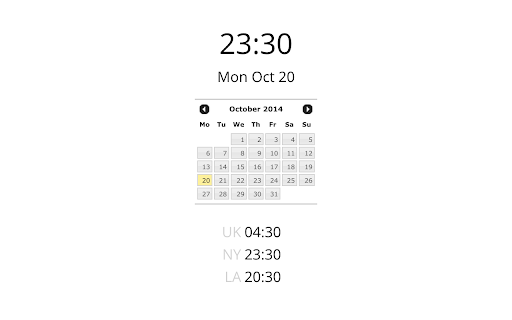


Calendar and clock showing multiple time zones Adds a clock icon to your toolbar, when clicked it will display a popup with simple calendar and time in several time zones of your choice.

Today's Date
Shows you today's date and some other info... Just a simple extension that will show you today's date and some related info. Click on the icon and you'll get: today's date, week, day of the week, the roman year, how many days left to new year and, if you click on another date, the difference between the current date and selected one ... You can change the date format on the options page (right-click on the extension's icon and select "Options")

GMT/UTC Clock
UTC Clock extension for Google Chrome. An extremely simple extension that adds a button for GMT/UTC Time in your Chrome toolbar. Link to the font used in the screenshot in the developer website link. Please download and install this font (free) if you want it to look as it does in the screenshot. --- v4.1 Changelog --- Updating base font for improved readability. --- v4.0 Changelog --- * New aesthetic styling! Easier to read & prettier. * No font download required- using Google Web Font to display. * New code standards enforced. * Day of the week (in UTC format) now displays. --- v3.0 Changelog --- * Updated art and text to only show 'UTC' -- GMT is an antiquated term.

Clock
from riverserene.de, simple desktop clock simple desktop clock based on css3 References https://cssanimation.rocks/clocks/ https://www.w3schools.com/graphics/canvas_clock.asp http://www.pagetutor.com/common/bgcolors1536.html

Toolbar Clock
Stylish analog clock in your browser toolbar. Toolbar Clock is a browser add-on that renders a stylish analog clock in the toolbar popup and also a simple analog clock as the toolbar icon. To see the clock, please click on the toolbar icon to open the popup. There are few settings at the bottom of the UI to adjust the clock. There is also a reload button to refresh the clock UI in case an unexpected error happens. Please note that this add-on does not have any options or settings to adjust. All you need is available in toolbar popup UI. If you want to report a bug or have a feature request, please fill the bug report form in the add-on's homepage (https://mybrowseraddon.com/toolbar-clock.html).
