
nnhjbieohombilpeikbpcogfmimobped

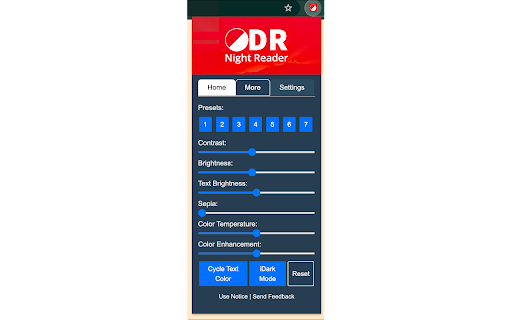


Ease eye strain. Dark Read is a simple Chrome extension to change the background color of a web page. Dark Read is a light weight dark mode Chrome extension that lets you transform the look of any webpage theme with just a few clicks. With its simple interface and intuitive controls, you can easily change the background colour, text colour, contrast and brightness of any webpage to create a more comfortable reading experience. Whether you're browsing late at night or just want to customize the look of your favourite websites, Dark Read is the perfect accessibility tool. It's never been easier to change the colour scheme of any webpage. 📍Pre-set Page Colours 📍Black and White Mode 📍8Bit Black and White Mode 📍Blank out Images and Background Images Install Dark Read today and enjoying a more comfortable, customizable browsing experience. With its powerful features and intuitive controls, it's the perfect tool for anyone who wants to make the most of their web browsing experience. Please note: This extension is under development and still has a few bugs. It does not function on certain webpages like the Chrome Web Store or any Chrome settings pages. Bug fixes, better site support and feature enhancements. Bug fixes, better site support. New B&W modes, more Pre-sets and "Global Enable" feature (experimental). Improved Inverted mode and bug fix. Bug fixes, more site support and Improved Reset function, plus UI changes.

Dark Reader
Dark mode for every website. Take care of your eyes, use dark theme for night and daily browsing. This eye-care extension enables night mode by creating dark themes for websites on the fly. Dark Reader inverts bright colors to make web pages high contrast and easier to read. Adjust brightness, contrast, the sepia filter, font preferences. Enable dark mode on every web page or give websites a sepia tone. Enable or disable Dark Reader for specific websites, automatically sync with system dark mode, or detect already dark websites and leave them unchanged. This is the original Dark Reader extension. Since 2014, we continuously evolve alongside modern web technologies to deliver fast and reliable dark mode support for people sensitive to bright light. By installing the extension you agree to these terms of use https://darkreader.org/terms/

Dark Reader for Chrome
A classic Dark theme for every website. Switch any web pages to dark mode or night shift mode in one click. Dark Reader - Dark Mode and Night Shift is a fast, lite and simple extension that automatically turns the colors of your browser content to warmer or darker. This eye-care extension enables night mode by creating dark themes for websites on the fly. Dark Reader inverts bright colors, making them high contrast and easy to read at night. What will you get from Dark Mode extension: 1) An easy way to create dark mode on every website. In addition, you can customize your dark theme visual from Brightness, Contrast, to Saturation. 2) A night shift mode which changes the website's color to warmer, making it much more pleasing to watch. You can choose to use either dark theme or night shift mode, or both. Turning on reading mode protect your eyes from reading for hours. You can manually choose the shift from color presets, to pick up the most comfortable and calm atmosphere for your eyes during the night sessions or thru the all day long. Social networks, mainstream sites, and all other new tabs will be in dark mode with Dark Theme extension. No needs to open every website settings one by one - just one add-on makes every website in dark mode. Note: Remember to disable any similar dark theme or night shift mode extension to prevent compatibility issues. We really hope that our Dark Reader will be useful to you! We look forward to your feedback and ratings! Also write your suggestions for improving the functionality.

Page Plain Text
Chrome extension that shows page plain text and allows you to edit or download the text [Features] - Shows page plain text (keyboard shortcut: Ctrl + Shift + 1) - Extracts text from the selection on the page - Text editing - Download page plain text (keyboard shortcut: Ctrl + Shift + 2) - Removes all formatting from text - Removes all advertising to focus only on the content of the text - Copy text to use it in other documents (keyboard shortcut: Ctrl + Shift + 3) - Zoom In and Zoom Out text to improve legibility (keyboard shortcut: Ctrl + ➕ / Ctrl + ➖) - Contextual menu to quickly copy or download the plain text of the current page - Dark Mode color scheme [Keyboard Shortcuts] To change the keyboard shortcuts of the extensions you can go here: chrome://extensions/shortcuts [Links] - My Home page: https://www.vincenzodevivo.com/ - My GitHub: https://github.com/deltavi ... or you can buy my books on Amazon 📚 www.amazon.it/Vincenzo-De-Vivo/e/B09MPTBBFY

Dark Mode - Dark Reader for Chrome
Simple dark mode for Google Chrome. Switch all websites to dark mode as desired. Take care of your eyes by the night theme. Dark mode for Chrome can turn the dark theme on any website. Now surfing the Internet is more comfortable, as your eyes will feel much better! Apart from this, your browsing experience will be more stylish. Features of the extension: - Completely free, no in-app purchases. - You can turn on dark mode for any website. - You can install the plugin with one click. - The plugin is small, it does not make your computer slower. Our eyes perceive the dark theme better at night or indoors with poor lighting. It also just looks cool. This design is completely sleek and minimalist. Works on the toggle button in the upper right corner. It's so easy to switch from day to night mode. The dark mode is an extension that helps you quickly turn the screen (browser) to dark at night time. Social networks, mainstream sites, and all other websites will be all together covered in black colors.
