
nmnkjjojccjkllpmjcgjccfdgbefjand
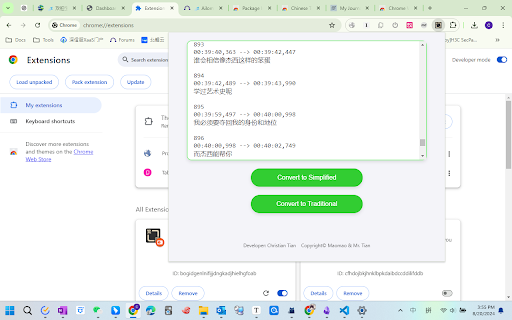

在繁體和簡體之間互相轉換 Convert text between Traditional and Simplified Chinese. The extension feature is very simple and facilitates easy conversion between Traditional and Simplified Chinese. It is mainly designed for Windows users, as MacOS has native conversion shortcuts. Usage Instructions: (It is recommended to pin the icon to the extension bar for easy access.) Click the icon - Simply paste the text into the box and click 'Convert to Traditional' or 'Convert to Simplified'. In theory, there is no limit on the number of characters in the text.

New TongWenTang
Convert characters between Chinese Simplified and Chinese Traditional New Tong Wen Tang is a Browser Extension that provide functions for convert between Simplicity Chinese and Traditional Chinese.

Simplified to Traditional Chinese converter
As one simplified character can have multiple traditional equivalences, sometimes the conversion will produce the incorrect traditional character. (For more information, read: https://en.wikipedia.org/wiki/Ambiguities_in_Chinese_character_simplification)

Upper Lower - Text Case Converter
Change a text to uppercase and lowercase quickly and easily **Includes a converter in the right-click menu** The extension is very easy to use: - Copy a text and paste it into the extension box. - Press the button according to how you want it (Uppercase, Lowercase, Capitalize, Capitalize All, Add hyphen, No spaces and No line break). - The extension will automatically select the result for you to copy. - Done, paste it wherever you want.

Simplify: Text Simplifier
🌟 Simplify: Your AI-Powered Text Simplifier Transform intricate texts into easily understandable content with Simplify! This revolutionary browser extension is your key to effortlessly deciphering challenging information. Perfect for students, professionals, researchers, and everyone in between, Simplify is your personal AI-powered tool for conquering complex text on the web. 🔍 Simplify Mode: Instantly turn complicated content into clear, concise insights. Perfect for making sense of dense websites and documents. 🤔 Explain Mode: Delve deep for thorough understanding. Ideal for exploring and grasping detailed topics. 📝 Summarize Mode: Get the gist quickly with concise summaries of lengthy material. 🎓 For Students: Effortlessly grasp academic concepts. Make studying more efficient and effective. 💼 For Professionals: Quickly interpret jargon-heavy reports and articles. Stay ahead in your field with ease. 🌍 For Non-Native English Speakers: Enhance your understanding of English content. Break down language barriers. 🔬 For Researchers & Academics: Navigate complex academic papers with simplicity. Focus on your research, not on deciphering text. 👀 For General Web Users: Make any online text more accessible. Simplify brings clarity to the web. 💡 How Simplify Works: Select complex text, click Simplify, and watch as our AI transforms it into something easy to understand. It's that simple! ✨ Why Choose Simplify? Save time, improve comprehension, and access information with ease. Simplify is more than a tool; it's your partner in understanding the complex world of text. 👉 Join the Simplify Community Today: Download now and experience the ease of comprehending complex information like never before! It's free for 20 uses a month, with optional upgrades.
