
nljkibfhlpcnanjgbnlnbjecgicbjkge
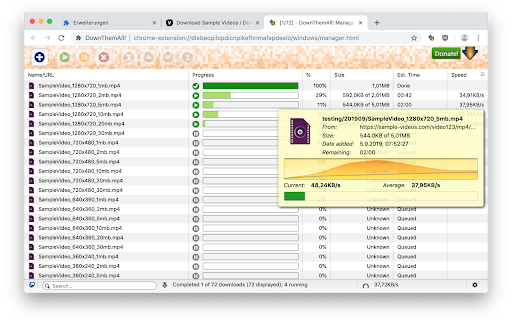
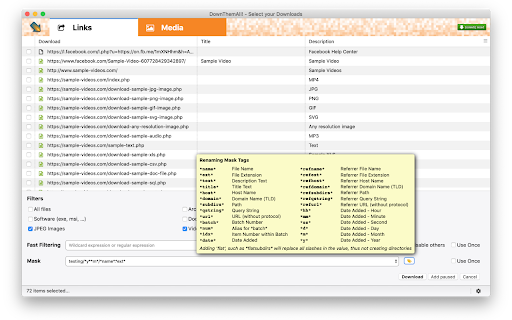
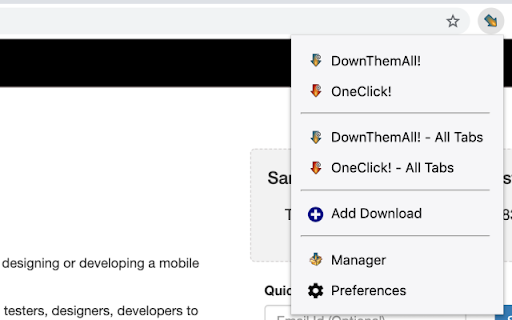
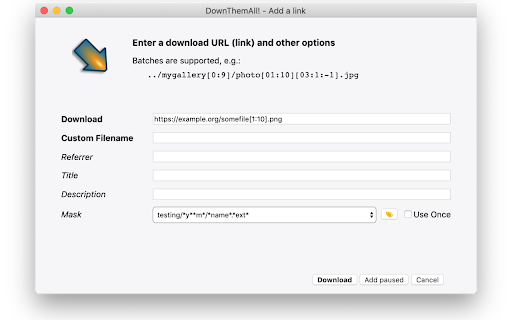
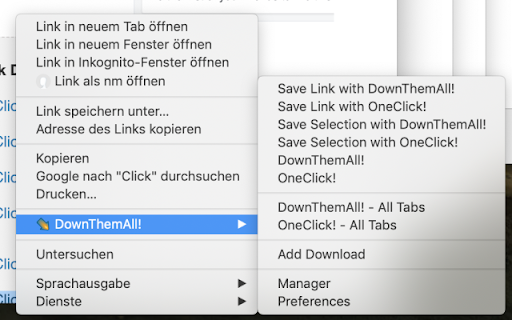
The Mass Downloader for your browser DownThemAll will help you select, queue, sort and run your downloads faster. It comes with advanced ways to select what links to download, and will remember your previous decisions so that you can queue more downloads with just OneClick! Please note: If you have Chrome configured to "Ask where to save each file before downloading", then the browser will do just that, potentially showing you a lot of prompts. There is no way to override this browser behavior from within the extension. This can become tiresome when you download a lot of things through DownThemAll! You can change this setting in the general Chrome Settings under Downloads at any time. Advanced users will also like using renaming masks, which let you automatically assign names (and even sub-folders within your downloads folder), fast-filtering or even custom, re-usable filters. DownThemAll is open-source and free. We spend a lot of time making it, and keep spending a lot of time improving it. We will never add adware, spyware, user tracking or other nasty stuff. Therefore we rely on your donations exclusively to fund the development. PS: We strive to have as few bugs as possible, so please be kind, patient and forgiving, and report any issues you have to https://github.com/downthemall/downthemall/issues

Bulk Image Downloader
Bulk download images from multiple tabs in one click. Supports AVIF, WebP & AI-generated images. Filter by resolution and file type. The fastest way to bulk download images from any website. Save photos from one page or multiple tabs at once — with powerful filters for resolution, file type, and more. Perfect for designers, photographers, researchers, and AI artists who need to save images quickly and efficiently. 🔥 **NEW: AI-Friendly Image Support** — Seamlessly download AI-generated images (data:image/jpeg, data:image/png, data:image/webp) from tools like Midjourney, DALL·E, Stable Diffusion, and more. 🔥 **Modern Format Support** — Full support for next-gen image formats including AVIF, WebP, SVG, and all traditional formats (JPEG, PNG, GIF, BMP). Key Features: ✔ Bulk download images from multiple tabs — choose from: all tabs, current tab, left of current tab, or right of current tab ✔ Preview all images found on the page, including linked images ✔ Filter images by width, height, and file type ✔ Sort images by resolution or tab index ✔ Download selected images to your local folder with one click ✔ Right-click context menu to save any image directly to Downloads, just like Safari ✔ Clean, modern UI for a smooth browsing and downloading experience Simply press the "Download" button, and all selected images are saved to your default Chrome download directory. No extra configuration needed. Versions: 1.1.0 1. Added support for modern image formats: AVIF, WebP, and more 2. Added support for data URI images (data:image/jpeg, data:image/png, etc.) — great for saving AI-generated images 3. Improved UI with a cleaner, more intuitive design 4. Fixed a bug in the "Save Image to Downloads" context menu feature 1.0.3 1. The picture is selected by default 2. Image filtering rules are automatically saved

Download All Images
Easily save images with a wide range of customization features, such as file size, dimensions, and image type. This is a bulk image downloader to extract all photos from the current web page. This online image downloader provides highly customizable filters based on file size, image size, and more! Features: 1. Detects all images loaded on the current web page (even if they're nested iframes) 2. Filters images by file size, dimension, URL or type 3. Finds images in links, background scripts, and CSS files 4. Displays images in a gallery view before downloading 5. Download blob-type images even if the source is dead Filters: 1. Filter by file size 2. Filter by image dimension 3. Filter by image type 4. Filter by image URL (regular expression matching) 5. Filter by same-origin policy 6. Detect image width and height by downloading only the header section of the image Features: 1. Bulk download images 2. Filter based on file properties 3. Filter based on image properties such as width and height 4. Deep image search (extract images from the current page and subsequent pages) 6. Can detect single image path 7. Can download photos in ZIP format 8. Can detect the original image size from thumbnail Download location: By pressing the "Save" button, the extension downloads all selected images in the default download directory or a specified subfolder. Change Log: Version 0.1.1 1. The extension now stores images in a sub-folder (the default sub-folder name is the domain's name) 2. One security bug is fixed. Version 0.2.0 1. Images are now saved in a zip archive to prevent multiple downloads and better file-naming 2. The image detection algorithm is improved. Version 0.2.1 1. User preferences are now persistent. It is still possible to reset them from the UI 2. It is now possible to ask for "Save Dialog" from the UI 3. There is progress indicating how many images proceed 4. UI closes itself when all images are downloaded. Version 0.2.2 1. Deep image searching through all links (up to two levels) 2. Updates JSZip library Version 0.3.4 1. You can now open "Gallery View" in a new browser tab 2. You can now click on a single image in the "Gallery View" 3. It is possible to download images from multiple tabs at once Version 0.3.7 1. Two new filters: remove identical images and remove images with forbidden keywords 2. It is now possible to stop the image spider from the UI without closing it Version 0.5.6 1. Deeps search level 3 (search for both links and images in the destination HTML pages) 2. Custom RegExp filters to increase the searching speed. Version 0.9.0 1. Moves to manifest v3 2. Internal module to detect image width and height only by downloading the header section 3. Detects images first, then detects other mime types 4. The extraction of hard-coded image links is improved

Persepolis Download Manager Integration
Persepolis Download Manager Integration extension replaces default download manager of FireFox by Persepolis Download Manager. Persepolis Download Manager Integration extension replaces default download manager of Google Chrome by PDM Download Manager. Features: - Catch downloads automatically - Exclude URLS by keywords for interrupting - Batch download filter based on include\exclude and file extension For more info & usage visit: https://github.com/persepolisdm/persepolis http://persepolisdm.github.io/

Simple mass downloader
A lightweight batch download manager with flexible filtering and mass-renaming options for easier, more efficient downloads. Simple Mass Downloader is a lightweight and unobtrusive Chrome download manager and batch/bulk/mass downloader. GOOD FOR: Downloading multiple resources from the web: ● Extract only the desired links from web pages using an advanced filtering system. ● Generate better file names using contextual information from the corresponding links (name masks). ● Organize downloads into custom directories using Favorite Folders or Automatic Folders. NOT SO GOOD FOR: ● Downloading streaming media or embedded videos. ● JavaScript-heavy websites where download links are generated on the fly after user interaction. In such cases, the extension cannot detect the links in advance. ● Extract links from the active tab, multiple open tabs, or selected text on web pages. You can also import links from the clipboard, a local file, or a pattern URL. ● Advanced filtering and mass-renaming capabilities using various name masks. You can also define custom categories for resource filtering. ● A dedicated thumbnail grid view for images. Images can be sorted by size or filtered by width and height. ● Flexible download management: a) Pause, resume, and open downloaded files. b) Set server limits or enable sequential downloading mode. ● Development and testing are mainly performed on Windows, with limited testing on Linux. The extension has not been tested on macOS. ● Before using the extension, verify that the “Ask where to save each file before downloading” option is disabled in Chrome’s download settings. Otherwise, multiple “Save As” dialog boxes will appear, defeating the purpose of a mass-downloading extension.
