
legimlagjjoghkoedakdjhocbeomojao
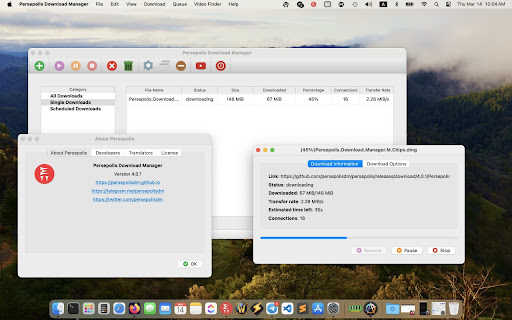
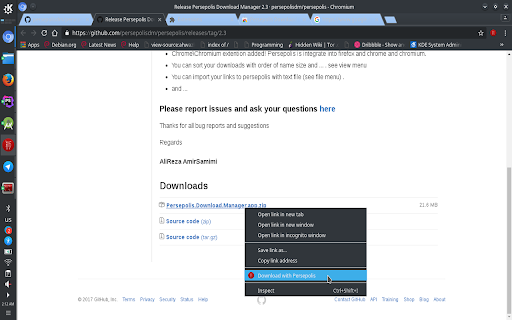


Persepolis Download Manager Integration extension replaces default download manager of FireFox by Persepolis Download Manager. Persepolis Download Manager Integration extension replaces default download manager of Google Chrome by PDM Download Manager. Features: - Catch downloads automatically - Exclude URLS by keywords for interrupting - Batch download filter based on include\exclude and file extension For more info & usage visit: https://github.com/persepolisdm/persepolis http://persepolisdm.github.io/

ArrowDL - Arrow Downloader
The easy way to download images, torrents, videos and music, from any website Free & Open-source software that helps you to download all links, pictures, videos, torrent files, and other media you find on the Web. It's called a "mass" download manager, because it helps you to select, organize, prioritize and run your downloads in parallel. Features: (1) Collect images, music, documents, files (2) Download from video sites (3) Peer-to-peer (4) Manage and prioritize the queue (5) Stop, pause, resume downloads (6) Recreate the same sub-directories as the web page (7) Batch Rename, Open and Move downloaded items How it works? =========== The browser add-on (this extension) sends the links to the open-source standalone application ArrowDL. Why a standalone application? This download manager is a standalone application, in order to separate this extension’s life cycle from the browser’s life cycle. Moreover a standalone manager provides a lot more features, not limited to the Chrome/Firefox/Safari/Opera browser or WebExtensions' API, so we could implement all the features we imagine. Acknowledgements ================ - Thanks to Andy Portmen for the native-client plugin. - Thanks to people contributing to YT-DLP. - Thanks to Arvid Norberg and contributors for the libtorrent library. Contact and Support ================= Hope you like this extension. Please leave a comment here or on Github. For more news, go to: https://www.arrow-dl.com/ For support, go to: https://setvisible.github.io/ArrowDL/

AB Download Manager Browser Integration
Download files with AB Download Manager app With this extension you can manage and organize your downloads with AB Download Manager App Features ✔ Adds "Download with AB DM" to the browser context menu ✔ Opens a popup to download selected links ✔ Detects and shows a popup for video, audio, and HLS streaming media (YouTube and other encrypted streaming sites are not supported) ✔ Automatically captures download links and sends them to the AB Download Manager app NOTE: - This extension ONLY works when you have installed AB Download Manager app on your device. You can install it using Installation link: https://abdownloadmanager.com/#download This Extension is Free and Open Source Link in GitHub: https://github.com/amir1376/ab-download-manager-browser-integration The App is also is Free And Open Source Link in GitHub: https://github.com/amir1376/ab-download-manager

Gopeed
Gopeed browser extension This Extension allows you to download the files via Gopeed instead of your browser's native download manager. Support mulit backend server. Github: https://github.com/GopeedLab/browser-extension

Download with Free Download Manager (FDM)
Sends your downloading jobs to the Free Download Manager by pausing the built-in download manager Send your downloading job requests to the well-known Free Download Manager (FDM) to take advantage of the following features: 1. BitTorrent support 2. Enhanced audio/video files support 3. Download acceleration 4. Resuming broken downloads 5. Smart file management and powerful scheduler 6. Adjusting traffic usage 7. Remote Control 8. HTML Spider This extension offers two levels of integration. The simple one is the right-click context menu items for video, audio, and image file types. The second level is an observer for downloading requests that are sent to the built-in download manager. The extension pauses each download when a new request is submitted. Then sends the actual downloadable URL to your Free Download Manager. This mode is more aggressive and can simply toggle on and off from the browser action. Notes: 1. For the extension to work you need to have Free Download Manager (FDM) installed; http://www.freedownloadmanager.org/ 2. For the extension to be able to communicate with FDM, a small native client is required. This native client can be found at https://github.com/belaviyo/native-client/releases. You will get the instruction on how to install this native client when the extension tries to communicate for the first time. 3. This extension can extract links from selected text. Use the right-click context menu over selected text to access this tool. Web Components: This extension uses "notification-view" web component: https://webextension.org/custom-component/notification-view/index.html
