
mijpgljlfcapndmchhjffkpckknofcnd

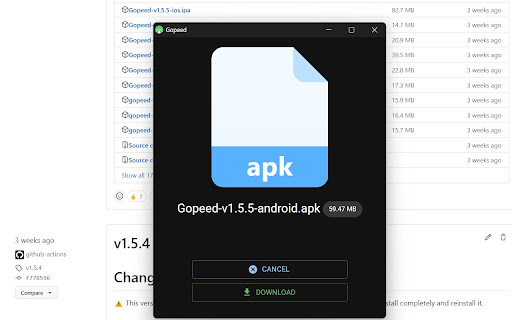
Gopeed browser extension This Extension allows you to download the files via Gopeed instead of your browser's native download manager. Support mulit backend server. Github: https://github.com/GopeedLab/browser-extension

KISS Translator
A minimalist bilingual translation extension that supports webpage, text selection, and video subtitle translation. - [x] Keep it simple, smart - [x] Open source - [x] Adapt to common browsers - [x] Supports multiple translation services - [x] Custom translation interface - [x] Covers common translation scenarios - [x] Web bilingual translation - [x] Input box translation - [x] Seletction translation - [x] Open the translation box on any page - [x] Favorite Words - [x] Mouseover translation - [x] YouTube subtitle translation - [x] Support for various translation effects - [x] Customizable text recognition and full-text translation - [x] Customizable translation styles - [x] Support for rich text translation and display - [x] Support for displaying only the translated text (hiding the original text) - [x] Advanced translation API features - [x] Aggregate and send translated texts in batches - [x] AI contextual conversation memory - [x] Customizable AI terminology dictionary - [x] AI-powered subtitle segmentation and translation - [x] Customizable hooks and parameters - [x] Cross-client data synchronization - [x] KISS-Worker(cloudflare/docker) - [x] WebDAV - [x] Custom translation rules - [x] Rule subscription/rule sharing - [x] Customized terminology - [x] Custom shortcut keys - `Alt+Q` Toggle Translation - `Alt+C` Toggle Styles - `Alt+K` Open Setting Popup - `Alt+S` Open Translate Popup / Translate Selected Text - `Alt+O` Open Options Page - `Alt+I` Input Box Translation

Ghost Downloader Browser Extension
A cross-platform fluent-design AI-boost multi-threaded downloader built with Python.

Aria2 Explorer
Speed up your downloads with Aria2, manage your download tasks easily. Aria2-Explorer captures browser's download task and exports it to Aria2 via JSON-RPC interfaces to complete download task. Aria2 is a lightweight multi-protocol & open-source command-line download utility. It supports HTTP/HTTPS, FTP, SFTP, BitTorrent and Metalink. 1. For Windows, please install Aria2 Manager: https://apps.microsoft.com/detail/9p5wq68q20wv?cid=cws Other platform, please download Aria2 utility: https://github.com/aria2/aria2/releases/latest. 2. For Windows, please run Aria2 Manager . Other platform, please run Aria2 in the Terminal with typing aria2c --enable-rpc. 3. Install this Chrome extension. 4. Enable auto-capture on the extension options page and configure others as you need. (For Motrix user, please use http://localhost:16800/jsonrpc as the RPC URL) After these steps, you could enjoy the multi-threads and BT download experience inside the Chrome. Warning: Please turn off auto-capture function, when you are using other extension to download network resources. Otherwise, there will be conflict and exception arisen. Features: [ ZERO collection of user data and privacy ] 1. Auto capture browser download tasks - Capture notification - Support magnet links - Toggle auto-capture by shortcut (Default: Alt + A) - Set all Aria2 options manually before download - Filter task by the domain, file extensions or file sizes Filter priority: domain > file-ext > file-size, white-list > black-list 2. Auto-select Aria2 RPC server by matching the preset download URL pattern 4. Synchronize and store all settings on the cloud 5. Support for zh-CN/zh-TW/en/fr/it/ja/ko/ru/uk languages 9. Support shortcuts in the options page (Save: Alt + S Reset: Alt + R Download: Alt + J Upload: Alt + U)

Motrix WebExtension
WebExtension for Motrix download manager This WebExtension allows you to automatically download all the files via Motrix Download Manager instead of your browser's native download manager. Please read the documentation before using the extension: https://github.com/gautamkrishnar/motrix-webextension#how-to-use Motrix needs to be running in the background for this extension to work. This extension cannot launch Motrix automatically if it is not already running, due to API limitations. You can download the motrix download manager from here: https://motrix.app/ Feel free to report issues at: https://github.com/gautamkrishnar/motrix-webextension/issues Make sure that you are not filing a duplicate issue. This is an opensource project. Your contributions can make a difference.
