
bdiifdefkgmcblbcghdlonllpjhhjgof
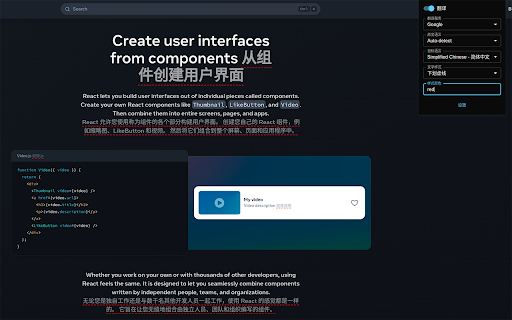

A minimalist bilingual translation extension that supports webpage, text selection, and video subtitle translation. - [x] Keep it simple, smart - [x] Open source - [x] Adapt to common browsers - [x] Supports multiple translation services - [x] Custom translation interface - [x] Covers common translation scenarios - [x] Web bilingual translation - [x] Input box translation - [x] Seletction translation - [x] Open the translation box on any page - [x] Favorite Words - [x] Mouseover translation - [x] YouTube subtitle translation - [x] Support for various translation effects - [x] Customizable text recognition and full-text translation - [x] Customizable translation styles - [x] Support for rich text translation and display - [x] Support for displaying only the translated text (hiding the original text) - [x] Advanced translation API features - [x] Aggregate and send translated texts in batches - [x] AI contextual conversation memory - [x] Customizable AI terminology dictionary - [x] AI-powered subtitle segmentation and translation - [x] Customizable hooks and parameters - [x] Cross-client data synchronization - [x] KISS-Worker(cloudflare/docker) - [x] WebDAV - [x] Custom translation rules - [x] Rule subscription/rule sharing - [x] Customized terminology - [x] Custom shortcut keys - `Alt+Q` Toggle Translation - `Alt+C` Toggle Styles - `Alt+K` Open Setting Popup - `Alt+S` Open Translate Popup / Translate Selected Text - `Alt+O` Open Options Page - `Alt+I` Input Box Translation

Douban Book+
Only 1-click from Douban to your favorite ebook platforms

ScTranslator - Translator, Page Translator, Dictionary
Translate selected text with multiple sources, Webpage translating that have 3 display modes... An all-in-one translation extension. Translate with multiple translate sources at the same time / Various keyboard shortcuts / Translate history in single webpage / Separate translate window / Customize theme / Text preprocessing / Translation Collection / Webpage translating ... Preview GIFs of related features: https://github.com/chunibyocola/sc-translator-crx/discussions/19 * There are a variety of options in the options page for you to set up, so it is recommended to access the options page first after installing this extension to adjust a set of configurations that best suits you. This extension provide a variety of ways to correspond the inline web translation, and you can enable of disable these according to your preference. Support webpage translating, you can make it display original text and translation simultaneously. Support custom translate source, you can add custom sources which built by yourself or others. Support dark theme, you can also customize your own theme. Support PDF viewer, with the PDF viewer, this extension can be used on PDF files. Separate translate window will auto respond to the translate request when you click the "translate" item of context menus in the extension unavailable page. If you want to use the URL suffix of ".cn" in some translate source like "Bing", you can check the "Use '.cn' in URL" option. Notice: After installing or updating this extension, if you need to use this extension in existing webpage, please refresh the webpage first.

LazyCat Bookmark Cleaner
Clean invalid bookmarks, duplicates and empty folders with one click. Generate bookmark profile. All features run locally to… # Lazy Cat Bookmark Cleaner - Your Bookmark Organization Assistant 🐱 Make bookmark management easy and enjoyable! A cute lazy cat assistant helps you intelligently clean and organize your browser bookmarks. ### 🧹 Smart Bookmark Cleaning - Automatically detect invalid bookmarks, duplicate bookmarks and empty folders - Batch cleaning feature, restore tidiness with one click - Support multiple error type detection and classification - Preview before cleaning, safe and controllable ### 📊 Personalized Bookmark Profile - Generate unique bookmark usage reports - Visualize your collection preferences - Discover your treasured web collections - Understand your browsing habits ## 🌟 Highlights - Adorable cat assistant accompanies the organization process - Clean and elegant interface design - Supports both English and Chinese interfaces - Real-time progress display, transparent operation ## 🎯 Perfect For - Bookmark collectors - Digital organizers - Browser cleaners - Productivity tool enthusiasts Start organizing now and give your bookmarks a fresh new look! ✨

codebox-AI Download Article
Website:https://www.code-box.fun Note: Due to review reasons, the new version may be delayed in listing. Please wait patiently. If you have any questions, please submit an issue on GitHub. We will not respond in the comment section. GitHub address: [https://github.com/027xiguapi/code-box](https://github.com/027xiguapi/code-box) Customization - Insert custom styles (CSS code) - Customize the download of HTML - Customize the download of Markdown - Customize the download of PDF CSDN - Open any CSDN blog to start copying code. - In the unlogged state on CSDN, code selection is supported. - In the unlogged state on CSDN, one-click copy is available via the button at the top right corner of the code block. - In the unlogged state on CSDN, no forced login pop-up will appear. - In the state of not following the blogger, no prompt will appear to follow the blogger to read the full article, and the article will be fully displayed. - Code blocks will be automatically expanded. - On mobile devices, the prompt to jump to the app will be blocked. Zhihu - One-click code copying. - In the unlogged state on Zhihu, no prompt will appear to expand and read the full article, and the article will be fully displayed. - In the unlogged state on Zhihu, no forced login pop-up will appear. Baidu - Disable the AI chat box. Jianshu - One-click code copying. - No prompt will appear to expand and read the full article, and the article will be fully displayed. - No forced login pop-up will appear. Script Home - Open any Script Home blog to start copying code. - In the unlogged state on Script Home, code selection is supported. - Ads will be blocked. - On mobile devices, in the unlogged state on Script Home, one-click copy is available via the button at the top right corner of the code block. 51CTO Blog - In the unlogged state on 51CTO Blog, code selection is supported. - In the unlogged state on 51CTO Blog, one-click copy is available via the button at the top right corner of the code block. - In the unlogged state on 51CTO Blog, no forced login pop-up will appear. - On mobile devices, in the unlogged state on 51CTO Blog, one-click copy is available via the button at the top right corner of the code block. PHP Chinese Network - In the unlogged state on PHP Chinese Network, code selection is supported. - In the unlogged state on PHP Chinese Network, one-click copy is available via the button at the top right corner of the code block. - In the unlogged state on PHP Chinese Network, no forced login pop-up will appear. - On mobile devices, in the unlogged state on PHP Chinese Network, one-click copy is available via the button at the top right corner of the code block.
