
djlkbfdlljbachafjmfomhaciglnmkgj
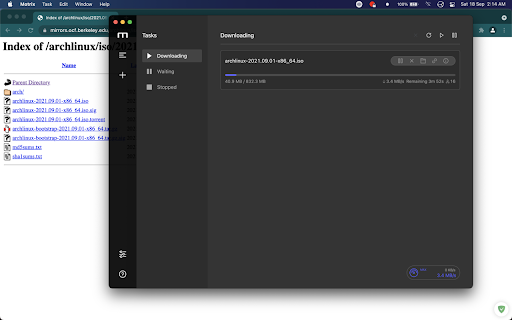
WebExtension for Motrix download manager This WebExtension allows you to automatically download all the files via Motrix Download Manager instead of your browser's native download manager. Please read the documentation before using the extension: https://github.com/gautamkrishnar/motrix-webextension#how-to-use Motrix needs to be running in the background for this extension to work. This extension cannot launch Motrix automatically if it is not already running, due to API limitations. You can download the motrix download manager from here: https://motrix.app/ Feel free to report issues at: https://github.com/gautamkrishnar/motrix-webextension/issues Make sure that you are not filing a duplicate issue. This is an opensource project. Your contributions can make a difference.

Free Download Manager
Free Download Manager integration with browser It's an official Google Chrome extension by Free Download Manager developers. The sole purpose of this extension is integration with Free Download Manager. FDM is a fast and reliable download manager and accelerator that improves your experience with downloads and helps you organize them in an easy manner. If you want to help us make Free Download Manager (or this Chrome extension) better - you are always welcome on our forum where you can post bug reports, feature suggestions, and ideas, as well as get support for any issues you stumbled upon with FDM: https://www.freedownloadmanager.org/board/ Note: Windows, Mac and Linux! Requires FDM to be installed to work properly.

Motrix Next Extension
Motrix Next Extension seamlessly bridges your browser with the Motrix Next desktop download manager. When you download a file, the extension automatically intercepts it and delegates the task to Motrix Next's aria2 engine — unlocking multi-threaded, resumable, and accelerated downloads. • Automatic Download Interception Captures browser downloads and routes them to aria2 for multi-threaded acceleration. Works transparently — just download as you normally would. • Per-Site Rules Add glob-pattern rules (e.g. *.github.com) to always intercept, always skip, or defer to global settings for specific domains. • Context Menu Integration Right-click any link, image, audio, or video and choose "Download with Motrix Next" to send it directly to aria2. • Magnet Link Support Clicks on magnet: links are automatically captured and routed to Motrix Next. • Torrent File Handling Intercepted .torrent files are forwarded to aria2 for immediate BitTorrent download. • Real-Time Dashboard The popup displays live download/upload speeds, active/waiting/completed task counts, and connection status. • Auto-Launch When Motrix Next is not running, the extension can automatically launch it via the motrixnext:// protocol, wait for the RPC service to become available, then retry the download. • Download Bar Control (Optional) Hide Chrome's native download shelf after a download has been intercepted, keeping your browser clean. • Completion Notifications Get desktop notifications when downloads are sent to aria2 and when they finish. • Appearance Customization Choose from System/Light/Dark themes and 10 Material You color schemes. • Multi-Language Support Full English, Chinese (Simplified), and Japanese localization. • Diagnostics Built-in event log with severity levels for troubleshooting interception issues. 1. Install the extension and configure the RPC port and secret in Settings 2. Make sure Motrix Next is running on your computer with RPC enabled 3. Download any file — the extension intercepts it and sends it to Motrix Next 4. The file downloads through aria2 with multi-threaded acceleration This extension does NOT collect, store, or transmit any personal data. All communication occurs exclusively between your browser and the Motrix Next app running on your local machine (127.0.0.1). No data is ever sent to any external server. Full privacy policy: https://github.com/AnInsomniacy/motrix-next-extension/blob/main/docs/PRIVACY_POLICY.md This extension is free and open source under the MIT License. Source code: https://github.com/AnInsomniacy/motrix-next-extension

NeatDownloadManager Extension
Integrates Neat Download Manager Application with Chrome browser. Sends your Download links to Neat Download Manager and helps you Download Video/Audio from many websites. Caution: For Mac and Windows and needs Neat Download Manager to be installed. Can’t download YouTube videos and encrypted media files. NeatDownloadManager does not collect or send any personal data. Holding down Delete-Key will bypass the extension.

Chrono Download Manager
Chrono Download Manager is the first and only full-featured download manager for Google Chrome™. Manage all your downloads inside Chrome™ and there is no need to install any separate downloader application. Chrono is tightly integrated with Chrome™ by context menus, toolbar buttons and key shortcuts. Besides download management, Chrono is also your best video download helper and bulk image downloader. The Chrono Sniffer detects all links, images, audios and videos on a webpage, and you can filter URLs by their file types or by Regular Expression. Start downloading with Chrono today! Have fun playing with it, and don't forget to share! * Totally override the Chrome™'s default download manager, and get rid of the bottom downloads toolbar. * Access your downloads in a popup window with a single click on the toolbar icon. * Organize your downloads with a fresh and clean table view or list view, and apply custom filters to group your downloads into different categories. * Notifications for downloads. * Preview your docs, images, audios, videos and zip files right after your download completes. * Highly customizable task filters let you group downloads by type, date, url etc. * Batch descriptors help you download a range of URLs with pattern painlessly. * Naming Mask allows you to name a downloaded file by link text, page title, URL components, date/time and many more. * Rule System uses programmable rules to automatically rename your downloads, and to route your files to different folders. * Chrono currently uses Chrome™'s built-in Downloads API, so it does not offer multi-threaded downloading capability and has limited support for pausing and resuming a large download. * The extension may not work properly in incognito mode. * The extension is not for downloading youtube videos.
