
modofbhnhlagjmejdbalnijgncppjeio


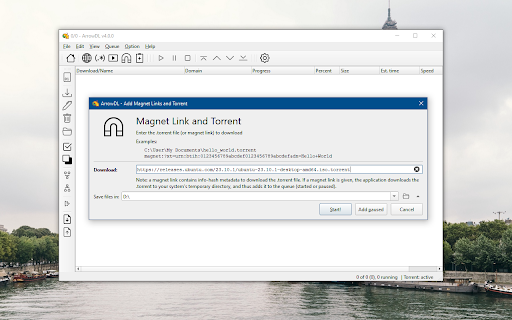

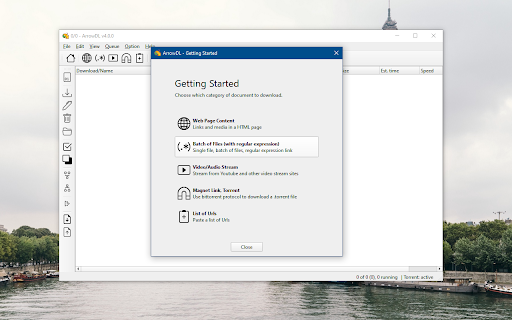
The easy way to download images, torrents, videos and music, from any website Free & Open-source software that helps you to download all links, pictures, videos, torrent files, and other media you find on the Web. It's called a "mass" download manager, because it helps you to select, organize, prioritize and run your downloads in parallel. Features: (1) Collect images, music, documents, files (2) Download from video sites (3) Peer-to-peer (4) Manage and prioritize the queue (5) Stop, pause, resume downloads (6) Recreate the same sub-directories as the web page (7) Batch Rename, Open and Move downloaded items How it works? =========== The browser add-on (this extension) sends the links to the open-source standalone application ArrowDL. Why a standalone application? This download manager is a standalone application, in order to separate this extension’s life cycle from the browser’s life cycle. Moreover a standalone manager provides a lot more features, not limited to the Chrome/Firefox/Safari/Opera browser or WebExtensions' API, so we could implement all the features we imagine. Acknowledgements ================ - Thanks to Andy Portmen for the native-client plugin. - Thanks to people contributing to YT-DLP. - Thanks to Arvid Norberg and contributors for the libtorrent library. Contact and Support ================= Hope you like this extension. Please leave a comment here or on Github. For more news, go to: https://www.arrow-dl.com/ For support, go to: https://setvisible.github.io/ArrowDL/

Simple Download Manager
Simple Download Manager is integrated into your browser download manager as much as possible. Main features: 1. Pause and resume downloads. 2. Notification telling you the download estimated time. 3. Sound played when download ends. Share your experience at the Chrome Store and rate Simple Download Manager(SDM) extension Extension made by Adrián Arbizu Donoso (Spain). Framework used: Angular 16.

Elite Download Manager
Easily manage all your downloads from toolbar popup! Elite Download Manager is an extension that lets you easily access the download library from the browser toolbar popup. You can manage all downloads without opening the download tab in your browser. Using this add-on could save you time while you are browsing as it gives you quick access to all your downloaded items from the toolbar popup UI. Please note that what happens in the popup gets updated in the download library simultaneously and vice-versa. There are also several buttons for each item within the toolbar that have a tooltip title and are self-explanatory. If you want to report bugs or have a feature request, please fill out the bug report form on the addon's homepage (https://mybrowseraddon.com/download-manager.html).

Bookmarks Commander
A dual-pane Norton Commander liked bookmarks manager that supports sorting, dark theme, search, and duplicate detection This is a two-panel bookmarks manager for your browser. It works similar to the famous Total Commander. You can move items between the panels or view two different directories simultaneously. Instruction: Click on the toolbar button once to open the commander in a new browser tab. By default the left panel has focus. Use arrow up and arrow down keys to navigate. Use Enter to move to a directory. To move the other panel simply press The left or right arrow key. Shortcuts: [open links]: Press Enter key to open on the same tab. Press Ctrl + Enter or Command + Enter to open in a background tab or use double-click to open on the same tab. Press Ctrl/Command while double-clicking to open in a background tab. [select multiple bookmarks]: Ctrl/Command with left-click to select more items. [copy links to the clipboard]: Ctrl + C or Command + C to copy selected links to the clipboard. [copy titles to the clipboard]: Ctrl + X or Command + X to copy selected titles to the clipboard. [directly navigate to a bookmark]: Press the first character of the title multiple times to navigate between items starting with this particular character [move one step up]: Use backspace to navigate to the parent directory [move between left and right panels]: use Tab key to toggle between panels. Use Ctrl + 1 or Command + 1 to move to the left tab. Use Ctrl + 2 or Command + 2 to move to the right tab. You can alternatively use arrow-left and right to move between panels. [move selected bookmarks and folders to the other panel]: Use Ctrl/Command + right arrow key to move selected items to the right panel when the left panel is focused. Use Ctrl/Command + left arrow key to move selected items to the left panel when the right panel is focused. [sort items]: Ctrl/Command + J for A-Z and Ctrl/Command + Shift + J for Z-A [find duplicated bookmarks]: Ctrl/Command + Shift + F; use the "duplicates" keyword on the search bar to find all duplicated bookmarks in the current directory and subdirectories. [move bookmarks between different browsers]: Ctrl/Command + Y to export selected bookmarks to the clipboard, then use Ctrl/Command + P to import them to the new machine. This way you can transfer bookmarks between two browsers. [configurations]: Use Ctrl/Command + S to access configuration panel. You can change the font size and font family of the interface or change the color scheme (theme) of the interface (dark, light, or based on your OS color scheme) or toolbar icon's color. It is also possible to use the new "VIM" mode to support VIM-compatible navigation (still in progress). Notes: 1. When an operation is not allowed, the button is disabled. 2. You can see all the shortcuts by placing your mouse over the buttons. 3. You can drag and drop bookmarks between panes 4. You can use right-click context menu to open links in new windows

Extentie - extension manager
A simple and elegant Chrome extension manager allows you manage your extensions in a popup window. Extentie is a simple and beautiful tool that allows you to toggle and manage Chrome extensions in a popup. Latest update: - Now you can create your own groups to manage your extensions - Revamped from ground up, added more features
