
agokeleincpgkfodginnangajeejbgjd

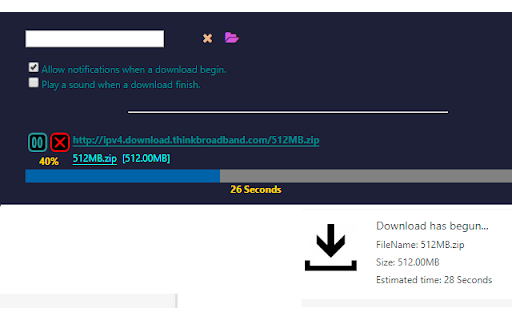
Simple Download Manager is integrated into your browser download manager as much as possible. Main features: 1. Pause and resume downloads. 2. Notification telling you the download estimated time. 3. Sound played when download ends. Share your experience at the Chrome Store and rate Simple Download Manager(SDM) extension Extension made by Adrián Arbizu Donoso (Spain). Framework used: Angular 16.

Downloads Button
Easily open downloads in a new tab via the toolbar button. Downloads Button is a simple, easy-to-use and lite addon that helps you open downloads tab as quickly as possible with just one click. a. Adds a toolbar button to open downloads page in a new tab. b. Adds a context menu item to open downloads page (similar to toolbar button). c. If downloads tab is already open, clicking on the toolbar button will only reload the tab. d. You can still open downloads tab with (Ctrl+J) hotkey. e. The toolbar icon supports both the light and dark browser themes. Note: to report bugs, please fill the bug report form in the addon's homepage (https://mybrowseraddon.com/downloads-button.html).

SVD Video Downloader
Smart Video Downloader is an extension that allows you to download videos from most popular video streaming websites. - When the… Smart Video Downloader is an extension that allows you to download videos from most popular video streaming websites. - When the extension detects that a video is being played in a website, icon will change allowing you to notice the download link. You simply just need to open the extension's popup page and press download. - You can also preview the video before starting the download. Share your experience at Chrome Store and rate SMART VIDEO DOWNLOADER (SVD) extension Extension made by Adrián Arbizu Donoso (Spain). Framework used: Angular 12.

Turbo Download Manager (3rd edition)
A download manager with speed acceleration, site spider, dynamic segmentation, resume, pause, and download recovery "Turbo Download Manager" (edition 3) is a download management extension that employs multi-threading techniques and incorporates an embedded HTML spider for extracting video, audio, and image content from web pages. Much like IDM (Internet Download Manager) and JDownloader, this extension includes a feature to enhance download speeds by fetching multiple file segments simultaneously. This downloader is written entirely in JavaScript and does not rely on external dependencies. Features: 1. Resume and Error Recovery: You can resume downloads and recover from interruptions, such as lost connections, computer shutdowns, or unexpected power outages, without restarting from scratch. 2. Pause Active Tasks: Pause ongoing downloads when necessary to reduce network traffic. 3. Dynamic Segmentation and Speed Boost: Turbo Download Manager divides files into multiple sections and downloads them concurrently within an internal IndexedDB database, ensuring optimal download speeds regardless of your connection type. 4. Enhanced Media File Support: It includes an internal HTML spider module for detecting media content like videos, audio, and images. 5. Integrated M3U8 Parser and Live Stream Downloader: This tool supports HLS (HTTP Live Streaming) and features AES-128 decryption capabilities. 6. Custom "Referrer" Header Support: You can specify custom "Referrer" headers for download jobs. Whether you want to accelerate your download speeds or enhance download stability on unreliable networks, this download manager integrates with your browser's download manager to provide a smooth experience.

Download with Free Download Manager (FDM)
Sends your downloading jobs to the Free Download Manager by pausing the built-in download manager Send your downloading job requests to the well-known Free Download Manager (FDM) to take advantage of the following features: 1. BitTorrent support 2. Enhanced audio/video files support 3. Download acceleration 4. Resuming broken downloads 5. Smart file management and powerful scheduler 6. Adjusting traffic usage 7. Remote Control 8. HTML Spider This extension offers two levels of integration. The simple one is the right-click context menu items for video, audio, and image file types. The second level is an observer for downloading requests that are sent to the built-in download manager. The extension pauses each download when a new request is submitted. Then sends the actual downloadable URL to your Free Download Manager. This mode is more aggressive and can simply toggle on and off from the browser action. Notes: 1. For the extension to work you need to have Free Download Manager (FDM) installed; http://www.freedownloadmanager.org/ 2. For the extension to be able to communicate with FDM, a small native client is required. This native client can be found at https://github.com/belaviyo/native-client/releases. You will get the instruction on how to install this native client when the extension tries to communicate for the first time. 3. This extension can extract links from selected text. Use the right-click context menu over selected text to access this tool. Web Components: This extension uses "notification-view" web component: https://webextension.org/custom-component/notification-view/index.html
