
jbialncfijnjojchcmhfmjgjggbbdghb
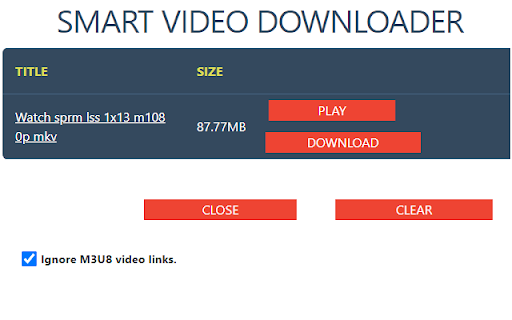
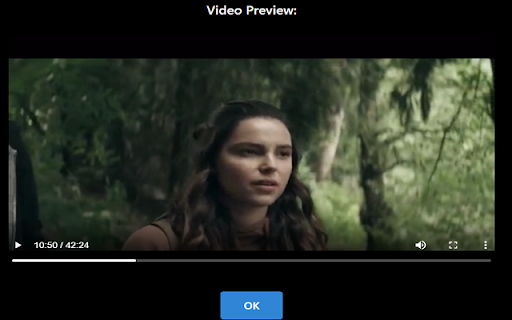
Smart Video Downloader is an extension that allows you to download videos from most popular video streaming websites. - When the… Smart Video Downloader is an extension that allows you to download videos from most popular video streaming websites. - When the extension detects that a video is being played in a website, icon will change allowing you to notice the download link. You simply just need to open the extension's popup page and press download. - You can also preview the video before starting the download. Share your experience at Chrome Store and rate SMART VIDEO DOWNLOADER (SVD) extension Extension made by Adrián Arbizu Donoso (Spain). Framework used: Angular 12.

Video Downloader Prime
Video Downloader Prime is an extension that helps you quickly download popular video formats right from your browser's toolbar popup. Note: Video Downloader Prime is NOT working for the YouTube website or any other YouTube videos embedded in other websites due to Google, YouTube, and Chrome Store policies and restrictions. Note: Video Downloader Prime is NOT responsible for media content that you download with this addon. We strongly recommend that you verify the related media copyright permissions on each website before downloading any video file(s). Key features: 1. Toolbar popup, provides an easy interface to download the video(s) or copy the video links to the clipboard. 2. Badge icon text shows the number of captured videos within the page. 3. You can add, delete, or disable video formats from the Options page. 4. There is also a setting to specify the minimum size for videos to trigger the download (see Options page). 5. Popup interface supports dark theme. To switch theme, please press the - moon - icon at the bottom toolbar. If you see any bugs, or you have a feature request or other improvements in mind, please fill out the bug report form on the addon's homepage (https://mybrowseraddon.com/download-helper.html).

Video Downloader professional
Download online videos in various formats from any websites. Video Downloader save video and watch it later. Video Downloader professional for fast downloading online videos from any webpages. The popular Chrome extension supports many video formats. Watch favorite moments with friends or show useful guides to business partners even if you aren't online. Save interested video files to review them later on your PC. You can try Video Downloader professional and notice the difference! Use extension for free without any registration. Save in different available formats and qualities according to your needs. How video downloader works? - After installing the extension, go to a website that contains video resources. - All available video files that are on the page will be detected by the extension. Once found, an number mark is shown on the extension icon indicating that media file is available for download. - A green Download button will appear on the video itself, along with all the available video file sizes. - You just have to choose the size of the video you want to download. - Nothing complicated! You do not need to register an account to use this video saver. You can download any video or audio without register. Download using popup icon: Available for downloading video files are shown after clicking popup icon of the extension. Number shown on popup icon of the extension corresponds to q-ty of video available for downloading on page. Note: Video Downloader is not a Youtube Downloader. Due to restrictions of the Google Web Store Policies and Developer Program Policies we can not download Youtube Videos. Thank you for understanding. We really hope that our extension will be useful to you! We look forward to your feedback and ratings! Also write your suggestions for improving the functionality.

Video downloader that works! Save online videos
Download video now, watch it later. Fast, light and reliable video downloader Video Downloader is a free video downloader browser extension that lets you save videos from Facebook, Instagram, Twitter, and hundreds of other websites directly to your device. Free Video Downloader – Download videos from Facebook, Instagram, Twitter, and more at no cost. Fast Downloads – Consistent and reliable download speeds across all supported websites. One-Click Download – Detect and download any video with a single click directly from your browser. Multiple Formats – Save videos in MP4 and other popular formats compatible with any device. Auto Video Detection – Automatically detects downloadable videos on Facebook, Instagram, Twitter, and any webpage you visit. Unlimited Downloads – No caps on the number of videos you can save from any website. Lightweight – Designed to be resource-efficient so it doesn't slow down your browser. Easy to Use – Simple, clean design that's easy for anyone to use. Quick Support – Friendly and responsive support team available anytime. Save Facebook Videos – Download any public Facebook video directly to your device for offline viewing. Download Instagram Videos – Save Instagram videos, reels, and stories before they disappear. Download Twitter Videos – Capture and save Twitter videos and GIFs instantly with one click. Download Videos from Any Website – Save streaming videos, tutorials, and clips from hundreds of websites. Offline Viewing – Keep your favourite videos saved locally so you can watch them anywhere without internet.

Video Downloader Social
Video downloader free extension for social networks save online videos such as m3u8, live streams, mp4, hls, etc. Video Downloader Social is a powerful extension for Chrome browser to save videos from popular video hubs. This tool is the easiest and fastest way to save online videos from mainstream websites. Run saved video later at any time even without an internet connection. Save files and share with friends funny moments. Keep downloaded files on your PC for future watching. You do not need to register an account to use this video downloader. You can download any video or audio without register. This video downloader is for free to use. This extension detects M3U8 streaming formats on the active tab and offers to download these segmented streams as a single file to the user's local disk. When downloading HLS videos, if the m3u8 file provides multiple resolutions, you can freely switch between them. Extension is suitable for videos that use common playback technologies, such as HLS videos played through m3u8 files or mp4 and webm videos played through video tags. Usage Video Downloader Social allows you to download mp4, wmv, flv, 3gp, swf - files, but not streams. No Youtube Downloader. Please note: this Vide Downloader Social is NOT a Youtube Downloader. Due to restrictions of the Google Web Store Policies and Developer Program Policies this extension can not download Youtube Videos. Thank you for understanding.
