
jbmbplbpgcpooepakloahbjjcpfoegji
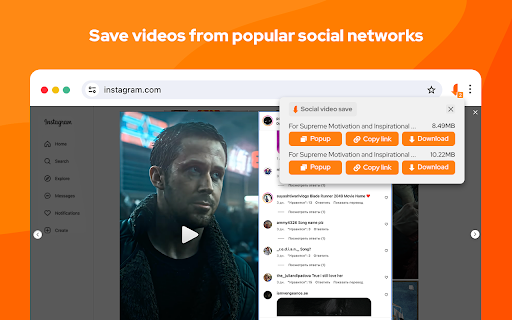


Video downloader free extension for social networks save online videos such as m3u8, live streams, mp4, hls, etc. Video Downloader Social is a powerful extension for Chrome browser to save videos from popular video hubs. This tool is the easiest and fastest way to save online videos from mainstream websites. Run saved video later at any time even without an internet connection. Save files and share with friends funny moments. Keep downloaded files on your PC for future watching. You do not need to register an account to use this video downloader. You can download any video or audio without register. This video downloader is for free to use. This extension detects M3U8 streaming formats on the active tab and offers to download these segmented streams as a single file to the user's local disk. When downloading HLS videos, if the m3u8 file provides multiple resolutions, you can freely switch between them. Extension is suitable for videos that use common playback technologies, such as HLS videos played through m3u8 files or mp4 and webm videos played through video tags. Usage Video Downloader Social allows you to download mp4, wmv, flv, 3gp, swf - files, but not streams. No Youtube Downloader. Please note: this Vide Downloader Social is NOT a Youtube Downloader. Due to restrictions of the Google Web Store Policies and Developer Program Policies this extension can not download Youtube Videos. Thank you for understanding.

FetchV - Video Downloader for m3u8 & hls
The video downloader for saving web videos and live streams. Features: 1. Supports HLS video (streaming video indexed by m3u8 file), integrating all media fragments into a single MP4 file. 2. Supports HLS live streaming. 3. Supports videos or live streams with a 'blob' prefix in the player's src address. For such media, when the actual media address cannot be detected, the "recording mode" can be used to convert the buffered data into an MP4 file. 4. Supports various static videos or audios that can be played on web pages, such as MP4, WEBM, etc. 5. Supports streaming MP4 (HLS v7, may add support for "MPEG-DASH" in the future). 6. Uses multi-thread downloading, which can significantly increase the download speed in good network conditions, very useful for downloading large files. 7. Supports switching resolutions, available when the HLS video's m3u8 file provides multiple resolutions. 8. Provides media preview, if multiple media are captured on a page, you can confirm your target through the preview. 9. Provides a feature-rich download interface, where you can know the download speed, progress, and perform operations like switching download threads, switching resolutions, and modifying file names. 10. All the work of this tool is done in your browser, without using any third-party servers to transmit or convert media data. Notes: 1. This tool is only applicable to videos that comply with technical standards, and it does not work for videos using non-standard playback technologies. It does not have special adaptations for specific websites. 2. It does not support encrypted videos, and we are not responsible for any media you download. It is recommended to check the copyright of the media before downloading. 3. Although this tool has been adapted to popular web videos, it cannot guarantee absolute success in the adapted scope. If it doesn't work for you, please try other tools as an alternative.

Video Downloader - MPMux
A professional online video downloader for saving videos such as mp4,m3u8,hls,live. This extension is designed for downloading online videos and differs from most video downloader extensions. In addition to downloading standard MP4 and WEBM videos, it can also download HLS videos and HLS live streams, which are currently popular for online video playback. It converts HLS streams into a single MP4 file without needing third-party tools. 1. Broad Compatibility: Supports popular online video formats. 2. Optimized for Large File Downloads: Utilizes concurrent request technology for faster downloads. 3. Video Recording Feature:** Suitable for streams that cannot be directly downloaded. 4. No Third-Party Tools Required: For streaming videos, the extension can directly merge video fragments and output them as MP4 files. 5. Regular Updates and Maintenance: We continuously improve the extension’s features and fix bugs in response to changes in web environments and programming technologies. 6. Security and Privacy: It does not collect any user information or store any download data. All downloads and data processing are handled within your browser.

Video Downloader by Qooly
Download videos from popular video websites quickly and easily. Save the most popular video formats like mp4 and m3u8. Video Downloader is a powerful and user-friendly browser extension designed to help you download videos from popular websites quickly and easily. With Qooly, you can save M3U8 streams to MP4 format, ensuring your favorite videos are always available offline. With its user-friendly interface and robust features, our Video Downloader is an essential tool for anyone who values flexibility and control over their video content. Say goodbye to buffering issues and data limitations, and hello to a seamless, high-speed downloading experience. Whether you're a student, professional, content creator, or casual viewer, Qooly empowers you to enjoy your video content on your terms, anytime and anywhere. Features: 📥 Capture and Convert Seamlessly captures M3U8 video streams from web pages and downloads them directly to your computer in MP4 format. 🎙️ Live Stream Recording Records live streaming videos from the web and saves them to your computer in MP4 format for later viewing. 📹 Static Video Identification Automatically identifies and downloads static videos on web pages to your PC. 🌐 Free and Accessible Completely free to use, making it accessible to everyone. You can use our video downloaders for various reasons, including: 1. Offline Viewing Watching videos without an internet connection is especially useful for travel or areas with poor connectivity. 2. Archiving Content To save videos for future reference or personal archives, ensuring access even if the content is removed from the web. 3. Educational Purposes To download instructional videos, tutorials, or lectures for offline study and review. 4. Content Creation To gather video clips for creating new content, such as compilations, presentations, or remixes. 6. Sharing To share videos with others who may not have easy access to streaming services or websites. 7. Research and Analysis To analyze video content for research, critique, or professional purposes without relying on continuous internet access. 8. Saving Live Streams To capture and save live streaming events that may not be available for replay later. 9. Convenience To have quick access to videos without the need to navigate to the original website each time. Enjoy the convenience of offline video access with M3U8 Video Downloader, your go-to tool for capturing and saving online videos effortlessly. Whether you're looking to watch your favorite content during a commute, preserve educational material for future study, or create your video compilations, Qooly makes it simple and efficient. Experience the freedom of offline access and make Qooly Video Downloader your trusted companion for all your video downloading needs. Download now and start building your video library today!

Stream Recorder - HLS & m3u8 Video Downloader
You can download and save live streaming video in HLS / m3u8 format. The most popular downloader for streaming videos. With this extension, you can easily save live and archived videos that are delivered in a typical HLS(HTTP Live Streaming) format, such as ts/m3u8. Even more, you can record videos directly using the unique video capture function. Downloaded audio and video data is converted to mp4 as it is with the same quality without re-encoding. This conversion is done inside the extension, without the use of an external server. Please be aware that we accept no liability for your recording of any media. We recommend ensuring the copyright and permissions of the media before recording. Be sure to use the latest version of your browser; we cannot promise availability on the Canary version. You can check the privacy policy and terms of use on the following page.
