
nnffbdeachhbpfapjklmpnmjcgamcdmm
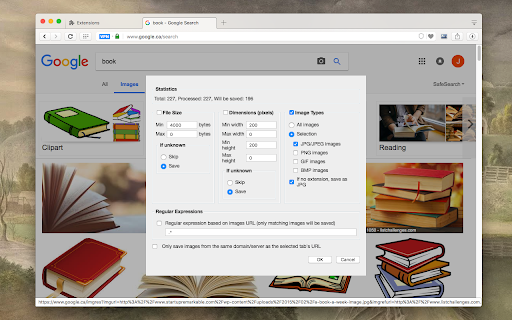
Easily save images with a wide range of customization features, such as file size, dimensions, and image type. This is a bulk image downloader to extract all photos from the current web page. This online image downloader provides highly customizable filters based on file size, image size, and more! Features: 1. Detects all images loaded on the current web page (even if they're nested iframes) 2. Filters images by file size, dimension, URL or type 3. Finds images in links, background scripts, and CSS files 4. Displays images in a gallery view before downloading 5. Download blob-type images even if the source is dead Filters: 1. Filter by file size 2. Filter by image dimension 3. Filter by image type 4. Filter by image URL (regular expression matching) 5. Filter by same-origin policy 6. Detect image width and height by downloading only the header section of the image Features: 1. Bulk download images 2. Filter based on file properties 3. Filter based on image properties such as width and height 4. Deep image search (extract images from the current page and subsequent pages) 6. Can detect single image path 7. Can download photos in ZIP format 8. Can detect the original image size from thumbnail Download location: By pressing the "Save" button, the extension downloads all selected images in the default download directory or a specified subfolder. Change Log: Version 0.1.1 1. The extension now stores images in a sub-folder (the default sub-folder name is the domain's name) 2. One security bug is fixed. Version 0.2.0 1. Images are now saved in a zip archive to prevent multiple downloads and better file-naming 2. The image detection algorithm is improved. Version 0.2.1 1. User preferences are now persistent. It is still possible to reset them from the UI 2. It is now possible to ask for "Save Dialog" from the UI 3. There is progress indicating how many images proceed 4. UI closes itself when all images are downloaded. Version 0.2.2 1. Deep image searching through all links (up to two levels) 2. Updates JSZip library Version 0.3.4 1. You can now open "Gallery View" in a new browser tab 2. You can now click on a single image in the "Gallery View" 3. It is possible to download images from multiple tabs at once Version 0.3.7 1. Two new filters: remove identical images and remove images with forbidden keywords 2. It is now possible to stop the image spider from the UI without closing it Version 0.5.6 1. Deeps search level 3 (search for both links and images in the destination HTML pages) 2. Custom RegExp filters to increase the searching speed. Version 0.9.0 1. Moves to manifest v3 2. Internal module to detect image width and height only by downloading the header section 3. Detects images first, then detects other mime types 4. The extraction of hard-coded image links is improved

One-click image downloader - Grabit
Download images in one click. A powerful downloader with original-size saving, bulk downloads, and auto-scroll capture. Save images from the web—faster and easier. Grabit is a Chrome extension that makes downloading images quick and effortless. - Download images instantly with a single click on the on-image button, or simply drag and drop the image to save it. - When a full-resolution version is available, Grabit automatically prioritizes and saves it. Pro Features (Free version has limitations) - Select a specific area on the screen to bulk download only the images you want. - Automatically scroll the page to find and download off-screen images. - Works on many websites. For example, you can use it on image pages such as X, Instagram, and Pixiv. - Note: Due to website structure or restrictions, it may not work properly on some pages. - To manage usage limits for some features and prevent abuse of Pro features, Grabit uses only minimal information such as anonymous IDs and usage counts. Browsing URLs, image URLs, and page contents are not sent. - Usage statistics and error reports are sent only if you opt in.

Image Downloader
Browse and download images on the web 🟦 Image Downloader ━━━━━━━━━━━━━━━━━ To save multiple photos at once, this extension enables you to: - Browse pictures on the active webpage - Filter by size, dimensions, or URL - Remove duplicates - Download or view any single photo with one click - Save to a subfolder - Rename downloaded files - Download in the background Note: If no default download folder is set, you’ll need to choose a save location for each photo, which may trigger multiple popups. Configure a download directory in your browser settings for a smoother experience. ❓ FAQs ━━━━━━ 💭 There's a problem, what do I do? Please visit the support page and describe your issue: https://chromewebstore.google.com/detail/cnpniohnfphhjihaiiggeabnkjhpaldj/support We cannot reply to reviews - only support posts. 💭 Why does this extension need access to all site data? To extract photos from a webpage, Image Downloader must access all content when the popup is activated. No data is sent off your device. See our Privacy Policy for details: https://pactinteractive.github.io/image-downloader 💭 Why were some downloaded photos smaller or missing? Image Downloader only retrieves photos currently displayed on the page, which may be thumbnails rather than full-resolution versions (like in Facebook albums). Some sites, like Instagram, load only a few pictures at a time in carousels to save bandwidth. Consider using other specialized extensions tailored to downloading from Facebook or Instagram.

Bulk Image Downloader From Url List
A Chrome extension to bulk download images from a list of image URLs. Schedule downloads, filter by image type, save in folder, etc. ## Bulk Image Downloader From URL List Extension Version 3.2 Bulk Image Downloader from URL List is NOT your ordinary image download extension! It replaces manual image downloads with a clean workflow: paste URLs, import templates, apply filters, run conversions, preview refined results, and package final files inside Chrome. Every task, setting, and helper runs locally; no data leaves the browser. Feed it a list of URLs and let the extension handle the rest while you focus on higher priorities. ### Best Features of the Bulk Image Downloader From URL List Extension - 🔥 CSV/TXT ingestion and templates such as template.csv and custom-filenames-template.csv let teammates drop shared spreadsheets straight into the extension, tag tasks with folders, and keep column names consistent. - 🔥 Draft Save persistence records every task edit, folder name, filter, and filename in Chrome storage, so reloads resume right where you left off. - 🔥 Parallel downloads and scheduling unlock queue or scheduled modes, concurrency caps from 1-100, minute offsets, the Respect Order toggle that keeps filenames aligned with your list, and the choice to deliver everything through the Chrome download manager or ZIP archives. - 🔥 Download IF filters with contains, not-contains, regex, AND/OR logic, ensuring only URLs that match your keywords download. The inline keyword builder shows active conditions, lets you tweak them point-and-click, and keeps the logic visible inside each task card before a run launches. - 🔥 Conversion and Resizing let you switch output formats such as PNG, JPG, WEBP, or TIFF, adjust quality, control worker concurrency, strip EXIF metadata, and enforce width, height, or fit constraints so downloads match publishing or dataset requirements. - 🔥 Custom filename and folder builder combines sortable tokens like filenames, hyphen, sequence, timestamps, underscore, URL fragments, website (Domain), random strings, custom filename from files (Most requested), prefixes & suffixes (Using the Add New option), zero-padded padding, and auto-foldering by domain or URL fragments; every layout survives exports and can be replaced by a filename list you upload per task. What more can you possibly ask for? - 🔥 Duplicate control and bulk cleanup pairs the Advanced Image Filter with bulk selectors, duplicate counters, keep filtered only, and remove duplicate actions so the cleanest task set runs every time. - 🔥 Side panel extractor and helpers grab URLs while you browse, then validate each link with the Redirect Checker, 404 Checker, and Watermark Previewer before the download run. - 🔥 Docked command bar keeps Save, Download Task, Download All, Remove All Tasks, and, during downloads, a Stop button pinned to the edge so every run stays manageable. - 🔥 License and account controls surface Google login, key detection, status, and expiration next to Lock Drag, Export Tasks, Dark Mode, and the help link. - 🔥 Manifest V3 foundation leverages service workers and self-contained helper scripts so nothing leaves Chrome - Privacy win! Your URLs are never revealed - they stay with you! ### How the workspace works Paste URLs or drop task files, then name each task, assign a folder, and fine-tune file type selectors. Templates cover familiar column names, exports and imports capture curated jobs, and task cards remember folder names, Download If rules, conversion metadata, and the last run report that records success counts, errors, and elapsed time so the workspace stays consistent. Add or remove tasks, rename them, reorder via drag handles, duplicate entire tasks with their settings, and use Lock Drag plus Draft Save buttons at the top and bottom to protect work in progress. Filename automation means dragging sequence, custom filename, and other tokens into a sortable list, layering prefixes and suffixes, setting sequence start and padding, including zero-padded counts, and enabling auto folders by domain, URL fragments, or custom segments. Toggle the Filename Constructor to use the builder, or upload a custom txt or csv filename list per task for precise names. Custom filenames appear live next to tasks, survive exports, and feed directly into downloadable templates so everyone stays aligned. Choose Queue Mode for sequential downloads or scheduled mode when you want minute gaps between tasks. Concurrency can be dialed from one to one hundred. Respect Order keeps filenames aligned even when downloads finish out of order, and ZIP packaging bundles entire batches when a single archive is preferred. Conversion controls switch formats, adjust quality, and direct worker concurrency. Resize inputs let you define width, height, fit, and a thread limit that keeps CPU usage stable, while the option to strip EXIF metadata keeps output files lightweight. Download If settings live per task, so you can mix contains, not contains, and regex keywords with AND or OR logic before you hit Save & Download. Use Download Task to target a single task or Download All to fire every queued task at once. Upload a txt or csv file with one filename per row to tell the Filename Constructor exactly how to name each URL in a task. The extension stores each list per task, includes it in exports, and rehydrates it on import so you can share precise naming conventions. Mix this with prefix and suffix tokens to keep structure and sequence padding intact. The Advanced Image Filter tab tracks every image, showing thumbnails, dimensions, format, shape, file size, and task context. Apply text search, task filters, format and shape selectors, dimension ranges, aspect ratio operators, and file size controls in KB or MB to narrow the view. Bulk selectors let you Select All, Remove Selected, Remove Duplicates, or Keep Filtered Only, while toast messages, duplicate counters, pagination, column controls, column count toggles, and a show hide switch keep the grid tidy. The tab caches metadata per session and preserves your view preference in Chrome storage, so filtering remains fast and optional. ### Helper tabs and watermark instructions Helper tabs include the Redirect Checker, which follows URL chains with progress bars, copy buttons, and CSV results, and the 404 Checker, which verifies image responses and flags broken links. The Watermark Previewer lets you upload a PNG watermark with a sample background, adjust gravity, opacity, margin, and max size as a percentage of the base image, and preview the composition before downloading the files. Saved watermark settings automatically apply to the next run, so watermarked batches stay consistent. ### Monitoring, reliability, and quick fixes The header status bar displays the parallel download cap, queued versus scheduled state, license key, status, and expiration, Lock Drag, Draft Save, Export Tasks, Dark Mode, login and logout, and the help link. Action buttons such as Save and Download, Export Tasks, and Draft Save sit inside clear groups, and a docked toolbar (Save, Download Task, Download All, Remove All Tasks, Stop) stays visible during downloads. Toasts confirm exports, deletions, template downloads, startup failures, and other local actions. Install the side panel to scrape any tab, gather visuals, then import them into a task. The extracted URLs run through the same filters, duplicate checks, and helper validations as the rest of the workflow, and the extractor works without disturbing the options page. ### Quick rundown of the features Ready to try? Install the extension, pin and open it, paste a list, import a template, or drop a CSV so Chrome takes over. 🔥🔥You are just one quick setup away from a full download pipeline with advanced filters, conversions, helpers, and automation already built in. Disclaimer: Ensure you have the necessary rights to download images and do not infringe on the owner's rights. 🔒 Privacy & Security No hidden data collection—your URLs and downloads stay private. I value your feedback! Got an issue? Got a feature suggestion that you badly want me to integrate? I will be happy to take a look. Send me a quick message on the extension's official contact page https://bulkimagedownloaderurllist.com/contact/ or use the email info@bulkimagedownloaderurllist.com to reach out. You can rest assured any feature you ask will be implemented - as long as it will benefit most of us using this extension! So go ahead and tell us what you really struggle with and we'll dive right in. It's what we love doing - fixing what has always been time consuming, repetitive and boring!

Image Downloader - Image Search
Image downloader free, multiple image formats. Image search, filter by size and bulk image downloader. Image Downloader free Chrome extension for browse and download images on the web! ⭐️⭐️⭐️⭐️⭐️ Main Feature: 🔍 Image search: it will automatically scan all the images available on the present page and show their list inside Image Downloader interface. 📏 Filter by size: filter images by size to make selection easier. 📥 Bulk image downloader: download several images simultaneously with Image Downloader. 🖼️ Multiple image formats: supports png, svg, jpeg, gif, webp, bmp, ico and tiff. 📁 Specify download location: select folder to save the downloaded images. 🔗 Image URL: get the direct link for any image. 👀 In Image Downloader, look through each image in picture preview to make sure its precisely what you would like before downloading. 🌎 Support for popular image sites: Works with sites like Unsplash, Google Images, Pinterest and more. ⭐️⭐️⭐️⭐️⭐️
