
nlbijchkgbnfcjliaplbphhehaalgild
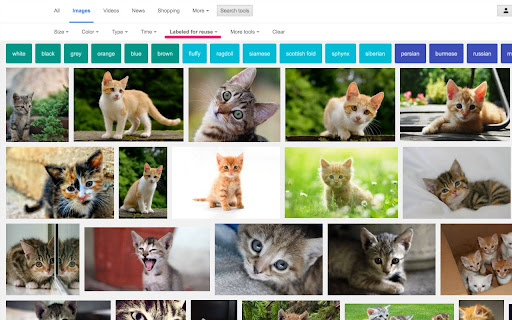
See only images you can safely reuse. Avoid copyright issues with a single click. Copyright Free Images Filter shows only images in Google search that are licensed for reuse, including Creative Commons and other non-restricted categories. Features • Filter Google Images to display only copyright-free or reuse-friendly results • Automatically hide images that aren’t safe to reuse • Ideal for students, teachers, bloggers, designers, and content creators • Lightweight, fast, and simple • Reduces risk of accidental copyright misuse Find images you can safely use with Copyright Free Images Filter.

Move It
Busy working on your computer? Spending hours searching the internet? Get active with Move It. Your brain works better when your body moves. Move It is a productivity extension that interrupts your work sessions with short, randomised movement breaks — helping you stay focused, avoid burnout, and build healthy habits without thinking about it. Whether you follow the Pomodoro Technique, manage ADHD, or just spend too many hours at a desk, Move It gives your brain the reset it needs to keep performing. How it works Set your break interval (anywhere from 5 to 55 minutes). When the time is up, Move It takes over your screen with a randomly selected physical activity. Complete it, click Done, and get back to work. No willpower required. Why it works Regular movement breaks are proven to improve concentration, reduce mental fatigue, and support attention regulation — making Move It a natural fit for anyone with ADHD or anyone using focus techniques like Pomodoro. The randomised activities remove decision fatigue entirely: you don't choose what to do, you just do it. Customisable break intervals from 5–55 minutes 160+ randomised activities — from desk stretches to full body exercises Work Hours mode — only active during your working hours and days Daily completion counter to track your movement Shuffle to swap any activity that doesn't suit you

FlashTabs
FlashTabs is a digital flashcard app in your new tab screen. Create decks, add some cards, then learn every time you open a new tab. FlashTabs is a simple Chrome Extension that makes learning easy. No longer do you have to load up a flashcard application to process through your deck, now you can create a deck and process through it as part of your daily workflow, every time you open a new tab screen. Feature List: -> Create multiple decks of flashcards -> Have multiple decks active at the same time -> View your flashcards in your new tab screen -> FlashTabs uses a spaced repetition algorithm, only showing you cards at the optimal times to increase knowledge retention. -> Import and Export your decks to share with others -> Upload an image to the front and back of your cards -> With FlashTabs Pro, choose different colours for your Decks

Sir Links-a-Lot
This extension will modify Google Apps URL. Do you like to manipulate Google app URL's to meet the needs of your students? Well, you are in luck because Sir Links-a-Lot extension has your Back with big round buttons in your face to do all the work for you! Templates ~ Force a copy ~ Preview ~ PDF ~ Templets ~ Demo Mode with just a click check this out! Update 1.5.7 ~ Bug fixes ~ Repetitive Splash Page Fix & few other annoying Bugs ~ NEW Additions ~ Demo action & Tabs Support ~ In the works ~ Custom short link Special thanks for always being an inspiration: Dee Lanier @deelanier & Special thanks for help with the great name: Marcus Painter @marcusep1

Symbaloo Bookmarker
Easily save the website you are visiting and organize all your bookmarks in a personalized and safe online environment. Save and organize your favorite websites effortlessly with the Symbaloo Bookmarker extension. As you browse the web, this handy tool allows you to instantly save any website or link directly to your Symbaloo Webmixes. No more lost bookmarks or scattered links – keep all your digital resources neatly organized and accessible in one place. Ideal for educators, students, and professionals, the Symbaloo Bookmarker ensures that your essential online tools and resources are always just a click away. Simplify your digital life and enhance productivity with Symbaloo’s user-friendly bookmarking solution. The Symbaloo Bookmarker connects directly to your Personal Symbaloo account, where they are stored safely for later use. Bookmarking can be easily done for the page you are visiting with the icon in the Browser Toolbar. Alternatively you can bookmark and link with a right click on the link which will open en contextMenu to save the link. With Symbaloo you surf with one click to all of your favorite websites. Symbaloo is an easy-to-use online application and best of all, it’s free. You will have all of your favorite websites at your fingertips, anywhere and always. Choose your favorite websites and within a few clicks, you can create your very own homepage. With an account, your favorites are available on any iPhone, PC, Mac, iPad, and tablet. Wherever you go, you always have access to your favorite websites. The main advantages are: ✔️ Never have to type in an address manually ✔️ With one click you go anywhere on the web ✔️ Add a new website with one click to your account ✔️ Never lose your favorite websites again ✔️ Free! Features: 📱 Your favorites automatically sync between your iPhone, PC, Mac, and iPad. 🌎 Instantly add new websites to your homepage 📰 Integrated RSS reader for all of your favorite news sources 🔗 Share your favorites with others 🖼️ Personalize your homepage with custom backgrounds
