
nkjiffgankhjcemjlikehngfajkdgfgd
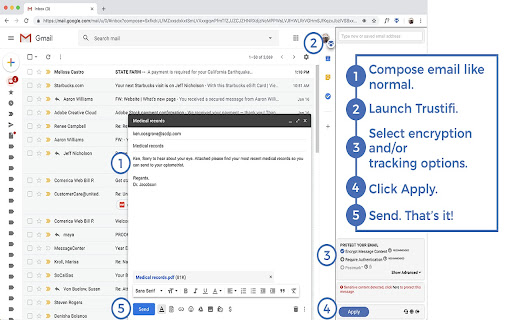


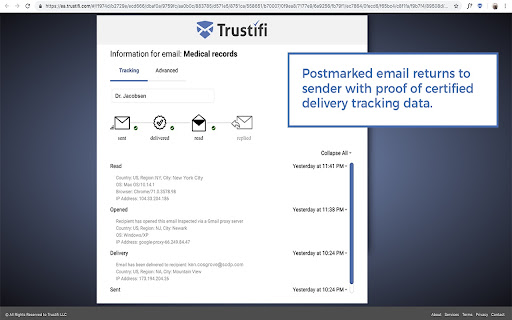
This extension will allow you to easily use the Trustifi services Trustifi makes it easy for you to get the email protection and control you need with the ultimate add-in for Gmail, including alerts, traceability, monitoring and awareness, while being straightforward, transparent and simple enough to apply all this security at the click of a button. Encryption • NSA-grade email encryption, plus full DLP with sophisticated rules engine to support any use case • Secure mobile relay for full protection on any device • Recall, block, modify and set expirations for already sent and delivered emails Data Loss Prevention • 100% compliant with HIPAA/ HITECH, PII, GDPR, FSA, FINRA, LGPD, CCPA and more • Real-time knowledge about when emails have been received, opened and read with certified delivery and tracking • Two-factor authentication on the recipient (even without registering) Advanced Threat Protection • Malware, ransomware, virus detection, BEC attack prevention • Spoofing, phishing, fraud detection and spam filtering • Whitelisting, blacklisting and many other configuration options Productivity Focused Email Security Features • Block emails for everyone or specific recipients • Edit content after an encrypted email has been sent • Add, edit, or delete attachments after an encrypted email has been sent • Postmarked proof, track and see where emails are opened • Provides visibility and rapid response into all email-based threats and attacks How to get started: 1. Install the Trustifi add-in on your Gmail and Login 2. Sign up directly from the Addon or at https://app.trustifi.com to get your free plan 3. Verify your email address (by clicking on the link within the email we'll send you) 4. When composing a new mail, open the Trustifi task pane (look for the Trustifi icon) 6. Add/Select recipients, choose protection methods from the task pane and click Apply. 7. Write your email, add any attachments (for extra privacy - add the attachments directly to the task pane), and send! 8. Comeback to a previously sent email, open the Trustifi task pane to view the email's reports for Tracking, Controlling, Recall, Postmark, Encrypted Reply and more.

PassLok for Email
High security encryption for email. PassLok is in no way associated with Gmail, Yahoo, or Outlook. ⚠️ PASSLOK FOR EMAIL IS DEPRECATED: PLEASE UPGRADE TO PRIVACY BAR ⚠️ Due to continuous, unannounced layout changes by email providers like Gmail, Yahoo, and Outlook, maintaining reliable embedded toolbars has become unsustainable. Recent interface updates have permanently broken the integration for this extension. To ensure your secure communications are never interrupted again, we have migrated all core features of PassLok for Email into our actively maintained flagship extension: Privacy Bar. Privacy Bar gives you the exact same serverless, battle-tested encryption, but interacts with your browser through a stable interface that email providers cannot break. It is fully backward-compatible with your existing Lock collection, which you can read from sync storage. 👉 Search the Chrome Web Store for "Privacy Bar" or visit privacybar.net to upgrade. TAKE PRIVACY INTO YOUR OWN HANDS Easy, end-to-end secure encryption for email, plus real-time chat, that does not rely on servers and is therefore immune to hacking or government intervention. Right now PassLok for Email supports Gmail, Yahoo mail and Outlook online. If you need any other emails right away, check out PassLok Universal, which is also more resistant to changes in the services. --PassLok for Email is incredibly easy to use-- To encrypt a message or file, just click the PassLok icon at the bottom of the Compose or Reply box. A popup will take your private message and encrypt it with the click of a button. Then you can send it out like any other message, or as an attachment. To decrypt it, click the PassLok icon at the top of the encrypted message. A popup will show the decrypted message or file immediately, or will tell you if there is any problem. PassLok asks you for your Password only once. It can be anything you want, so you can actually remember it. PassLok will evaluate its strength and compensate for its weakness by lengthening the computations. It won't be stored or sent anywhere, and PassLok will forget it after five minutes of inactivity. If you want to change your Password, go ahead and start using a new one when PassLok asks you for it. You may be asked for the old Password if PassLok can't decrypt something, but otherwise that's all you'll have to do. You can use either of these two encryption modes, by just clicking a button: 1. Signed mode: encrypted messages can be decrypted again, so long as the recipients supply their authentic passwords. Recipients are also assured that the message was encrypted by the sender. 2. Read-once mode: after a few encrypted messages have been exchanged they can no longer be decrypted by anyone, even if they supply the correct passwords. In addition, you can make encrypted chat invitations which, when decrypted by the recipients, open a webRTC real-time chat session where participants are directly connected to one another. The chat session includes text, files, audio, and even video. PassLok for Email allows you to encrypt files and images as well. Just load them with a toolbar button. You can also encrypt them separately and load them as regular attachments. You can also communicate with users of services not supported by PassLok for Email. They can use PassLok Privacy (also in the Chrome store), which has a special mode fully compatible with PassLok for Email. For the very paranoid (and who isn't these days?), PassLok for Email includes four special features: 1. Encrypt to image: the message is encrypted into an image you supply and then attach to your email, so the presence of a hidden message cannot be detected even by computer analysis. 2. Concealed mode: the encrypted message does not look encrypted, but actually looks like normal text. PassLok still detects it and decrypts it normally, though. 3. Invisible mode: the encrypted material cannot be seen at all. It is hidden in the space between the lines of an otherwise normal message. 4. Hidden msg: there is a hidden message in addition to the regular message, and it is encrypted by a separate key. The hidden message is completely undetectable to those who don't know it exists. Images also can contain hidden messages. --State-of-the art security-- PassLok is based on the NaCl encryption engine, which uses 255-bit standard elliptic curves vetted against weaknesses by experts. On top of that, it uses the 256-bit XSalsa20 symmetric cipher, a high-performance, open source algorithm, which has been scrutinized by experts for nearly a decade without any practical weaknesses being found. The image-encryption part of PassLok, developed in-house but open-source, has recently been shown to be much harder to detect than F5, the champion steganography tool until now. PassLok does not use servers that might eventually compromise your private data. All encryption is done client-side. All data sent to the email server is encrypted, and they don't have the password that decrypts it. With PassLok, you can actually SEE that that your messages have been encrypted. You can also see the code. PassLok hides nothing from you. PassLok for Email is now in public beta testing. To report any bugs or suggest improvements, please submit them as "Issues" at this GitHub page:

SendSafely Encryption for Chrome and Gmail
Chrome extension that provides end-to-end encryption for Gmail. Encrypt private emails and securely share files up to 10GB. With the SendSafely Chrome Extension, you can send encrypted files and messages directly from Gmail or using our Chrome pop-out menu. It's never been easier for Chrome or Google Mail users to use SendSafely. SendSafely is an end-to-end encryption platform that eliminates the need for pre-shared encryption keys and passwords. With SendSafely, nobody other than you and the people you send items to can view them...not even us. - Built on OpenPGP: OpenPGP is the most widely used email encryption standard in the world. It's been in development and use for years, and proves to be the best encryption available today. - Multi Factor Authentication: We offer an extra layer of security to keep your information secure. When users access items sent using SendSafely, they are prompted for a username and password, along with a unique SMS code. - No Software for Recipients: With SendSafely, the people you share items with don't need to download or install on anything on their computer. If they have a web browser, they can receive your files.

RPost for Gmail
Gmail Chrome extension for Rmail • How you send matters. RMail empowers Gmail with security, privacy & compliance, eSignatures, Email Eavesdropping alerts and more. All the functionality you need, all in one installation: track email delivery and opening, get automatic court-admissible proof of email and content delivered, encrypt emails for privacy and compliance, get documents e-signed, actively hunt cybercrimes leading to wire fraud, append private messages only Cc or Bcc recipients will see, and convert Google Drive files into PDF files en route. ★ We're Trusted With more than 25 million users worldwide across all sending platforms, RMail is the world's leading provider of all-in-one services for important email communication. RMail users around the world enjoy greater visibility, data privacy, legal proof, and more. 🔏 Smart Encryption RMail is intuitive to use and there’s no requirement for your recipients to have any special software or whatsoever. Dynamically adapting encrypted email ensures elegantly easy; simple for recipient means happy sender. Far beyond opportunistic TLS, RMail encrypted email service smartly adapts to provide peace-of-mind with end-to-end encryption, secure file sharing, auditable proof of fact of GDPR and HIPAA privacy compliance, email thread security monitoring, and more. Email Tracking and Proof of Delivery Gain insights of the overall journey of your email, how popular who read what when, and receive forensic certified proof. RMail provides your business with legal proof. Each message comes with a Registered Receipt™ email record; the global standard for court-accepted, timestamped proof of secure delivery of emails — and its attachments. This record is durable (it may be forwarded, retaining its self-authenticating integrity), and is self-contained (it does not require any other record to be stored anywhere). ⛔ Prevent mis-wire before it happens RMail outbound Email Eavesdropping™ services detects what should be sent encrypted and then dynamically transforms the message into a secure message with active cybercriminal eavesdropping detection. With RMail, senders have the peace-of-mind that the intended recipient can view their private message with ease; knowing that they will be alerted in real time if a cybercriminal has compromised their recipient’s email inbox and when that cybercriminal is preparing the steal. RMail sends in real time, aggregate Email Eavesdropping™ red-alerts to administrators. And if desired, to their managed security service provider. With Email Eavesdropping™ alerts, every email sent out of the organization has every activity associated with it analyzed forensically, for a period of time. These alerts include all the email forensics so that IT security specialist can validate and take immediate action, before the cybercriminal lures users into mis-wiring money to the criminal’s bank. ⏳ Automate your signing workflows and optimize timelines RMail makes it easy to get documents and forms signed electronically by simplifying the process of preparing and signing documents. With a few clicks, the sender prepares and sends documents; and recipients sign from any device. • RMail is free to install and available for everyone to use, up to 5 messages per month. Existing customers can begin using immediately after installation. If you need to send more than 5 RMail messages per month, visit www.rmail.com or contact a sales representative at 866-468-3315 to discuss the best options for you and your business.

Gmail app badge notification
Show badge notifications in the taskbar when using Gmail as an app 1. Install the extension 2. Add Gmail as an app. You can do so by following this guide: https://support.google.com/chrome_webstore/answer/3060053?hl=en - make sure to select the option "open as a window". 3. Open the newly installed app.
