
ehakihemolfjgbbfhkbjgahppbhecclh


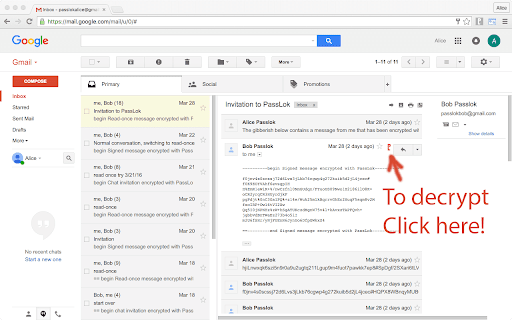
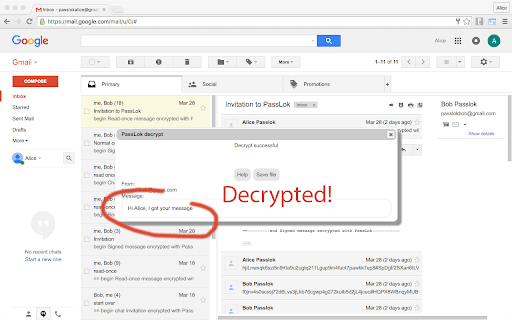
High security encryption for email. PassLok is in no way associated with Gmail, Yahoo, or Outlook. ⚠️ PASSLOK FOR EMAIL IS DEPRECATED: PLEASE UPGRADE TO PRIVACY BAR ⚠️ Due to continuous, unannounced layout changes by email providers like Gmail, Yahoo, and Outlook, maintaining reliable embedded toolbars has become unsustainable. Recent interface updates have permanently broken the integration for this extension. To ensure your secure communications are never interrupted again, we have migrated all core features of PassLok for Email into our actively maintained flagship extension: Privacy Bar. Privacy Bar gives you the exact same serverless, battle-tested encryption, but interacts with your browser through a stable interface that email providers cannot break. It is fully backward-compatible with your existing Lock collection, which you can read from sync storage. 👉 Search the Chrome Web Store for "Privacy Bar" or visit privacybar.net to upgrade. TAKE PRIVACY INTO YOUR OWN HANDS Easy, end-to-end secure encryption for email, plus real-time chat, that does not rely on servers and is therefore immune to hacking or government intervention. Right now PassLok for Email supports Gmail, Yahoo mail and Outlook online. If you need any other emails right away, check out PassLok Universal, which is also more resistant to changes in the services. --PassLok for Email is incredibly easy to use-- To encrypt a message or file, just click the PassLok icon at the bottom of the Compose or Reply box. A popup will take your private message and encrypt it with the click of a button. Then you can send it out like any other message, or as an attachment. To decrypt it, click the PassLok icon at the top of the encrypted message. A popup will show the decrypted message or file immediately, or will tell you if there is any problem. PassLok asks you for your Password only once. It can be anything you want, so you can actually remember it. PassLok will evaluate its strength and compensate for its weakness by lengthening the computations. It won't be stored or sent anywhere, and PassLok will forget it after five minutes of inactivity. If you want to change your Password, go ahead and start using a new one when PassLok asks you for it. You may be asked for the old Password if PassLok can't decrypt something, but otherwise that's all you'll have to do. You can use either of these two encryption modes, by just clicking a button: 1. Signed mode: encrypted messages can be decrypted again, so long as the recipients supply their authentic passwords. Recipients are also assured that the message was encrypted by the sender. 2. Read-once mode: after a few encrypted messages have been exchanged they can no longer be decrypted by anyone, even if they supply the correct passwords. In addition, you can make encrypted chat invitations which, when decrypted by the recipients, open a webRTC real-time chat session where participants are directly connected to one another. The chat session includes text, files, audio, and even video. PassLok for Email allows you to encrypt files and images as well. Just load them with a toolbar button. You can also encrypt them separately and load them as regular attachments. You can also communicate with users of services not supported by PassLok for Email. They can use PassLok Privacy (also in the Chrome store), which has a special mode fully compatible with PassLok for Email. For the very paranoid (and who isn't these days?), PassLok for Email includes four special features: 1. Encrypt to image: the message is encrypted into an image you supply and then attach to your email, so the presence of a hidden message cannot be detected even by computer analysis. 2. Concealed mode: the encrypted message does not look encrypted, but actually looks like normal text. PassLok still detects it and decrypts it normally, though. 3. Invisible mode: the encrypted material cannot be seen at all. It is hidden in the space between the lines of an otherwise normal message. 4. Hidden msg: there is a hidden message in addition to the regular message, and it is encrypted by a separate key. The hidden message is completely undetectable to those who don't know it exists. Images also can contain hidden messages. --State-of-the art security-- PassLok is based on the NaCl encryption engine, which uses 255-bit standard elliptic curves vetted against weaknesses by experts. On top of that, it uses the 256-bit XSalsa20 symmetric cipher, a high-performance, open source algorithm, which has been scrutinized by experts for nearly a decade without any practical weaknesses being found. The image-encryption part of PassLok, developed in-house but open-source, has recently been shown to be much harder to detect than F5, the champion steganography tool until now. PassLok does not use servers that might eventually compromise your private data. All encryption is done client-side. All data sent to the email server is encrypted, and they don't have the password that decrypts it. With PassLok, you can actually SEE that that your messages have been encrypted. You can also see the code. PassLok hides nothing from you. PassLok for Email is now in public beta testing. To report any bugs or suggest improvements, please submit them as "Issues" at this GitHub page:

PassLok Privacy
High security asymmetric encryption and steganography for text, files and chat. TAKE PRIVACY BACK INTO YOUR OWN HANDS Celebrating 10 years of uncompromising, battle-tested end-to-end encryption and steganography for email, files, and real-time chat. PassLok Privacy is true sovereign software. Designed to operate completely independent of servers that could compromise, monitor, or leak your data, everything executes locally on your machine. We store nothing secret—not in the cloud, and not on your device. WHAT YOU CAN DO WITH PASSLOK: True E2E Messaging: Write messages that only your intended recipient can decrypt, without ever needing to pre-arrange a shared password. Universal Locking: Secure files and images just as easily as text. P2P Secure Chat: Establish real-time, peer-to-peer rooms for text, files, audio, and video—completely serverless. Digital Signatures: Cryptographically sign text, images, and files so recipients know with absolute certainty they came from you. Platform Agnostic: Turn your favorite webmail or texting app into a secure, encrypted channel. Decoy Mode: Create plausible deniability by ensuring your true message isn't what it appears to be. Cross-Ecosystem Compatibility: Communicate seamlessly with users across the entire suite, including our newest and greatest Privacy Bar, and PassLok for Email. Offline Persistence: Run the app entirely offline. Communicate securely over local networks, or even use a borrowed device if you suspect yours is compromised. A DECADE OF PROVEN CRYPTOGRAPHY For ten years, PassLok has relied on cryptography that has been relentlessly scrutinized by industry experts without a single practical weakness being found. PassLok uses 255-bit standard elliptic curves combined with 256-bit XSalsa20 encryption and 512-bit hash functions to complete the encapsulation process. XSalsa20 is an incredibly fast, high-performance, open-source cipher designed specifically to be immune to the timing attacks that plague older encryption methods. HOW IT WORKS The first time you run PassLok, it helps you generate a Master Key from a text phrase of your choosing. We enforce no arbitrary rules—your Key can be anything you can easily remember, ensuring you never have to write it down. From this Key, PassLok generates a public "Lock" (functioning much like a phone number). You share this Lock with anyone. They use it to seal messages meant for you, and only your Master Key—which never leaves your brain—can unlock them. Optionally, you can post your Lock to the PassLok general directory with a video verification so people know it is genuinely yours. TRANSPARENCY & AUDITING PassLok is available here as a Chrome Extension, but is essentially identical to our standalone desktop and mobile web applications. You can run and audit the pure HTML version at: https://passlok.com/app If you want to verify the web integrity yourself, view the page source, hash it with an external SHA256 tool, and compare it. (Note: This step is not necessary for this Web Store version, as it is intrinsically code-signed by Google). Current SHA256 for the passlok.com/app single-file version: 211b66df03ccf366a9b35c0a1c373b1a187157e8ed1f905c0a0d459813cf6d9d

SeeOnce Privacy
High strength end-to-end encryption with perfect forward secrecy for your favorite email, plus real-time secure chat ⚠️ NOTICE: THIS EXTENSION HAS EVOLVED INTO PRIVACY BAR ⚠️ This legacy standalone tool is no longer actively maintained. The exact same functionality has been integrated, upgraded, and fully secured inside our flagship extension: Privacy Bar. Looking for pure Symmetric Encryption? Privacy Bar handles it entirely offline. Looking for Read-Once payloads? Privacy Bar generates self-destructing messages out of the box just like SeeOnce, and can handle several recipients at once. Looking for Page Isolation/Sandboxing? Privacy Bar features an enhanced, isolated "Safe Space" tab. 👉 Search the Chrome Web Store for "Privacy Bar" or visit privacybar.net to upgrade to the complete, modern suite. SeeOnce encrypts your email messages so they self-destruct after the recipient has read them. It does this without involving any servers or forcing you to make an account anywhere. You can keep using your preferred email. All other apps and extensions store your private content somewhere. SeeOnce does not do this; instead, it achieves forward secrecy by changing encryption keys with every message. This way, you don't have to trust anybody. When you get a locked message, just paste it into the extension and it will open automatically. Then you can reply directly from within the extension. Your friends don't need to have this extension. Messages open in a webpage just by clicking them. They can do this on an Android smartphone if necessary. Some people live in places where using encryption is itself compromising. This is why the extension can disguise its output so it looks like normal text. Just supply a sufficiently long cover text after the message is locked. Disguised messages also unlock as soon as you paste them in. If you find yourself exchanging a lot of emails, SeeOnce allows you to switch to real-time chat, which can involve text, files, audio, or even video. Just click the Chat button to make a secure invitation that only your correspondent can open, and then only once. The extension uses 255-bit standard elliptic curves, which have been vetted against weaknesses by experts. On top of that, it uses 256-bit XSalsa20 encryption and 512-bit hash functions to complete the locking process. XSalsa20 is a high-performance, open source cipher, which has been scrutinized by experts for nearly a decade without any practical weaknesses being found. This is the Chrome extension version of SeeOnce, essentially identical to the web version, except that it syncs its data seamlessly between machines. The following is to check the authenticity of the web version:

SendSafely Encryption for Chrome and Gmail
Chrome extension that provides end-to-end encryption for Gmail. Encrypt private emails and securely share files up to 10GB. With the SendSafely Chrome Extension, you can send encrypted files and messages directly from Gmail or using our Chrome pop-out menu. It's never been easier for Chrome or Google Mail users to use SendSafely. SendSafely is an end-to-end encryption platform that eliminates the need for pre-shared encryption keys and passwords. With SendSafely, nobody other than you and the people you send items to can view them...not even us. - Built on OpenPGP: OpenPGP is the most widely used email encryption standard in the world. It's been in development and use for years, and proves to be the best encryption available today. - Multi Factor Authentication: We offer an extra layer of security to keep your information secure. When users access items sent using SendSafely, they are prompted for a username and password, along with a unique SMS code. - No Software for Recipients: With SendSafely, the people you share items with don't need to download or install on anything on their computer. If they have a web browser, they can receive your files.

FDev Security
You are protected absolutely with our awesome features: Realtime protection, block seen and typing indicator, blur messenger! # INTRODUCTION You are often afraid about "malicious" websites on the internet. It seems that you cannot know when your sensitive data was stolen by attackers. And when your information, data is hacked by someone (such as banks account, Facebook, ...), you just realized that your data is very importance and you begin to care about the security when you browsing in the Internet. Let's CoderDocs Security protect you with real-time protection feature. And we also has another awesome features like: Facebook (+Zalo) privacy, Privacy Web Experience, Blur Messenger, Malware URL scanning, .... # FEATURE 1: REAL-TIME PROTECTION When you install CoderDocs Security extension successfully, this feature will enable real-time immediately. This feature is the most important, so you cannot disable it. When you visit a malware site, the warning popup will be displayed to warning you about this malicious site. # FEATURE 2: FACEBOOK (+ZALO) PRIVACY You can easily enable / disable this feature by check or uncheck the checkbox of every small functions. This feature includes: - Block "Seen" indicator: When you receive a Facebook message, you click to view this message, the sender will see the status "seen" in their message space. But if you enable this function, the sender can not see the status "seen" any more. They never know whether you saw the message or not. - Block "Typing" indicator: Similar with block "seen", the sender can not see the "typing" indicator when you compose the message in Facebook message space (the three dots indicator "..."). - Block "Seen" status in Story: When you click to view the Story of someone, they will know that you have seen their Story. But with this function, nobody can know that you saw their Story. You can click and see your ex-girlfriend any time. - Block "Typing" indicator in Comments space: When you are typing the comment in any post. People can see the indicator "Someone are typing ...". But if you enable this function, this indicator will be disappear forever. - NOW, it support block seen and typing indicators in Zalo web version. Note: Block "Seen" status in Story and block "Typing" indicator in Comments are disable now because some technical problems. # FEATURE 3: PRIVACY WEB EXPERIENCE You can also easily enable / disable this feature by check or uncheck the checkbox of every small functions. This feature includes: - Block important sites when you absent: When you go out, you forgot to lock your computer, someone can open you browser, they can open some important site such as Facebook, Gmail and see your sensitive information. If you don't want that thing happen. Let enable this function. It allow you to block some importance sites that you don't want anyone access to if you have to lend your computer or you go out. - Block tracking Ads Scripts: This function allow you to block the tracking scripts like Facebook, Google. For example, you go to an e-commerce website, when you comeback to Facebook, the previous items in e-commerce website will be display. You can enable this function to block them. - Browser for kids: This function allow you to block almost porn sites in the world. If your kids uses your computer, let enable this function. # FEATURE 4: URL MALWARE SCANNING This is a feature that allow you to operate directly on the user interface. Let go to menu path: TOOLS / SECURITY / MALWARE SCAN and explore this feature. This feature allow you to analyze any URL and inform for you if the URL will be redirected to the website that contains any malware/virus. # FEATURE 5: BLUR MESSENGER This feature allow you to hidden all information when you chat with someone in the Messenger (messenger.com). Just don't care anyone who often peek at your messages. It only work with Messenger - Open Messenger (messenger.com) - Click Settings Icon in the left side bar. - Enjoy the new Messenger feature. More information about CoderDocs Extension: https://lenhatthanh.com/en/coderdocs-security/
